Lua/LSP API
Overview
This page documents the core Barracuda App Server (BAS) Lua/LSP API. Everything described here belongs to the standard Lua integration layer that is available in BAS builds with Lua support.
The BAS Lua documentation is split into two parts. This page covers the always-available core API: the ba library, the LSP execution model, request/response processing, directories, sessions, and related runtime services. Additional functionality is documented in The Auxiliary Lua API. The auxiliary API can be excluded in custom builds, but it is included in most products and example servers, including Mako Server and Xedge.
Security Note on the Lua Execution Model
The Barracuda App Server (BAS) executes Lua code as trusted application logic deployed by the device manufacturer. Lua in BAS is not sandboxed by default and provides full access to Lua-to-C bindings.
It is, however, possible to provide a limited sandboxed environment (e.g., via custom _ENV tables) for systems that allow customers to write their own Lua code. However, implementing such a sandbox requires a deep understanding of Lua and the APIs exposed by BAS. In general, a secure approach is to explicitly grant access to a well-defined set of functions rather than attempting to exclude unsafe functionality.
For maximum security, applications should be deployed as signed packages, ensuring that only authorized and untampered code can execute.
Use Cases and Lua-to-C Bindings
Lua in BAS is not limited to server-side page generation. It is used for request handling, device and application logic, timers, authentication, directory services, and integration with C/C++ bindings. When the optional auxiliary libraries are enabled, the same Lua environment can also act as an HTTP(S) client, SMTP client, socket endpoint, and crypto integration layer. If you are new to Lua in embedded systems, start with the tutorial Why Smart C Coders Love Lua.
Real Time Logic designs BAS, its plugins, and the BAS-specific Lua bindings. The embedded Lua language itself is the standard Lua project, which uses the MIT license and is suitable for commercial products.
At runtime, Lua is typically entered from C code. A request, timer callback, socket event, or another BAS event activates Lua code, and that Lua code can in turn call back into C through bindings. This event-driven boundary between C and Lua is the key to understanding how BAS applications are structured.
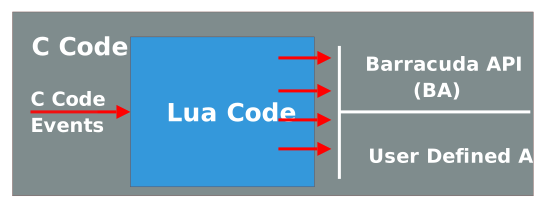
The BAS library includes a large set of ready-made Lua bindings, and you can extend the environment with your own bindings when you need to expose device-specific or application-specific functionality. Binding creation is covered in the Lua book, and tools can automate much of the work by parsing C/C++ headers. For more information, see the online tutorial Lua to C Code.
How to use this page: Read the overview sections first to build the BAS mental model: LSP, HTTP directories, the request/response environment, and coroutine/thread mapping. After that, use the anchor links throughout the page as an API reference.
See the section Thread Mapping and Coroutines for the execution model behind BAS Lua events, blocking bindings, and thread-pool interaction.
LSP
Lua Server Pages (LSP) is BAS's server-side execution model for mixing Lua with text resources and for building dynamic request handlers. Although LSP started as a page-oriented technology, it is now also a practical foundation for embedded web interfaces, REST services, IoT logic, and other event-driven applications. If you are familiar with Node.js, see the comparison between Node.js and Barracuda App Server for additional context.
Using LSP for Web Development
For web applications, LSP provides a direct way to generate dynamic responses without a separate compilation step. Conceptually it is similar to CSP, but LSP pages are parsed and executed directly at runtime.
We recommend reviewing the following tutorials before you begin designing web interfaces:
- What is an Embedded Web Interface
- HTML Forms and LSP for Beginners
- Ready-to-Run Embedded Web Interface Template
- LSP + htmx: Simplify Modern Web Design
In a typical BAS web application, LSP is enabled by creating a Resource Reader (resrdr) and installing it in the Virtual File System. Both the Mako Server and Xedge provide straightforward ways to configure Resource Reader-based LSP applications. A Resource Reader is only one option, however; BAS also supports more advanced designs, including custom MVC-style engines such as the one used in the Ready-to-Run Embedded Web Interface tutorial.
LSP lets you mix Lua with any text resource, most commonly HTML, XML, JSON, JavaScript, or plain text.
LSP tags use XML-compliant syntax:
- <?lsp ?> - Execute the enclosed Lua statements.
- <?lsp= ?> - Evaluate a Lua expression and emit the result as text.
Because the tags are XML-compliant, most HTML editors and tooling can handle LSP pages without special configuration.
LSP can also be used together with CSP. CSP pages can include LSP pages and LSP pages can include or forward to CSP pages and other server resources.
HTTP Directories
As detailed in the Virtual File System Documentation, Lua can be used to build and assemble directory tree objects that participate directly in BAS request routing. Using the ba.create family of functions, you can create dir-derived objects such as resrdr, WebDAV, and WFS instances either in preload scripts or directly from Lua code. The directory APIs are intentionally close to the Barracuda C/C++ APIs, so the same mental model applies whether you work in Lua or native code. All directory types share a common base behavior and a common set of methods.
The Command (Request/Response) Environment
|
Lua uses environments to define variable scope. In the standalone Lua interpreter, the shared global environment is _G. LSP keeps that global environment, but adds a second environment for request handling called the request/response environment, also referred to as the CMDE (command environment). The easiest way to think about CMDE is as a per-request workspace. Variables created in LSP pages and directory functions are stored in this temporary environment and are shared across all included or forwarded resources that participate in the same request. The diagram (shown to the right) illustrates the relationship between the command environment, LSP pages, directory functions, and their associated tables. The command environment is created when the first LSP page or directory function executes and persists until the request ends. This makes it possible to pass state through a request without writing to Lua globals or to long-lived application data. Note: The diagram shows a deliberately deep delegation chain so the object relationships are easy to see. Real applications are usually simpler. |
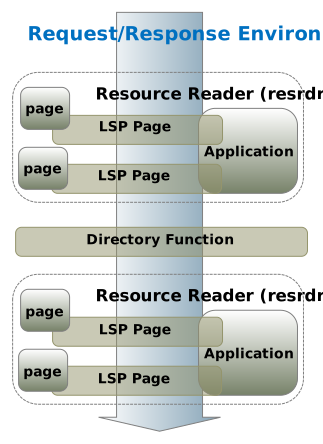 |
Make sure to download the Request/Response example from GitHub.
Directory Function
A directory function is a Lua function installed in one of dir, resrdr, or dav. It gives you programmatic control over how a directory handles a request. In practice, directory functions are used when a static directory object is not enough and you need custom routing, access control, request transformation, or application-specific behavior.
Lua Server Pages
A Lua Server Page (LSP) is a Lua script resource, typically with the extension .lsp, executed by a Resource Reader. In other words, the resrdr provides the file-system-facing part of the application, while the LSP engine provides the execution environment for the page.
An LSP page executes with a small set of BAS-provided variables:
- page - page-local state for this specific LSP resource.
- app - the shared application table, if the resrdr was configured with one.
- io - the I/O object registered with the resrdr.
- pathname - the current LSP path relative to
io. For example,assert(io:stat(pathname))succeeds for the currently executing page. The following example calculates the path to the directory containing the current LSP page:pathname:match"(.-)[^/]+$"
Page Table
Each LSP page has its own private page table. Data stored there lives for as long as the owning Resource Reader lives, which makes the page table useful for caching per-page state or counters that should survive across requests but remain private to that page. Resource Readers can be created and removed dynamically, and a resrdr that is no longer referenced is automatically cleaned up by Lua garbage collection.
<?lsp
  -- Using page variables
  print("<pre>");
  page.count = (page.count or 0) + 1
  print("Access count = ", page.count)
  print("</pre>")
?>
This code updates the variable count each time the page is displayed. When there are multiple users of the page, the number may increment by more than one each time you refresh the page. If we change the code to the following:
<?lsp
  -- Using page variables
  print("<pre>");
  page.count = (page.count or 0) + 1
  print("Access count = ", page.count)
  ba.sleep(10);
  print("Access count = ", page.count)
  print("</pre>")
?>
then the two values of the access count may be different when we have multiple users.
Application Table
A Resource Reader can optionally expose an application table by calling rsrdr:lspfilter(apptab). The table is shared by all LSP pages in that resrdr, but is private to other Resource Readers. Use it for code and data that should be shared at the application level, such as configuration, caches, timers, HTTP client instances, or helper functions loaded from a .preload script. The xedge and wfs examples both use this pattern.
Session Object/Table
In addition to the per-request CMDE, the per-page page table, and the per-application app table, the LSP engine can also expose a session object. Session state is visible only to the current user session and is destroyed when that session terminates.
Lua globals
Lua globals (_G) are shared across all pages, requests, and sessions running in the same Lua state. A value written to _G in one request can therefore be read from another request.
That makes globals useful for framework-level helpers, but risky for request-specific data. In LSP code, values can be read without the _G prefix, but to create or update a true global you must explicitly assign through _G.
<?lsp
  -- Using Lua Globals
  print("<pre>");
  _G.count = (_G.count or 0) + 1
  print("Global LSP Access count = ", _G.count)

  print(_G.stdpageheader)
  print(_G.copyright)

  -- global functions
  _G.myfunction()

  print("</pre>")
?>
Thread Mapping and Coroutines
Lua provides coroutines, which are lightweight cooperative execution contexts. A coroutine runs until it explicitly yields or returns, which means Lua code can switch tasks without preemptive context switching and without the usual locking model associated with application-level threads.
For more information on Lua coroutines, see the Lua coroutine documentation and the online coroutine tutorial.
BAS extends this model by mapping incoming C-side events onto Lua coroutines. Each request, timer callback, socket event, or similar BAS event can execute on its own Lua stack even though Lua itself is not preemptive. This is what makes BAS feel event-driven while still preserving Lua's single-VM execution rules.
In practice, only one native thread executes Lua bytecode at a time. However, when a binding yields Lua while performing lengthy C work, another pending coroutine may run. This is how BAS can support blocking-looking operations such as SQLite queries or client-side HTTP work without requiring you to manually manage context switches in most cases. See Lua-SQLite and LSP Considerations for a concrete example.
The following LSP page demonstrates several calls that may spend significant time on the C side and may therefore yield execution while the operation is in progress:
<?lsp
response:setcontenttype("text/plain")

-- Trick to make the browser flush its internal cache and start displaying data as it trickles in
for i = 1, 15 do
   print("--------------------------------------------------------------------")
end

-- Function to print and flush the server's send buffer
local function pf(...)
    print(...)
    response:flush()
end

pf("Fetching 50 quotes")
local http = require("httpm").create()
local t, err = http:json("https://zenquotes.io/api/quotes")
if t then -- If we received a Lua table (decoded JSON string)
   for key, val in ipairs(t) do
      print(val.q) -- Print quote
      pf(val.a, "\n") -- Print author and flush
      ba.sleep(200) -- Sleep for 200 milliseconds
   end
end
?>
In this example, the following functions may yield:
- http:json(): The HTTP library is designed for blocking calls and yields when TCP data is pending.
- print(): Internally uses response:write(), which yields if the TCP output queue is full.
- ba.sleep(): Yields the Lua coroutine and pauses the execution of the native thread, allowing other tasks to proceed.
When you click the run button above, you should see the data gradually appear in the browser window instead of all at once. This is due to the yielding behavior of the functions used, which allows the output to be sent in chunks and displayed progressively.
The following diagram provides a high-level overview of the event and threading mechanism in BAS:
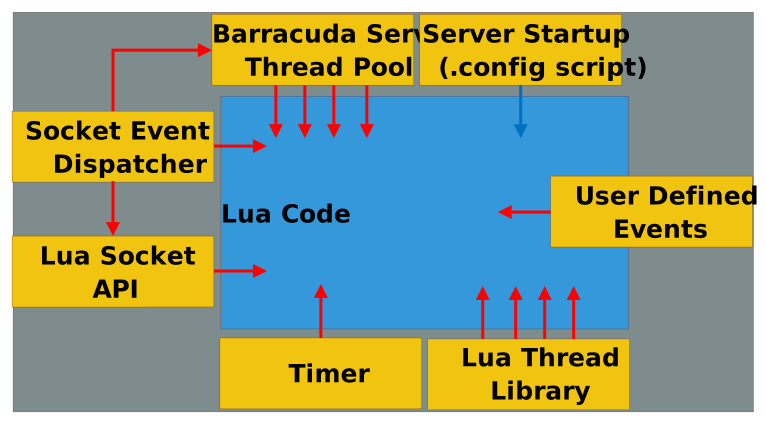
The diagram above approximates a typical assembled BAS server such as the Mako Server and Xedge standalone; however, in Xedge standalone, the Thread Pool and Thread Library are combined. If you assemble your own server using C code, you decide on the components to include. The only required component is the Socket Event Dispatcher. While the server can run without additional threads, using the optional Thread Pool and Thread Library enhances performance for Lua code calling time-consuming C functions, like SQLite operations, and enables blocking code, such as the HTTP client library, to run without interfering with other services.
Note: when you call blocking code such as ba.sleep(), you suspend the native thread. You can see from the diagram above that this is not a good idea when you run in the context of the Socket Event Dispatcher and the Timer thread, as this will suspend these threads from performing their operations. You can initiate lengthy operations within the context of these two threads by calling ba.thread.run().
BAS Key Components:
- Socket Event Dispatcher
- Handles all network data, including non-blocking socket operations.
- Typically runs on the main thread.
- Powers the advanced cosockets API.
- Thread Pool
- Handles HTTP requests by activating threads to manage the request/response of LSP related code.
- Enhances performance for LSP code (request/response calls) calling time-consuming or blocking C functions, like SQLite operations.
- High-end servers like Mako include the Thread Pool and Thread Library, while RTOS examples like Xedge standalone rely on the Thread Library.
- Thread Library
- Similar to the Thread Pool, allows threading with ba.thread.run().
Lua Authentication and Authorization
Authentication in the Barracuda Server is an optional component that can be installed in any directory type. You can configure a single authenticator for the entire application or install multiple authenticators as needed. An authenticator can protect all resources or be restricted to a specific subset.
Authentication Examples
Recommendation
If you don't need to interface with an existing user database and plan to store a user database in local persistent storage, we recommend using the JSON-encoded authenticator database created with ba.create.jsonuser(). For Xedge and the Mako Server, we strongly recommend using the TPM-protected version, which securely encrypts the user database. Refer to the TPM API and ba.tpm.jsonuser() for more details.
Protected Resource
local dir=ba.create.dir()
dir:insert()
-- Enable authentication and
-- authorization for the directory.
dir:setauth(authenticator,authorizer)
-- Note: you must also reference (anchor)
-- the dir to prevent it from garbage collecting.
directory functionality:
In this example, an unnamed directory is created and installed as a root directory. We install the directory in the root, thus covering all pages in the server. The last line inserts an authenticator and authorizer in the server. We will soon look into how one can create authenticator and authorizer objects. Authenticators can be installed, replaced, or removed in a running system. For example, the authenticator is removed by calling dir:setauth().
The Lua authentication and authorization logic are wrappers for the authentication and authorization classes implemented in C code. The C classes are based on an object oriented design and many of the classes are designed to be extended by the application designer. The Lua wrappers use the same concept and one can create multiple authenticator and authorizer types. The authenticator and authorizer can be implemented in Lua, but one can also use drop in authenticator and authorizer solutions implemented in C code. We are currently providing one authenticator and authorizer drop in solution that stores user database information as JSON. See ba.create.jsonuser() for more information.
The authenticator object is responsible for the authentication handshaking between the client and the server. The authorizer is an optional component that authorizes the action performed by authenticated users. The following example expands on the previous example and implements an authenticator, but we are not using an authorizer.
local dir=ba.create.dir()
dir:insert()
-- The username/password callback function.
local function getpassword(username)
   if username == "admin" then return "admin" end
end
-- Create the username database from our getpassword func.
local authuser=ba.create.authuser(getpassword)
-- Create authenticator by using the username database.
local authenticator=ba.create.authenticator(authuser)
-- Enable authentication for the directory.
dir:setauth(authenticator)
An authenticator is created by calling ba.create.authenticator(). It requires a user database, so in this example we first create a basic user database with ba.create.authuser(). The user database object requires a password lookup function. That function looks up the user and returns the password if the user exists. The authenticator compares the stored password with the password provided by the user and accepts the user when they match. In the example above, the password lookup function returns "admin" if the username is "admin", which means the user is accepted when both username and password are "admin". The example getpassword callback returns the password in plaintext. You can also return a hash value or use external authentication.
The above is all that is required to implement authentication for a directory. Authentication defaults to digest authentication when the authenticator type is not configured. The authenticator also uses an integrated HTTP response message, which is displayed if the user clicks the cancel button in the browser's digest pop-up window.
Authorizing Users
An authorizer object is created as follows:
local function authorizer(username, method, path)
     -- return true or false
 end
local  authorizer = ba.create.authorizer(authorizer)
dir:setauth(authenticator,authorizer)
The authorizer callback function determines user access based on the username, HTTP method, and requested relative path. It returns true if the user has access, and false or nothing if the user does not.
You have flexibility in how you authorize users. While authorizers typically use the username, method, and path, you can implement additional criteria as needed. Each LSP page can make its own access decisions, or you can override the directory service function to create a generic authorizer tailored to your application.
The Authenticator Types
The authenticator example above is using HTTP digest authentication, which is the default if the type is not specified. The authenticator type can be specified by setting field "type" in the optional "option table".
local authenticator=ba.create.authenticator(authuser,{ type="basic" })
The following authenticator types can be specified:
- "digest" - Use HTTP digest authentication, the default authenticator.
- "basic" - Use HTTP basic authentication.
- "form" - Use form-based authentication. Form-based authentication requires a custom response message handler that sends a login form to the user. The HTML form returned by the handler must have the two following input fields: ba_username and ba_password. See creating a custom response message handler for more information.
- "sform" - Use form-based authentication, but do not allow the password to be sent in plaintext. In this mode, the password is only accepted if the connection is using SSL or if the password is cryptographically hashed. Note: the authenticator cannot prevent the password from being sent in plaintext unless the response message handler is designed to make sure the user is either using a secure URL or that the password is cryptographically hashed. See the SHA1 cryptographic form example for how to send the password cryptographically hashed or see the force secure connection example for how to make sure the connection is secure.
- "dav" - A specialized version of digest and basic authentication designed for WebDAV clients. Not all WebDAV clients can manage digest authentication and the "dav" authenticator gives the client the option of using either basic or digest authentication. The dav authenticator is using its own response message and will not use your custom response message handler if provided. Also see response:setdigest().
- "auth" - An all-in-one authenticator type that implements basic, digest, and form-based authentication. The authenticator is designed for server applications that accept a mix of browser-based and non-browser-based clients. For example, a non-browser-based client typically does not accept form-based authentication and requires either digest or basic HTTP authentication.
The authenticator uses digest or basic authentication if the client is directly specifying the authentication type by setting the "Authorization" header. Command based and HTTP client libraries integrated with applications typically set the "Authorization" header before sending the request. The authenticator also checks if the client sends a Barracuda specific "PrefAuth"http header which should be set to basic or digest.
The authenticator defaults to digest authentication if the type is not specified and the request is for a non text based URL or if the request includes the
X-Requested-With: XMLHttpRequestheader.The authenticator defaults to form-based authentication if the authentication type is not specified and the request is for an
.html,.lsp, or.cspfile.The "auth" authenticator requires a custom response message handler, which is typically more complex to design than custom response message handlers for the other authenticator types.
Encrypted Passwords
All authenticator types are designed to work with user databases where the passwords are not stored in cleartext, but as a hash value. However, the hash encoded passwords must be stored using an encoding called HA1. See storing passwords as a hash value for details.
Creating a Custom Response Message Handler
A login response message handler is responsible for sending login information and login failed information to a client. The function is not called unless the client requires login information, or if the authenticator failed to authenticate the client, or if the client is denied by the authenticator, or an installed login tracker denied the request. |
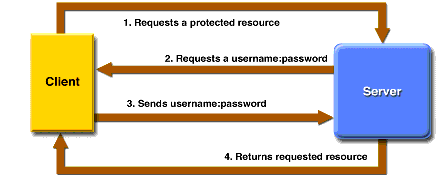 |
In the login sequence shown above, the response handler is called when the user requests a protected resource (1). The response handler requests the user credentials (2) by sending login information to the client. Note: The response handler should send response data, but it must not set the HTTP authorization header, since that header is managed by the authenticator. The response handler is also called if the username, password, or both do not match (3).
The following example shows how to create a login response message handler for form-based authentication:
-- Custom Response Message Handler
local function loginresponse(_ENV, authinfo)
   if authinfo.username then response:forward".loginfailed.lsp" end
   response:forward".loginform.lsp"
end
local authenticator=ba.create.authenticator(
   authuser,{type="form", response=loginresponse})
The _ENV variable is the command environment where globals such as the request and response objects are found.
The authinfo is a table with information about the login status. The username is set if the user failed to login. The username is not set when the client requests the login page. Notice that we are not using an "else" statement when forwarding the request to the login form. The "else" statement is not needed since response:forward by default does not return to sender, thus the code below ".loginfailed.lsp" will not execute unless username is not set. The pages ".loginform.lsp" and ".loginfailed.lsp" are regular LSP pages that send HTML login information and error information to the client.
Creating a Form Response Message Handler
Form-based authentication requires a custom response message handler. The response handler can emit the complete response page, but it is often easier to create a response handler that forwards the request to a dedicated LSP page. The following example shows how to create the ".loginform.lsp" page for the form response message handler shown earlier.
<html>
  <body>
    <form method="post">
      Username: <input type="text" name="ba_username"><br>
      Password: <input type="password" name="ba_password"><br>
      <input type="submit" value="Login">
    </form>
  </body>
</html>
The above HTML form includes the two required form fields ba_username and ba_password. Pressing the submit button sends the login information in plaintext to the server. For this reason, you should use a secure (SSL/TLS) connection when using form-based authentication. See the "force secure connection" example for more information.
Using form-based authentication safely without using SSL (sform)
The form authenticator supports cryptographic hashing and implements an authentication scheme similar to digest authentication, which allows user identity to be established securely without having to send a password in plaintext over the network. The form authenticator adds two additional fields to the authinfo table that can be used by the response handler when creating the login form.
The following examples show how to create a form response message handler and an LSP login form that supports cryptographic hashing.
Form response message handler:
We must modify the form response message handler shown earlier so that it supports the new form login page.
local function loginresponse(_ENV, au)
   authinfo=au -- Set authinfo in the global command environment
   if authinfo.username then response:forward".loginfailed.lsp" end
   response:forward".loginform.lsp"
end
The code above is similar to the previous example, except that it makes the variable authinfo available in the command environment. We can then use authinfo in the new .loginform.lsp page by making it global in the command environment.
Form login page:
The new ".loginform.lsp" page includes a JavaScript file and two new form fields. We have also changed the "submit" button to a standard html button. Changing the submit button to a standard button makes it impossible to submit the form if JavaScript is disabled, thus preventing the password from being sent in plaintext.
<html>
  <head>
    <script src="/rtl/sha1.js"></script>
  </head>
  <body>
    <form method="post">
      Username: <input type="text" name="ba_username"><br>
      Password: <input type="password" name="ba_password" autocomplete="off"><br>
      <input type="hidden" name="ba_seed" value="<?lsp= authinfo.seed ?>">
      <input type="hidden" name="ba_seedkey" value="<?lsp= authinfo.seedkey ?>">
      <input type="button" id="ba_loginbut" value="Login">
    </form>
  </body>
</html>
Notice how the two form fields ba_seed and ba_seedkey are created dynamically using LSP and values from the authinfo Lua table. The global authinfo table is made available to the LSP page by the response handler above. The form itself does not include inline JavaScript. The JavaScript code in sha1.js automatically discovers the HTML form with the fields ba_password, ba_seed, and the button with id="ba_loginbut". These fields are required by the JavaScript code, which calculates a SHA-1 hash from the password and seed value. The seedkey is required by the server-side authenticator when the form is submitted. The user will not be able to log in if any of these fields are missing.
The JavaScript file is found in the Barracuda SDK /WebResources/ directory. The two precompiled servers included with the SDK also include this file in the integrated ZIP file and make it available in the /rtl/ directory. The file sha1.js uses the browser's native DOM API and has no library dependency.
Many browsers give the user the option of saving the username and password in the browser. The JavaScript code run when pressing the login button replaces the password entered by the user by the SHA1 hash before submitting the page, thus making it impossible for the user to save the password. This feature increases security but degrades the user experience. If you want the user to be able to save the password, make the following changes to the HTML form:
    <form method="post">
      Username: <input type="text" name="ba_username"><br>
      Password: <input type="password" id="ba_password2"><br>
      <input type="hidden" name="ba_password">
      <input type="hidden" name="ba_seed" value="<?lsp=authinfo.seed?>">
      <input type="hidden" name="ba_seedkey" value="<?lsp=authinfo.seedkey?>">
      <input type="button" id="ba_loginbut" value="Login">
    </form>
The ba_password field is now changed to a hidden field, and the visible password field uses id="ba_password2". Notice that we use an id and not a name attribute for ba_password2. Form fields without a name are not submitted to the server, which is what we want, i.e., to prevent the password from being sent in plaintext. The JavaScript code in sha1.js is designed to look for this combination. The hash is created from ba_password2 + seed and inserted into ba_password. This construction allows the user to save the password in some browsers.
- The authentication will not work if the user has JavaScript disabled. The file sha1.js includes a JavaScript implementation of SHA1 and code to extract and manipulate the HTML form fields. The cleartext password is replaced by the hash of the password + seed.
- The authentication will not work if using an external authenticator, where the password is kept as a secret by the authenticator.
- The following field must be added to the form when using a user database with encrypted passwords.
<input type="hidden" name="ba_realm" value="Barracuda Server">
Realm is the authenticator's realm value. The default realm value is Barracuda Server.
You must also include spark-md5.min.js, which is used for calculating HA1.
The following shows the complete example:
<script src="/rtl/sha1.js"></script>
<script src="/rtl/spark-md5.min.js"></script>
<form method="post">
  Username: <input type="text" name="ba_username"><br>
  Password: <input type="password" name="ba_password" autocomplete="off"><br>
  <input type="hidden" name="ba_realm" value="Barracuda Server">
  <input type="hidden" name="ba_seed" value="<?lsp= authinfo.seed ?>">
  <input type="hidden" name="ba_seedkey" value="<?lsp= authinfo.seedkey ?>">
  <input type="button" id="ba_loginbut" value="Login">
</form>
Force Secure Connection
Basic and form-based authentication are unsafe unless the login information is sent over a secure connection. The following example makes sure the client is using a secure connection:
-- Create a secure URL from  URI (path)
-- cmd is the request and response object.
-- The username/password callback function.
-- Notice how we use the optional _ENV command environment.
local function getpassword(username, upasswd, _ENV)
   if not request:issecure() then
      -- Deny login: send redirect request
      response:redirect2tls()
      -- redirect2tls does not return to caller.
   end
   if username == "admin" then return "admin" end
end
-- Create the username database from our getpassword func.
local authuser=ba.create.authuser(getpassword)

-- The login response message handler
local function loginresponse(_ENV, authinfo)
   if not request:issecure() then
      -- Remove Authorization header set by basic or digest authenticator
      response:setheader("Authorization",nil)
      -- redirect2tls does not return
      response:redirect2tls()
   end
   -- The connection is secure if we get this far.
   if authinfo.username then response:forward".loginfailed.lsp" end
   response:forward".loginform.lsp"
end

local authenticator=ba.create.authenticator(authuser,{response=loginresponse})
dir=ba.create.dir()
dir:insert()
dir:setauth(authenticator)
The login response message handler checks if the URL is secure, and if it is not, sends a redirect request to the client. Removing the "Authorization" header set by the authenticator is necessary if using Digest or Basic authorization since we do not want the client to send the credentials before using a secure connection. |
|
A client normally starts by requesting a secure resource without providing the user's credentials (1), but a non-browser client such as an HTTP client library may directly send the credentials (3). The password is sent in plaintext and an eavesdropper could intercept it. We cannot prevent this on the server, but we can change the getpassword() function to ignore the login request and force a secure connection. The response is not normally committed in a getpassword() function, but the authenticators are designed such that they assume the getpassword() function sent a "denied" request if the response is committed. Method response:sendredirect() commits the response.
Note: The modified getpassword() function with the secure redirect is not needed if using the sform authenticator, since the secure form authenticator denies all non-secure requests and delegates the request directly to the response message handler.
External Lua Links
Barracuda Lua APIs
The BAS APIs, accessed through the global ba table, are divided into two documentation sets: the core API described on this page and the optional Auxiliary API. Most BAS products include both, but custom BAS builds can omit the auxiliary libraries when client-side protocols, sockets, or optional crypto features are not needed.
When reading the reference below, keep in mind that BAS applications also execute inside an LSP runtime with BAS-provided objects such as request, response, cookie, session, and page. The ba library provides the server-level and utility functions that those higher-level constructs build upon.
ba
A library that provides a number of BAS utility and I/O functions.
Error conventions: Parameters and return values below include their names and Lua types. A Throws section describes argument or state errors and any additional exceptions implemented by the binding. Errors returned as values are listed under Return values. Lua allocation failures can also raise an out-of-memory error, including in functions with no argument checks. Do not assume that every failure is an exception.
- ba.aesdecode(key, string)
-
Parameters
- string key - Required key. It must match the effective key used by aesencode.
- string string - Required Base64url-encoded encrypted value without embedded NUL bytes.
Return values
- string plaintext - Decrypted binary data on success. Authentication failure or insufficient decoded data returns no values, which becomes nil when assigned to a variable.
Throws
Throws for an argument that cannot be read as a Lua string, embedded NUL in the encoded input, input larger than INT_MAX bytes, detected Base64 output overflow, or native buffer allocation failure. An incorrect key or authentication failure does not throw.
Decodes, authenticates, and decrypts a string returned byba.aesencode(). The key must be the same as the key used when encoding the string. The function returns no values (nil in an assignment) if the decoded input is too short or authentication fails, including an incorrect key or modified ciphertext. - ba.aesencode(key, string)
-
Parameters
- string key - Required binary key. Keys up to 16 bytes are zero-padded to 16 bytes; longer keys are padded to 32 bytes or truncated to their first 32 bytes.
- string string - Required binary plaintext. Embedded NUL bytes are supported.
Return values
- string encoded - Authenticated ciphertext encoded as Base64url, containing the random IV, ciphertext, and authentication tag.
Throws
Throws for arguments that cannot be read as Lua strings, input exceeding the checked buffer-size limits, native buffer allocation failure, or failure of the random generator.
Encrypts and authenticates a string using AES-GCM and returns the result as a Base64URL-encoded string. A new random initialization vector is generated for every call; encoding the same string and key multiple times therefore produces different results. The encoded value contains the initialization vector, ciphertext, and authentication tag required byba.aesdecode().This function is intended for transient application state, not long-term persistent storage. It is typically used as a substitute for creating a session object. The LSP page can instead store the session state as a hidden variable in the dynamically created page returned to the browser. The authentication tag prevents modified state from being accepted. The following example illustrates how to encode and decode state information in a hidden variable.
Encoding:-- Data to be encoded and stored in hidden variable local stateInfo={x=10,y="Top Secret"} local data=ba.aesencode(app.key, ba.json.encode(stateInfo))Decoding:-- Data received via hidden variable from client local data=ba.aesdecode(app.key, request:data"MyHiddenVariable") local stateInfo=data and ba.json.decode(data)
- ba.aeskey([len])
-
Parameters
- integer len - Optional; default: 16. Use 16 or 32 bytes. The implementation selects 16 when len converted to an unsigned 16-bit integer is 16; otherwise it selects 32. It does not reject other integers.
Return values
- string key - Random binary key, either 16 or 32 bytes.
Throws
Throws if a supplied non-nil length cannot be read as a Lua integer, or the random generator reports failure.
Create a cryptographically random 16 or 32 byte key that can be used byba.aesencode()andba.aesdecode(). The key is typically created at startup in the.preloadscript and stored in the app table. Data encoded with such an in-memory key cannot be decoded after the application is restarted and a new key is created. - ba.b64decode(string)
-
Decode Base64 or Base64url text.
Parameters
- string string - Required Base64 or Base64url text; must not contain NUL bytes.
Return values
- string or nil data - Decoded binary data. Characters outside the encoding alphabet, including padding and whitespace, are ignored; this function does not strictly validate Base64 syntax.
- string error - Second result on native buffer allocation failure: "malloc". The first result is nil.
Throws
Throws if the required argument cannot be read as a Lua string. Also throws for embedded NUL, input larger than INT_MAX bytes, or detected output overflow.
- ba.b64encode(string)
-
Encode binary data as Base64.
Parameters
- string string - Required binary data; embedded NUL bytes are supported.
Return values
- string encoded - Base64-encoded data, including padding.
Throws
Throws if the required argument cannot be read as a Lua string.
- ba.b64urlencode(string [,padding])
-
Encode binary data as Base64url.
Parameters
- string string - Required binary data; embedded NUL bytes are supported.
- boolean padding - Optional; default: false. True includes trailing = padding.
Return values
- string encoded - Base64url-encoded data.
Throws
Throws if the required argument cannot be read as a Lua string. Throws if padding is supplied and is neither a boolean nor nil.
- ba.urldecode(string)
-
Decode percent escapes in URL text.
Parameters
- string string - Required URL text. A plus sign remains a plus sign; this is not form decoding.
Return values
- string or nil decoded - Text with percent escapes decoded.
- string error - Second result on native buffer allocation failure: "malloc". The first result is nil.
Throws
Throws if the required argument cannot be read as a Lua string. Also throws for an embedded NUL, malformed % escapes, escaped NUL, raw or escaped ASCII control characters (0–31 and 127).
- ba.urlencode(string)
-
Encode URL text.
Parameters
- string string - Required URL text without embedded NUL bytes.
Return values
- string or nil encoded - Text with characters selected by the BAS URL encoder percent-escaped. Spaces become %20 and plus signs become %2B.
- string error - Second result on native buffer allocation failure: "malloc". The first result is nil.
Throws
Throws if the required argument cannot be read as a Lua string. Also throws for embedded NUL, an input too large to allocate the worst-case encoded result.
- ba.clock()
-
Parameters
None.
Return values
- integer milliseconds - Platform millisecond clock value, normally time since system startup. Resolution and wraparound depend on the platform; the Windows GetTickCount-based port wraps after about 49.7 days.
Throws
No argument-validation errors or operational errors are raised by this binding.
- ba.cmpaddr(addr1, addr2)
-
Compare IPv4 or IPv6 address strings. IPv4 and equal-length IPv6 strings are compared as text. IPv6 strings of different lengths are converted before comparison. The literal prefix ::ffff: is recognized for comparison with an IPv4 string. This is not a general address-validation function.
Parameters
- string or nil addr1 - First address; optional, default: nil.
- string or nil addr2 - Second address; optional, default: nil.
Return values
- boolean equal - False if either argument is absent or nil. Otherwise the result of the comparison described below.
Throws
Throws if a supplied non-nil argument cannot be read as a Lua string. Address-conversion failure returns false.
print(ba.cmpaddr("127.0.0.1", "127.0.0.1")) -- Prints true print(ba.cmpaddr("::1", "0:0:0:0:0:0:0:1")) -- Prints true print(ba.cmpaddr("68.4.198.129","::ffff:68.4.198.129")) -- Prints true print(ba.cmpaddr("68.4.198.129","::ffff:68.4.198.128")) -- Prints false - ba.deflate(data [,rfc1950])
-
Compress a string or sequence of strings. See also response:setresponse().
Parameters
- string or table data - Required string or nonempty sequence of strings. Sequence elements are concatenated into one compressed stream; numeric elements accepted by Lua string conversion are also supported.
- boolean rfc1950 - Optional; default: false. False selects raw RFC 1951 DEFLATE; true includes the RFC 1950 zlib wrapper. The binding uses Lua truthiness.
Return values
- string compressed - Compressed binary data.
Throws
Throws for an unsupported data type, an empty sequence, or an element that cannot be read as a string. Also throws if zlib initialization fails, with "Zlib error".
ba.create
A table of functions for creating Barracuda objects:
- ba.create.authenticator(authuser[,options])
Creates an authenticator for dir:setauth(). See the authentication introduction.
Parameters
- userdata authuser - Required user database created by ba.create.authuser() or ba.create.jsonuser(). Retained by the authenticator.
- table options - Optional configuration. Omitted, nil, and non-table values use the defaults.
- string options.type - Optional; default: "digest". One of "auth", "digest", "basic", "form", "sform", or "dav". See the authenticator types.
- string options.realm - Optional authentication realm; default: "Barracuda Server".
- boolean options.tracker - Optional; default: false. Enables the login tracker. A tracker must already be installed. The binding uses Lua truthiness.
- function options.response - Response Message Handler, retained by the authenticator. Required for "form" and "sform"; optional for other types. The "dav" authenticator does not call this handler. See response handling and the callback below.
Return values
- userdata authenticator - New authenticator object.
Throws
Throws for an invalid authuser, an unsupported type, an invalid realm or response value, a missing response handler for form/sform, or enabling a tracker that is not installed. Lua allocation and errors from option-table metamethods can also throw.
- response(_ENV, authinfo)
Writes the response when authentication requires a login response. This callback does not run when the authenticator is created.
Parameters
- table _ENV - Current command environment, including request and response.
- table authinfo - Authentication attempt information. The fields below describe the attempted authentication, not necessarily an authenticated user.
- string authinfo.type - "digest", "basic", or "form".
- string or nil authinfo.username - User name, when the authenticator has a name for this attempt.
- string or nil authinfo.password - Stored credential supplied by the user database, possibly an HA1 hash or an empty string if no credential was obtained. Present when username is present. This is not the password entered by the client.
- string or nil authinfo.upwd - Client-supplied password when available, normally for Basic/Form authentication. Absent for Digest authentication.
- integer or nil authinfo.maxusers - Session limit from the user database; present when username is present. When the session limit prevents login, this is set to the negative number of existing sessions.
- boolean or nil authinfo.recycle - Whether older sessions may be recycled; present when username is present.
- integer or nil authinfo.inactive - Session inactivity timeout in seconds; 0 selects the normal session timeout. Present when username is present.
- integer authinfo.loginattempts - Login attempt count reported by the tracker; always present, including 0 without a tracker.
- boolean authinfo.denied - Whether the tracker denied this attempt; always present, including false without a tracker.
- string or nil authinfo.seed - Decimal form-authentication seed, when one is available. See form authentication hashing.
- string or nil authinfo.seedkey - Decimal encrypted seed value; present with seed.
Return values
None. Return values are ignored.
Throws
Callback errors are caught and reported by the request error handler. They do not propagate as errors from the authenticator constructor.
- ba.create.authorizer(callback)
Creates an authorizer for use with dir:setauth().
Parameters
- function callback - Required authorization callback. Retained for the lifetime of the authorizer.
Return values
- userdata authorizer - New authorizer object.
Throws
Throws if callback is not a function or Lua allocation fails.
- callback(username, method, relpath, session)
Parameters
- string username - Authenticated user name.
- string method - HTTP method, such as GET or POST.
- string relpath - Resource path relative to the owning directory.
- userdata session - Session associated with the authenticated user.
Return values
- boolean allowed - Only literal true grants access. False, nil, no return value, and all other types deny access. Extra return values are ignored.
Throws
Callback errors are caught by the binding and access is denied; they do not propagate as an error from the authorizer constructor.
-- isadmin is set by the application during login.
local az=ba.create.authorizer(function(u,m,r,s) return s.isadmin end)
- ba.create.authuser(callback)
Creates a user database backed by a Lua callback. Pass it to ba.create.authenticator().
Parameters
- function callback - Required credential lookup callback. Retained for the lifetime of the user database.
Return values
- userdata authuser - New user database object.
Throws
Throws if callback is not a function or Lua allocation fails.
- callback(username, upasswd, _ENV)
Parameters
- string username - User name being authenticated or explicitly looked up with authuser:getpwd().
- string or nil upasswd - Client-supplied password for Basic or Form authentication; nil for Digest authentication and for every explicit authuser:getpwd() lookup.
- table or nil _ENV - Command environment during normal authentication. For authuser:getpwd(username, request), the supplied request's existing command environment. For authuser:getpwd(username) or an explicit nil request, nil, even when the lookup is called from an LSP page.
Return values
- string, table, boolean, or nil password - Plaintext password string (at most 98 bytes in this build), a table whose first element is the 32-character HA1 string, or a boolean decision for Basic/Form authentication. Nil, no value, false, and invalid credential shapes reject the user.
- integer maxusers - Optional; default: 3. Maximum concurrent login sessions; 0 disables login. Applied only when the credential result is accepted and this value is numeric.
- boolean recycle - Optional; default: false. Enables recycling older sessions when the limit is reached. Applied only if maxusers is numeric and recycle is boolean.
- integer inactive - Optional inactivity timeout in seconds; default: 0, selecting the normal session timeout. Applied only when maxusers is numeric, recycle is boolean, and inactive is numeric.
Throws
During normal authentication, errors raised by the callback are caught by the request error handler; the credential result remains invalid. During an explicit authuser:getpwd() lookup, callback errors propagate to the getpwd() caller, with or without a request argument. Incorrect return shapes reject authentication or leave optional defaults unchanged rather than throwing from the constructor.
See HA1 hashes and external authentication for the alternative credential formats.
- ba.create.jsonuser()
- Creates an authenticator user database object that is using JSON as the user database format. The returned object can be used as the target for ba.create.authenticator(). The example Authentication and Authorization shows how to use this object to authenticate users and provide access via an Access Control List (ACL). When using Xedge or the Mako Server, we strongly recommend using the TPM-protected version, which securely encrypts the user database. Refer to the TPM API and ba.tpm.jsonuser() for more details.
Parameters
None.
Return values
- userdata juser - New, initially empty JSON user database. Use juser:set(userdb) to populate it.
Throws
Throws if Lua allocation fails. Database content is checked by juser:set(), not by this constructor.
- The created object has the following additional authenticator methods:
- juser:set(userdb)
Replaces the JSON user database. Pass the database directly; each top-level key is a username, including
v. Do not add an outervwrapper.Parameters
- table or string userdb - Required username-to-user-record table, or its JSON object representation. An empty table or JSON object removes all users.
- table (JSON object) userdb[username] - User record for the string username key. Its fields are listed below.
- string or table (JSON array) pwd - Required plaintext password, or an array whose first element is a 32-character HA1 hash. Credential lookup and authentication cannot use plaintext passwords longer than 98 bytes in this build, although the setter stores them.
- table (JSON array) roles - Required array of role-name strings. An empty Lua table, empty JSON array, or empty JSON object means no listed roles. The JSON authorizer gives users with no roles special super-user access; this is not a way to disable a user.
- integer maxUsers - Optional; default: 5. Maximum concurrent login sessions, clamped to 0..65535. Zero omits this user from the installed database. The alias maxusers is tried if maxUsers is missing or cannot be converted to an integer; if neither converts, 5 is used. Numeric fractions truncate; booleans and JSON null convert to 1 or 0.
- integer maxusers - Alias for maxUsers; see the precedence rules above.
- boolean recycle - Optional; default: false. Recycle older sessions when the session limit is reached. Missing or invalid values use false.
- integer inactive - Optional session inactivity timeout in seconds; default: 0, selecting the normal session timeout. Missing or invalid values and negative values use 0. Numeric fractions truncate; booleans and JSON null convert to 1 or 0.
Return values
- boolean or nil ok - True on success; nil on a conversion, JSON parsing, or database-schema error.
- string error - Error description; returned only with nil.
Throws
Throws for an invalid user-database object or a userdb argument that is neither a table nor convertible to a string. Lua allocation or errors from table conversion can also throw. JSON syntax and database-schema errors normally return nil, error.
A JSON parsing failure leaves the existing database intact. Once replacement begins, the old users are removed before the new records are validated. A schema or allocation error during replacement can leave an empty or partially populated database; failure does not restore the old users. Always check the return values.
-- Install a user database and check for invalid records. local ju=ba.create.jsonuser() assert(ju:set{alice={pwd='example-password',roles={'reader'}}})- juser:authorizer()
Creates a JSON authorizer associated with this JSON user database. Multiple authorizers can share the same user database. The authorizer retains the user database for its lifetime.
Parameters
None.
Return values
- userdata jauthorizer - New JSON authorizer, initially without constraints. Populate it with jauthorizer:set().
Throws
Throws for an invalid JSON user-database object or Lua allocation failure.
The combined JSON authenticator user database and the JSON authorizer provide a ready-to-use user database and constraint management using JSON as the database format. The JSON user database and the JSON constraints can be saved to a file system.
Examples:-
The following example sets up an authenticator and authorizer that simulates the same authentication and authorization logic as in the security C code example. The tutorial How to Create a WebDAV Server explains in detail how this example works.
-- Set up users. Defaults: maxusers=5, recycle=false, inactive=0. local userGuest={pwd='guest',roles={'guest'},maxusers=100} local userKids={pwd='kids',roles={'guest','family'}} local userDad={pwd='dad',roles={'guest','family','dad'},recycle=true,inactive=60*60} local userMom={pwd='mom',roles={'guest','family','mom'},recycle=true,inactive=60*60} -- Create a JSON user database object and install the user database local authuser=ba.create.jsonuser() authuser:set{guest=userGuest,kids=userKids,dad=userDad,mom=userMom} -- Create a digest authenticator (using default values). local authenticator=ba.create.authenticator(authuser) -- Setup the constraints local constr1={urls={'/*'},methods={'GET'},roles={'guest'}} local constr2={urls={'/*','/family/*'},methods={'POST'},roles={'mom','dad'}} local constr3={urls={'/family/*'},methods={'GET'},roles={'family'}} local constr4={urls={'/family/mom/*','/family/dad/*'},methods={'GET'},roles={'mom','dad'}} local constr5={urls={'/family/dad/*'},methods={'POST'},roles={'dad'}} local constr6={urls={'/family/mom/*'},methods={'POST'},roles={'mom'}} local constr7={urls={'/family/kids/*'},methods={'GET','POST'},roles={'family'}} -- Note, the constraint names are not used by the authorizer. local constraints={Guest=constr1,FamilyPost=constr2,FamilyGet=constr3, Parents=constr4,Dad=constr5,Mom=constr6,Kids=constr7} -- Create the authorizer and install the constraints. local authorizer=authuser:authorizer() authorizer:set(constraints) -- Create a directory and set the authenticator and authorizer local dir=ba.create.dir() dir:setauth(authenticator,authorizer) -- Note: you must also reference (anchor) the dir so it is not garbage collected. - The Dashboard App Tutorial shows how to use JSON authenticator and authorizer. See end of the file source/.lua/cms.lua for implementation details.
-
- ba.create.dav([name] [,priority], io [,lockdir [,maxuploads, maxlocks]])
Creates a WebDAV directory. It inherits the directory methods and requires a specialized 404 handler. See also WFS and asynchronous uploads.
Parameters
- string or nil name - Optional directory name; default: empty string. To specify priority without a name, pass nil before priority. A leading number is converted to a name.
- integer priority - Optional; default: 0. Higher values are searched first. Use -127..127; the C binding converts to a signed 8-bit value without checking its range.
- I/O userdata io - Storage backend, retained by the directory. See ba.openio() and ba.mkio().
- string or nil lockdir - Optional directory for persistent lock information. Nil, an unavailable directory that cannot be created, or maxlocks=0 disables locking. This does not disable writes to an otherwise writable backend. A read-only backend disables writes independently. Prefer creating this directory beforehand; a dot-prefixed name is suitable on Unix.
- integer maxuploads - Optional concurrent upload limit; default: 5. Values at or below zero become 1. Supply both limits, and use an explicit nil lockdir placeholder when locking is disabled. Downloads have no corresponding limit.
- integer maxlocks - Optional maximum number of locks; default: 20. Use a nonnegative value; zero disables locking. Supply this argument whenever maxuploads is supplied.
Return values
- directory userdata dav - New WebDAV directory, also providing dav:io(). Retain a reference while it is installed.
Throws
Invalid I/O objects and values that cannot be converted to integers in the priority or limit positions raise an argument error. A missing maxlocks after maxuploads also raises an error. Failure to enable locking does not throw; requests are handled with locking disabled.
- dav:io()
Gets the backend supplied to the constructor.
Parameters
None, apart from the object before the colon.
Return values
- I/O userdata io - The original storage backend.
Throws
Throws if called with an object of the wrong type.
- ba.create.dir([name] [,priority])
Creates an HTTP directory. Retain a Lua reference while it is installed, unless its parent explicitly retains it.
Parameters
- string or nil name - Optional directory name; omitted, nil, or empty string creates an unnamed directory. A leading integer argument is treated as priority.
- integer priority - Optional; default: 0. Higher values are searched first. Use -127..127. The C binding converts to a signed 8-bit priority without a range check.
Return values
- userdata dir - New directory; not inserted into the virtual file system until insert() is called.
Throws
Throws for an invalid priority argument or Lua allocation failure.
Creates a virtual directory node.
Parameters:- name - the name of the directory; nil or nothing indicates an unnamed directory. An unnamed directory can be installed as a root directory or as a chained child directory. A root directory and chained child directory act as if they are part of the parent, i.e., a root directory is part of the top server node and a chained child behaves as an extension to the parent. Named directories are only activated if the name matches the "top" name in the path.
- priority - optional priority of the directory. Default is zero. Negative gives lower priority and positive gives higher priority: min(-127) < default(0) < max(127).
The HTTP directory object returned by this function supports a variable set of functions.
local function testfunc(_ENV,path)
  response:setdefaultheaders()
  response:write[[
    <!-- example usage -->
    <html>
    <head>
    <title>test</title>
    <meta http-equiv="Content-Type"
       content="text/html; charset=utf-8">
    </head>
    <body>
    <pre>HELLO WORLD!
    ]]
  print("relative path=",path)
  print("absolute path=",request:uri())
  response:write[[
    </body>
    </html>]]
  return true -- say we are done
end
testdir = ba.create.dir("test")
testdir:setfunc(testfunc)
testdir:insert()
Run the example one time and navigate to tutorial.realtimelogic.com/test/xyzOutput: HELLO WORLD! relative path= xyz absolute path= /test/xyz
Using ba.create.dir() for RESTful Services
A directory object provides the foundation for designing RESTful services. The following two tutorials show how to transform a simple directory object into a fully functional RESTful service object:
- ba.create.domainresrdr(domainname [,priority] ,io [,404-page])
Creates a resource reader selected by the request Host header.
Parameters
- string domainname - Required domain name.
- integer priority - Optional; default: 0. Higher values are searched first. Use -127..127. The C binding converts to a signed 8-bit priority without a range check.
- userdata io - Required BAS I/O interface, retained for the directory lifetime.
- string or nil 404-page - Optional virtual-file-system path to forward to when this domain matches but the resource is not found. Without it, searching continues. The string is retained for the directory lifetime.
Return values
- userdata rsrdr - New domain-filtered resource reader, with the same methods as a standard resource reader.
Throws
Throws for an invalid domainname, I/O object, or 404-page argument, or Lua allocation failure.
local domains={ "my-domain-a.com", "my-domain-b.com", "my-domain-c.com" } local hio=ba.openio"home" -- Mako's home directory dirs={} -- Reference all domain directory objects: prevent GC of directories. for _,domain in pairs(domains) do -- Create a sub-dir for each domain assert(hio:stat(domain) or hio:mkdir(domain)) local dir=ba.create.domainresrdr(domain, ba.mkio(hio, domain)) dir:insert() -- as root dir dirs[domain] = dir -- Reference end- ba.create.wfs([name] [,priority], io [,lockdir] [,maxuploads, maxlocks])
-
The Lua module
wfsinstallsba.create.wfs. This function creates a ready-to-use, standalone Web File Server directory containing three interfaces to the same I/O object: the browser-based Web File Manager, the WFS JSON/HTTP service used by NetIo, and a WebDAV server.The table returned by
require"wfs"also supports embedded and customized managers. Itscreatefunction creates the JSON/HTTP and WebDAV service without automatically generating a browser page, and itswfmfunction creates the standard full-page callback. See the dedicated Web File Server and Web File Manager documentation for construction modes, arguments, object methods, protocol details, authentication, and the ES-module embedding API.Parameters
- string name - Optional directory name; omit it for an unnamed directory. Empty string is accepted. Do not use nil as a placeholder.
- integer priority - Optional search priority, default 0. Use -127 through 127. The wrapper recognizes Lua numbers, and the native constructor converts to signed 8-bit priority without a range check. Omit when not needed.
- userdata io - Required BAS I/O interface, retained by the created components. Write operations require a writable interface.
- string lockdir - Optional WebDAV lock directory. Create it beforehand. Omit the argument to disable WebDAV locking; do not insert a nil placeholder before later arguments.
- integer maxuploads - Optional concurrent upload limit, default 5. Applies independently to the WebDAV uploader and browser/HTTP uploader, so each can have up to this many active uploads. This is not a file-size limit or a shared total across both uploaders. Supply maxlocks as well. Values below 1 become 1; values above the maximum C int throw in the upload constructor.
- integer maxlocks - Required when maxuploads is supplied; default 20 when both are omitted. Maximum WebDAV locks. Use 0 through the maximum C int; the binding narrows through C int to unsigned 32-bit without a range check.
Return values
- table wfs - New WFS wrapper containing a resource-reader directory and retaining its WebDAV service and uploader through callbacks. Not inserted until insert() is called.
Throws
Throws when the parsed io is not a BAS I/O interface, supplied numeric values cannot be converted to integers by the native constructors, maxlocks is missing after maxuploads, maxuploads exceeds the native upload range, or Lua allocation fails. Optional arguments are recognized by type; omit unused ones. There is no constructor nil/error return for later filesystem or request failures.
The created object inherits the standard directory methods. Retain a Lua reference while it is installed in the virtual file system. Protect writable WFS and WebDAV mounts with an authenticator in production.
local wfs = require"wfs" -- Also installs ba.create.wfs local io = ba.openio"home" -- Ready-to-use standalone manager at /fs/ app.fs = ba.create.wfs("fs", io, ".LOCK") app.fs:insert() -- For an embedded manager, use wfs.create(...) and mount the -- browser client in an application page. See wfs.html. - ba.create.resrdr([name] [,priority], io)
Creates a directory that serves resources from a BAS I/O interface.
Parameters
- string or nil name - Optional directory name; omitted, nil, or empty string creates an unnamed directory. A leading integer argument is treated as priority.
- integer priority - Optional; default: 0. Higher values are searched first. Use -127..127. The C binding converts to a signed 8-bit priority without a range check.
- userdata io - Required BAS I/O interface, retained for the directory lifetime.
Return values
- userdata rsrdr - New resource reader. Insert it into the virtual file system and retain a reference while installed.
Throws
Throws if the parsed io argument is not a BAS I/O interface or Lua allocation fails. Optional arguments are recognized by type; use an integer priority and omit it entirely when not needed.
Creates a Barracuda Resource Reader. The first two parameters are the same as ba.create.dir().
The name represents a directory name. io - an I/O interface created by ba.mkio() or ba.openio() a reference to the I/O interface exists for as long as the created object exists.
When using the Mako Server or the Xedge, the two servers automatically create a resource reader for each application loaded. The resource reader directory object is automatically included in the application's environment and can be accessed in the .preload script as 'dir'. You can remove the resource reader from the server's virtual file system as follows if you create an application that does not provide a Web/REST/AJAX API: dir:unlink().
The created object has the following additional directory methods:
- rsrdr:getapp()
Reads the configured application table.
Parameters
None.
Return values
- table or nil apptab - The table last supplied to lspfilter(), or nil if none is configured.
Throws
Throws for an invalid resource-reader object. Lua allocation can also throw.
- rsrdr:io()
Returns the retained I/O object.
Parameters
None.
Return values
- userdata io - The BAS I/O interface supplied when creating this resource reader.
Throws
Throws for an invalid resource-reader object. Lua allocation can also throw.
- rsrdr:lspfilter([apptab])
Enables LSP processing. Every call resets the persistent-page cache and replaces or removes the application table, even when the filter is already installed.
Parameters
- table apptab - Optional application table, retained and exposed to LSP pages. Omitted, nil, and non-table values remove the previous application table.
Return values
- boolean installed - True if the LSP filter was newly installed; false if it was already installed or installation failed.
Throws
Throws for an invalid resource-reader object. Lua allocation can also throw.
- rsrdr:header(table-with-key-value-pairs)
Replaces the additional response headers for this resource reader, including its LSP responses.
Parameters
- table table-with-key-value-pairs - Required mapping of string header names to string or numeric values. Entries with values that cannot be converted to strings are skipped. An empty table removes the extra headers. Keys must be strings; numeric keys are not supported.
Return values
- boolean ok - True if the replacement was installed or cleared; false if the internal header block would require 65535 bytes or more, including its index table and string terminators.
Throws
Throws for an invalid resource reader or non-table argument. Unsupported keys can cause a Lua table-iteration error. Lua or header-storage allocation failure can throw.
Include additional/custom HTTP headers as part of every response for all resources delivered from the Resource Reader, including LSP pages. The method is typically called in a .preload script (as dir:header{...}) when configuring CORS settings that should be the same for all LSP pages included in the application. Individual LSP pages can set new CORS header values or overwrite the pre-set values.-- Example: harden security policy rsrdr:header{ ["Content-Security-Policy"]= "default-src 'self'", ["X-Content-Type-Options"]="nosniff", ["Strict-Transport-Security"]="max-age=31536000; includeSubDomains", }- rsrdr:maxage(seconds)
Sets the cache lifetime for resources served by this reader, excluding LSP output.
Parameters
- integer seconds - Required Cache-Control max-age value in seconds; assigned directly without a range check.
Return values
- boolean ok - Always true after assignment.
Throws
Throws for an invalid resource reader or a seconds value that cannot be converted to an integer.
- rsrdr:insertprolog(dir [,reference])
Inserts a child into the resource reader's prologue directory list, searched before its resources.
Parameters
- userdata or table dir - Required unlinked child directory, or wrapper table whose dir field is the directory userdata.
- boolean or nil reference - Optional; default: false. True retains the child in its parent so it cannot be collected while installed.
Return values
- boolean or nil ok - True on success; nil on a backend insertion failure.
- string error - Backend error description, returned only with nil.
- integer code - Backend error code, returned only with nil.
Throws
Throws for invalid objects, an already-linked child, insertion into itself, or an invalid reference argument. Reference validation follows insertion, so an invalid reference argument can leave the child inserted. Lua allocation can also throw.
Inserts a directory as a child in the Resource Reader. The method is similar to dir:insert, except for that the directory is inserted in the Resource Reader's prologue directory list. The prologue directory list is search prior to searching for resources in the Resource Reader. Directories inserted with dir:insert() are only searched if the resource was not found in the Resource Reader. Method rsrdr:insertprolog() is typically used when authentication is only needed on sub-directory in the Resource Reader. A prologue directory with an authenticator and directory name matching the directory in the Resource Reader that must be protected can be inserted as a prologue directory. The prologue directory will be activated if the relative URL matches the prologue directory, the authenticator will kick in, and make sure the user is authenticated.
- ba.create.upload(io [,maxuploads])
Creates a function that saves HTTP PUT or multipart/form-data POST uploads to persistent storage using asynchronous sockets. Call it from an LSP page or a directory callback. Unlike request:multipart() and request:rawrdr(), an active upload does not need a dedicated thread. The implementation uses the C HttpUpload class.
Parameters
- I/O userdata io - Backend where uploaded files are saved. The returned function retains this object.
- integer or nil maxuploads - Optional concurrent upload limit; default: 65535. Range: 0 through the maximum C int (2147483647 on supported 32-bit and 64-bit builds). Zero rejects all uploads with HTTP 503.
Return values
- function upload - Call as described below. Keep this function available while using its upload service.
Throws
Throws for an invalid I/O object, an invalid limit type, or a limit outside the supported range. The limit uses Lua integer conversion.
- upload(request, path, startfunc, completefunc, errorfunc [,environment [,return2caller]])
Starts an asynchronous upload. The default call ends execution of the current request handler. Storage and connection failures during an active upload are delivered to errorfunc. Reaching the concurrent upload limit, or failing to allocate an upload node, sends HTTP 503 without invoking a callback.
Parameters
- request userdata request - Active request for an HTTP PUT or multipart/form-data POST.
- string path - For PUT, the destination file path relative to io. For multipart POST, the destination directory prefix, including a trailing slash when nonempty. The server appends the basename from each part's filename attribute, not its form field name, and trims trailing whitespace.
- function startfunc - Required start callback, described below. Supply an empty function if no start processing is needed.
- function completefunc - Required completion callback, described below.
- function errorfunc - Required error callback, described below.
- table environment - Optional callback environment. Omission creates a new table; explicit nil is invalid. Its metatable is replaced with {__index=_G}, including when you supply the table.
- boolean or nil return2caller - Optional; default: false. True returns to the caller after starting or rejecting the upload. You must supply an environment table to reach this argument. The original request and response are invalid after the call, even when it returns.
Return values
No values. With return2caller omitted or false, BAS stops the current request handler instead of returning normally.
Throws
Throws for invalid arguments, an expired request, use inside an included response, or a request that is neither PUT nor multipart/form-data POST. The default handler termination also uses Lua error unwinding internally; it is a BAS control transfer. Active-upload failures use errorfunc rather than an exception in the original caller.
- start(_ENV, upload)
Called for each multipart file after extracting its filename and before opening the destination file. It is not called for PUT. Use it to validate the destination. Calling upload:response() stops receiving the upload and lets you send an early response.
Parameters
- table _ENV - The environment passed to the upload function, or the table it created.
- upload userdata upload - Callback handle supporting the methods below. It expires after completion, error, or an early response; do not retain it for later use.
Return values
Callback return values are ignored.
Throws
Errors raised by your callback are caught and logged by the upload binding. They terminate the upload; if no deferred response has been obtained, BAS sends HTTP 500.
- complete(_ENV, upload)
Called when the upload request completes successfully. Obtain upload:response() and send and close the response. If the callback finishes without obtaining a deferred response, BAS sends HTTP 500 (No response in Lua callbacks).
Parameters
- table _ENV - The environment passed to the upload function, or the table it created.
- upload userdata upload - Callback handle supporting the methods below. It expires after completion, error, or an early response; do not retain it for later use.
Return values
Callback return values are ignored.
Throws
Errors raised by your callback are caught and logged by the upload binding. They terminate the upload; if no deferred response has been obtained, BAS sends HTTP 500.
- error(_ENV, upload, error, extra)
Called for an error during an active upload, such as a failed file write or broken connection. A response can only be delivered if the connection is usable. Without a deferred response, BAS attempts to send HTTP 500.
Parameters
- table _ENV - The environment passed to the upload function, or the table it created.
- upload userdata upload - Callback handle supporting the methods below. It expires after completion, error, or an early response; do not retain it for later use.
- string error - I/O error name; see I/O error codes.
- string or nil extra - Additional error text, when available. The fourth callback argument is omitted when no additional text is available.
Return values
Callback return values are ignored.
Throws
Errors raised by your callback are caught and logged by the upload binding. They terminate the upload; if no deferred response has been obtained, BAS sends HTTP 500.
- upload:name()
Gets the destination path.
Parameters
None, apart from the object before the colon.
Return values
- string name - Path relative to the constructor's I/O backend. For multipart uploads this is the current or last file path; before a file name is available, it is the supplied directory prefix.
Throws
Throws for an invalid or expired upload handle.
- upload:url()
Gets the URL recorded for the upload request.
Parameters
None, apart from the object before the colon.
Return values
- string url - Request URL captured when the upload starts, using the server's redirect URL encoding. It does not change for each multipart file.
Throws
Throws for an invalid or expired upload handle.
- upload:multipart()
Identifies the upload request format.
Parameters
None, apart from the object before the colon.
Return values
- boolean multipart - True for multipart POST; false for PUT.
Throws
Throws for an invalid or expired upload handle.
- upload:session()
Looks up the session associated with the upload request.
Parameters
None, apart from the object before the colon.
Return values
- session userdata or boolean session - Session object if still available; false otherwise. This method does not create a session.
Throws
Throws for an invalid or expired upload handle.
- upload:response()
Switches the upload from receiving data to sending a response. In a start callback, this stops the upload early. Close the returned response when finished.
Parameters
None, apart from the object before the colon.
Return values
- deferred-response userdata response - Response handle; see deferred-response methods. It retains the native upload node and can outlive the callback handle.
Throws
Throws for an invalid or expired upload handle, or if a response has already been obtained for this upload.
- ba.exec(prog)
-
Run a command and wait for completion. Output collection stops after reaching at least 65536 bytes; the final read can extend beyond that threshold. The BAS mutex is released while waiting and reading. Available only on supported process-based platforms. See also ba.forkpty().
Parameters
- string prog - Required command and arguments passed to the platform popen implementation.
Return values
- string output - On success, captured output. Standard output is captured on Windows; standard error is also redirected into the pipe on non-Windows platforms.
- integer status - Second success result: 0.
- nil, integer, string result, status, output - On nonzero pclose status: nil, the platform-specific status, and captured output. The status is not guaranteed to be a portable exit code.
- nil, string result, error - If the pipe cannot be opened: nil and a message beginning with "popen: ".
Throws
Throws if the required argument cannot be read as a Lua string. Failure to open the pipe and nonzero process status are returned rather than thrown.
JSON
See also
Binary JSON
XML Parser
A library that supports JSON encoding and decoding.
- ba.json.encode(table[,table][,size])
-
Encodes one or more Lua tables. Multiple tables produce consecutive JSON documents in one string.
Parameters
- table table - One or more required input tables. Strings must contain valid UTF-8. Use finite numbers for valid JSON output.
- integer size - Optional initial output-buffer size in bytes; default and minimum: 512. The buffer grows as needed. The first numeric argument after the initial table ends the table list; later arguments are ignored.
A table with a nonzero raw length becomes an array of its indexed values; other keys are ignored. Otherwise it becomes an object with string or numeric keys. An empty table becomes {}. Unsupported value types and recursive table references become JSON null. Unsupported object-key types produce an error return.
Return values
- string or nil json - Encoded JSON on success; nil on a reported encoding failure.
- string error - Returned only on failure: "mem", "utf8", "stack exceeded", or a message beginning "Invalid key type:".
Throws
Throws if the first argument is not a table, or a later argument before size is neither a table nor numeric. Errors from array-access metamethods can propagate. Reported encoding errors return nil and an error string; Lua allocation failures outside the protected result-copy step can still throw.
- ba.json.decode(json [, jnull] [, stacklen, namelen])
-
Decodes one or more complete JSON objects or arrays. Top-level scalar values are not supported.
Parameters
- string json - Required UTF-8 JSON data. Consecutive objects or arrays are supported.
- boolean jnull - Optional; default: true. Preserves JSON null as ba.json.null. False converts null to nil, removing object members and omitting null array elements. Later array elements shift down.
- integer stacklen - Optional parser stack capacity; default: 16, minimum: 8. Smaller values are raised to 8.
- integer namelen - Optional member-name buffer size in bytes; default: 255, minimum: 127. Smaller values are raised to 127.
jnull is recognized only when the next argument is boolean; otherwise that argument occupies the stacklen position. Nil selects the default for a numeric option.
Return values
- table object1, object2, ... - On success, one table for each complete JSON object or array.
- nil result - First return value on failure. Previously decoded tables from this call are not returned.
- string error - Second value on failure: "needmoredata" for incomplete input, "parse" for a parse error, "interface" for a value-conversion callback failure, "mem" for native parser allocation failure, or "stack" for parser stack exhaustion.
Throws
Throws if json cannot be read as a string or the numeric options cannot be read as Lua integers. Parse errors use the error returns above. Lua allocation failures while constructing the result can throw.
print(ba.json.decode('{"myvar":null}').myvar == ba.json.null) -- prints true print(ba.json.decode('{"myvar":null}',false).myvar == nil) -- prints true local table1, table2 = ba.json.decode('{}{}') assert(type(table1) == "table" and type(table2) == "table") - ba.json.encodestr(string)
-
Parameters
- string string - Required UTF-8 text. Embedded zero bytes are escaped.
Return values
- string or nil json - Escaped JSON string, including surrounding double quotes, or nil on failure.
- string error - Returned only on failure: "utf8" for invalid UTF-8 or "mem" for native buffer allocation failure.
Throws
Throws if the argument cannot be read as a Lua string. Invalid UTF-8 returns nil, "utf8". Lua allocation failure can throw.
- ba.json.null
- A light userdata value that represents JSON null. Use this value to preserve null members and array positions when decoding and encoding.
- ba.json.parser([jnull] [, stacklen, namelen])
-
Module JSONS simplifies the use of the stream based JSON parser when used with a TCP/IP or WebSocket connection.
Creates a parser that accepts JSON objects and arrays in successive chunks. Use ba.json.decode when all input is already available.
Parameters
- boolean jnull - Optional; default: true. Preserves null as ba.json.null; false omits null members and array elements.
- integer stacklen - Optional stack capacity; default: 16, minimum: 8.
- integer namelen - Optional member-name buffer size in bytes; default: 255, minimum: 127.
Options use the same positional rules and minimums as ba.json.decode.
Return values
- userdata parser - Parser object with a parse method. Incomplete input is retained between calls.
Throws
Throws if numeric options cannot be read as Lua integers or Lua cannot allocate the parser and its state.
The JSON parser is ideal for building advanced, asynchronous, message passing protocols on any type of communication channel. The communication can, for example, be between a standalone web server and other programs, or between embedded systems that are interconnected. The JSON parser can easily be used together with the socket library, but you can also use the JSON parser in combination with your own specialized communication channels such as message queues, USB connections, serial connections, etc.
- parser:parse(data [,asarray])
-
Parses a chunk and retains any incomplete object or array for the next call.
Parameters
- string data - Required chunk of UTF-8 JSON data.
- boolean asarray - Optional; default: false. Only literal true groups completed objects into one array. Other values use separate return values.
Return values
- boolean or nil ok - True when the chunk is accepted, even if no object is complete. Nil on a parse failure.
- table object1, object2, ... - With asarray false, completed objects follow true as separate results. No objects means true is the only result.
- table objects - With asarray true, a sequence of completed objects follows true. This result is absent when no objects are complete.
- string error - Follows nil on failure: "parse", "interface", "mem", or "stack", as described for ba.json.decode. Completed objects from the failing call are discarded.
Throws
Throws for an invalid parser receiver or data that cannot be read as a string. Lua allocation failures can throw. Incomplete input is accepted; parse failures return nil and an error code. Create a new parser after a parse failure.
Example 1, JSON Server:The following example shows a potential use case for the JSON parser. A specialized LSP page is designed to extract the active socket connection from the current request and morph the HTTP request into an asynchronous receive channel for JSON data. See the socket API for more information on how to use sockets. Note: see also the JSONS module.
<?lsp

-- Activated when s:event(asyncReceiveCoroutine) is called below
local function asyncReceiveCoroutine(s)
   local parser=ba.json.parser()
   -- variable x: multiple types, or nil on error
   local x,err=true,nil
   while x do -- While no error
      -- Block and wait for data
      x,err=s:read()
      if x then -- x is JSON socket data
         local array
         x, array = parser:parse(x,true)
         if x then -- If ok
            if array then -- If at least one object
               for _,v in ipairs(array) do
                  -- Dispatch the parsed JSON object 'v'
               end
            end
         else
            -- Parse error
            err=array -- array is now error code
         end
      end
   end
   if err == "closed" then
      print"Socket closed"
   else
      print("Socket or JSON parser error:", err)
   end
   send=nil
   -- Return: exit and close connection
end


response:flush() -- Send HTTP response headers
-- Morph HTTP request into a socket connection
local s = ba.socket.req2sock(request)
-- Enable asynchronous socket receive
s:event(asyncReceiveCoroutine)

?>
The above code is designed to receive data. You can easily extend the code to also send asynchronous JSON data to the client side.
Example 2, JSON Client:The following example shows a basic JSON HTTP client that can be used with the JSON service above.
local c=http.create.basic()
c:request{method="GET",url="URL-TO-SERVER_RESOURCE"}
-- Morph HTTP request into a socket connection
local s=ba.socket.http2sock(c)
local data={txt="hello"} -- The data to send
s:write(ba.json.encode(data)) -- Encode and send
- Module JSONS
-
JSONS (JSON stream parser) is a small Lua library that simplifies the use of the JSON parser object when using the JSON parser for parsing data that trickles in on a TCP/IP connection or on a WebSocket connection.
Load the library as follows.
local js = require("JSONS")JSONS functions:- js.create([table,] socket [,cfg])
Creates a JSON stream reader/writer. Load the module with
local js = require("JSONS"). The wrapper retains the supplied socket and uses its read, write, state, and close methods.Parameters
- table table - Optional instance table. Omission creates a new table. A table-typed first argument is always treated as this instance, so supply an explicit instance before a table-based socket adapter. Construction replaces its metatable and internal fields; reserve names beginning with an underscore for JSONS.
- userdata or table socket - Required BAS TCP/WebSocket socket, or compatible socket adapter. The constructor stores it without validating its methods or connection state.
- table cfg - Optional options. Omitted, nil, or non-table values are ignored.
- integer or nil or false cfg.maxsize - Optional positive integer threshold for input that has not produced a complete JSON value. Nil, false, or omission disables it. Exactly convertible numeric strings are accepted; invalid limits throw. Text bytes, including whitespace, accumulate across reads; binary chunks do not count. If parsing produces no complete value and the count reaches maxsize, get returns nil, "maxsize". Producing one or more complete values resets the count. A complete value may therefore exceed maxsize, and the result can depend on read boundaries. This guard does not impose a strict per-object limit or limit the socket read buffer.
- function cfg.bincb - Optional callback for binary WebSocket data; nil or false disables it. Called as bincb(data, bytesRead, frameLen, js). A truthy non-function value fails when binary data arrives.
Return values
- table instance - The supplied instance table or a newly created table. Construction does not read from or write to the socket.
Throws
Throws for an invalid maxsize, a protected instance metatable, or errors raised by instance/configuration table access. Lua/parser allocation failures can also throw. Socket misuse may only be detected by a later method call.
- bincb(data, bytesRead, frameLen, js)
Optional callback supplied as cfg.bincb. Called synchronously by get for each binary WebSocket chunk; get continues looking for a JSON value after the callback returns.
Parameters
- string data - Binary bytes returned by socket:read.
- integer or nil bytesRead - Bytes read so far in a fragmented WebSocket frame; absent for a complete frame returned in one read.
- integer or nil frameLen - Total WebSocket frame size in bytes when fragment information is supplied.
- table js - The JSONS instance receiving this data.
Return values
- any results - All callback return values are ignored.
Throws
Callback errors propagate from get; JSONS does not catch them. A callback error does not set the persistent parser/size error, but the binary chunk has already been consumed.
- js:get([timeout])
Reads and returns one top-level JSON object or array as a Lua table. Supports blocking sockets and sockets used in their required asynchronous/cosocket context.
Parameters
- number or nil timeout - Optional timeout passed unchanged to each socket:read call, in milliseconds. Omitted or nil uses the socket default (indefinite wait). It is a per-read timeout, not a deadline for assembling the entire JSON value. Cached data requires no socket read.
Return values
- table or nil value - Decoded object/array on success; nil on failure.
- string error - Returned only on failure: a socket or parser error string, "closed", "binary" for an unhandled binary chunk, or "maxsize" when the incomplete-input count reaches the configured threshold.
Throws
Throws for an invalid instance/socket, unsupported socket use or execution context, or a failure in cfg.bincb. Lua allocation and table-access errors can also throw. Ordinary socket, parser, and size failures return nil and an error string.
The native parser handles partial input and multiple values in a read. Complete values are queued for subsequent get calls. The maxsize guard is checked only when parsing produces no complete value. After a parser or size error, later get calls return that error without reading more data; close the socket. Timeouts and unhandled binary chunks do not set this persistent error, and partial text data is retained. get never closes the socket itself.
- js:put(table)
Encodes a Lua table as JSON and writes the encoded bytes to the socket. For WebSockets, sends a text WebSocket frame. For TCP sockets, sends the same JSON bytes. The receiving maxsize option does not limit outgoing data.
Parameters
- table table - Required value accepted by ba.json.encode. binary also expects a Lua table; it does not send a supplied string as raw binary data.
Return values
- boolean or nil success - Socket write result on successful encoding: true for accepted output, or nil on failure. True can mean queued output.
- string or integer error - Returned with nil for an encoding or socket write failure. An asynchronous BAS socket can instead return its integer queued-byte count when the send queue is full and the caller cannot wait. Encoding errors include "utf8", "mem", and an invalid-key description. No socket write occurs if encoding fails.
- integer queued - May be returned as the second value with true by an asynchronous BAS socket: the number of bytes in the socket send queue. Otherwise absent. Socket-adapter return values are forwarded unchanged.
Throws
Throws for a non-table input, invalid instance/socket, unsupported socket use, or errors raised by encoding table access. The BAS socket also throws if a WebSocket payload exceeds 65535 bytes. Returned encoding and socket errors are forwarded as nil, error.
- js:binary(table)
Encodes a Lua table as JSON and writes the encoded bytes to the socket. For WebSockets, sends a binary WebSocket frame. For TCP sockets, sends the same JSON bytes. The receiving maxsize option does not limit outgoing data.
Parameters
- table table - Required value accepted by ba.json.encode. binary also expects a Lua table; it does not send a supplied string as raw binary data.
Return values
- boolean or nil success - Socket write result on successful encoding: true for accepted output, or nil on failure. True can mean queued output.
- string or integer error - Returned with nil for an encoding or socket write failure. An asynchronous BAS socket can instead return its integer queued-byte count when the send queue is full and the caller cannot wait. Encoding errors include "utf8", "mem", and an invalid-key description. No socket write occurs if encoding fails.
- integer queued - May be returned as the second value with true by an asynchronous BAS socket: the number of bytes in the socket send queue. Otherwise absent. Socket-adapter return values are forwarded unchanged.
Throws
Throws for a non-table input, invalid instance/socket, unsupported socket use, or errors raised by encoding table access. The BAS socket also throws if a WebSocket payload exceeds 65535 bytes. Returned encoding and socket errors are forwarded as nil, error.
- js:close()
Calls the retained socket's close method. Pending parsed values and wrapper state are not cleared.
Parameters
None. Additional arguments are ignored.
Return values
- boolean closed - For a BAS socket: true when closing it, false if it was already closed. Socket-adapter return values are forwarded unchanged.
Throws
Throws for an invalid instance/socket or an error raised by the socket adapter. The BAS close method does not return a separate error string.
- ba.loadfile(filename[,io][,_ENV])
-
Load Lua code through a BAS I/O object.
Parameters
- string filename - Required file name in the selected I/O interface.
- userdata io - Optional BAS I/O object; default: the VM I/O. Omit this argument, rather than supplying nil, to pass an environment in its place.
- table _ENV - Optional environment assigned to the loaded function’s first upvalue. If explicitly supplied, it must be a table.
Return values
- function chunk - Compiled function on success; it is not executed by loadfile.
- nil, string chunk, error - Loading or compilation failure, or a loaded chunk with no upvalue to receive the requested environment.
Throws
Throws for an invalid filename argument, an invalid I/O userdata, or a supplied environment that is not a table. File-loading and Lua compilation errors are returned as nil and an error message.
- ba.mime(extension)
-
Parameters
- string extension - Required file extension, such as "html".
Return values
- string mime - Registered MIME type, or "application/octet-stream" if unknown.
- boolean known - True if the extension was found; false otherwise.
Throws
Throws if the required argument cannot be read as a Lua string. An unknown extension is not an exception.
DateTime, TimeTable, and TimeSpan
The DateTime type represents dates and times with values ranging from 00:00:00 (midnight), January 1, 0001 through 11:59:59 P.M., December 31, 9999 in the Gregorian calendar. Time values are measured in nanosecond units called ticks. The ticks are internally stored as a 3-tuple {seconds, nanoseconds, offset}. The offset represents a time zone in minutes controlled by you. The 3-tuple {0, 0, 0} represents the time "1970-01-01T00:00:00Z". The time is internally always assumed to be UTC. The offset is used during encoding to ISO 8601 and optionally when encoding to TimeTable.
The DateTime object works together with the following supporting Lua tables:
TimeTable : {
   year = integer,   -- 1 to 9999
   month = integer,  -- 1 to 12
   day = integer,    -- 1 to [max value depends on month]
   hour = integer,   -- 0 to 23
   min = integer,    -- 0 to 59
   sec = integer,    -- 0 to 59
   nsec = integer,   -- 0 to 999,999,999
   offset = integer, -- -1,439 to +1,439 [ i.e. time zone +- 60*24-1 ]
}
TimeSpan : {
   days = integer,  -- Whole days; default: 0
   hours = integer, -- Whole hours; default: 0
   mins = integer,  -- Whole minutes; default: 0
   secs = integer,  -- Whole seconds; default: 0
   nsecs = integer, -- -999999999 to 999999999; default: 0
}
Constructors validate the initial date and the adjusted result within years 1 through 9999 at the stored offset. They validate integer values before converting to narrower C fields. A TimeSpan cannot repair an invalid initial date. Numeric arguments and table fields checked as integers also accept values Lua can convert exactly to integers; the optional NOW offset must have Lua integer type.
TimeSpan fields may be positive or negative. Converting the fields to seconds must not overflow a signed 64-bit integer, including intermediate sums. Arithmetic normalizes the nanosecond component before checking the resulting date range.
- Create a DateTime object
-
- ba.datetime("MIN")
Creates a new DateTime at the earliest supported instant, 0001-01-01T00:00:00Z.
Parameters
- string selector - The literal "MIN". Additional arguments are ignored.
Return values
- userdata datetime - A fresh DateTime with seconds -62135596800, nanoseconds 0, and offset 0. Changing its offset does not affect other objects or later constructor calls.
Throws
Lua allocation failure can throw. This fixed-value constructor does not return nil and an error message.
- ba.datetime("MAX")
Creates a new DateTime at the latest supported instant, 9999-12-31T23:59:59.999999999Z.
Parameters
- string selector - The literal "MAX". Additional arguments are ignored.
Return values
- userdata datetime - A fresh DateTime with seconds 253402300799, nanoseconds 999999999, and offset 0. Changing its offset does not affect other objects or later constructor calls.
Throws
Lua allocation failure can throw. This fixed-value constructor does not return nil and an error message.
- ba.datetime()
Creates a DateTime using the current UTC clock. Clock precision depends on the platform.
Parameters
None.
Return values
- userdata or nil datetime - New DateTime on success; nil for invalid date text, an out-of-range input value, TimeSpan overflow, or an out-of-range result.
- string error - Returned only on failure: "Invalid datetime range".
Throws
Throws for incorrect argument types or table fields that cannot be converted to integers. Lua allocation failure and errors raised by table field access can also throw. Invalid date values and ranges return nil and an error string.
- ba.datetime("NOW" [,offset] [,TimeSpan])
Creates a DateTime using the current clock.
Parameters
- string selector - The exact, case-sensitive literal "NOW".
- integer offset - Optional display offset in minutes, -1439 through 1439. Only an integer-typed second argument selects this overload; otherwise the second argument is interpreted as TimeSpan. Omission retains the platform clock offset.
- table or integer TimeSpan - Optional adjustment: a TimeSpan table as defined above, or an integer number of nanoseconds. Omit it when no adjustment is needed; an explicit nil in its position throws.
Return values
- userdata or nil datetime - New DateTime on success; nil for invalid date text, an out-of-range input value, TimeSpan overflow, or an out-of-range result.
- string error - Returned only on failure: "Invalid datetime range".
Throws
Throws for incorrect argument types or table fields that cannot be converted to integers. Lua allocation failure and errors raised by table field access can also throw. Invalid date values and ranges return nil and an error string.
- ba.datetime(ISO8601 [,TimeSpan])
Parses an ISO 8601 timestamp, preserving its timezone offset.
Parameters
- string ISO8601 - Timestamp accepted by the ISO 8601 parser. Invalid text returns nil and an error string. The reserved selectors "NOW", "MIN", and "MAX" must match exactly.
- table or integer TimeSpan - Optional adjustment: a TimeSpan table as defined above, or an integer number of nanoseconds. Omit it when no adjustment is needed; an explicit nil in its position throws.
Return values
- userdata or nil datetime - New DateTime on success; nil for invalid date text, an out-of-range input value, TimeSpan overflow, or an out-of-range result.
- string error - Returned only on failure: "Invalid datetime range".
Throws
Throws for incorrect argument types or table fields that cannot be converted to integers. Lua allocation failure and errors raised by table field access can also throw. Invalid date values and ranges return nil and an error string.
- ba.datetime(timetable [,local] [,TimeSpan])
Creates a DateTime from calendar fields.
Parameters
- table timetable - TimeTable with integer fields and ranges shown above. Missing or nil year, month, and day default to 1; hour, min, sec, nsec, and offset default to 0. The date must exist in the Gregorian calendar. Other fields are ignored.
- boolean local - Optional, default false. True interprets the calendar fields at timetable.offset and converts them to UTC. False interprets them as UTC and retains offset for display. If the second argument is not boolean, it is interpreted as TimeSpan; omit local to place a TimeSpan table second.
- table or integer TimeSpan - Optional adjustment: a TimeSpan table as defined above, or an integer number of nanoseconds. Omit it when no adjustment is needed; an explicit nil in its position throws.
Return values
- userdata or nil datetime - New DateTime on success; nil for invalid date text, an out-of-range input value, TimeSpan overflow, or an out-of-range result.
- string error - Returned only on failure: "Invalid datetime range".
Throws
Throws for incorrect argument types or table fields that cannot be converted to integers. Lua allocation failure and errors raised by table field access can also throw. Invalid date values and ranges return nil and an error string.
- ba.datetime(secs [,nanosecs [,offset [,TimeSpan]]])
Creates a DateTime from UTC seconds, a nanosecond component, and a display offset.
Parameters
- integer secs - UTC seconds since 1970-01-01T00:00:00Z. The date must fall within years 1 through 9999 at the supplied offset.
- integer or nil nanosecs - Optional nanosecond component, 0 through 999999999; omitted or nil means 0.
- integer or nil offset - Optional display offset in minutes, -1439 through 1439; omitted or nil means 0.
- table or integer TimeSpan - Optional adjustment as described above, in argument 4. Supply nanosecs and offset, or nil placeholders, to reach this argument.
Return values
- userdata or nil datetime - New DateTime on success; nil for invalid date text, an out-of-range input value, TimeSpan overflow, or an out-of-range result.
- string error - Returned only on failure: "Invalid datetime range".
Throws
Throws for incorrect argument types or table fields that cannot be converted to integers. Lua allocation failure and errors raised by table field access can also throw. Invalid date values and ranges return nil and an error string.
- DateTime methods
-
ba.datetimereturns aDateTimeobject with these methods.- datetime:tostring([offset])
Formats the instant as ISO 8601 using the stored offset or a temporary override. Does not change the stored offset.
Parameters
- integer offset - Optional timezone offset in minutes, -1439 through 1439. Only an integer-typed argument overrides the stored value; other types, nil, and omission are ignored.
Return values
- string text - ISO 8601 timestamp on success. Returns the literal string "Invalid datetime range" if the instant cannot be represented at the selected offset; this is not a nil/error pair.
Throws
Throws for an invalid DateTime object or an integer offset outside -1439 through 1439. Lua allocation failure can also throw. The __tostring metamethod uses the same formatter.
- datetime:offset([offset])
Reads or changes the stored display offset without changing the instant.
Parameters
- integer offset - Optional new offset in minutes, -1439 through 1439. Only an integer-typed argument changes the value; other types, nil, and omission leave it unchanged.
Return values
- integer previousOffset - The offset in minutes before this call, including when setting a new value.
Throws
Throws for an invalid DateTime object or an integer offset outside the supported range. The setter does not check whether displaying the instant at the new offset crosses the calendar limits; tostring() or date(true) can subsequently report that range error.
- datetime:ticks()
Returns the stored instant and offset as three separate values.
Parameters
None.
Return values
- integer secs - UTC seconds relative to 1970-01-01T00:00:00Z, converted from the stored signed 64-bit value to a Lua integer.
- integer nanosecs - Stored nanosecond component.
- integer offset - Stored timezone offset in minutes.
The full supported calendar requires 64-bit Lua integers to represent secs. The binding does not check for narrowing in a build with smaller Lua integers.
Throws
Throws for an invalid DateTime object. Does not validate the stored calendar range.
- datetime:date([local])
Converts the instant to calendar fields.
Parameters
- boolean or nil local - Optional, default false when omitted or nil. False returns UTC calendar fields; true applies the stored offset. This does not look up the operating system timezone.
Return values
- table or nil timetable - Calendar table on success; nil if the instant cannot be converted within the supported calendar range.
- string error - Returned only on conversion failure: "Invalid datetime range".
The returned table contains these integer fields:
- integer year - Calendar year, 1 through 9999.
- integer month - Month, 1 through 12.
- integer day - Day of month, starting at 1.
- integer hour - Hour, 0 through 23.
- integer min - Minute, 0 through 59.
- integer sec - Second, 0 through 59.
- integer nsec - Nanosecond component.
- integer wday - Weekday, 1 for Sunday through 7 for Saturday.
- integer yday - Day of year, starting at 1.
- integer offset - Stored offset in minutes, even when local=false and the calendar fields are UTC.
Throws
Throws for an invalid DateTime object or a non-boolean local argument other than nil. Calendar conversion failure returns nil and an error string.
- Metamethods
-
In addition, the DateTime object supports the following meta methods: __add, __sub, __eq, __lt, __le, and __tostring. The metamethods enable arithmetic operations and automatic conversion to ISO8601 string.
Valid operations:first - second: first and second are DateTime userdata. Returnsnanoseconds(integer), the nonnegative difference between the instants.datetime +/- span: datetime is DateTime userdata and span is a TimeSpan table. Returnsresult(DateTime userdata), preserving datetime's offset.datetime +/- nanoseconds: datetime is DateTime userdata and nanoseconds is an integer. Returnsresult(DateTime userdata), preserving datetime's offset.first OP second: first and second are DateTime userdata; OP is <, <=, ==, ~=, >=, or >. Returnsmatches(boolean), comparing the stored instants.
Throws
DateTime addition and subtraction throw for invalid operand types, invalid TimeSpan fields, or a TimeSpan seconds calculation that overflows a signed 64-bit integer. They also throw if an input DateTime is invalid or the result falls outside years 1 through 9999 at the object's stored offset. Nanoseconds must be normalized to 0 through 999999999 and the offset must be within -1439 through 1439 minutes. Adding two DateTime objects is not supported and throws.
Subtracting two DateTime objects also throws if first is earlier than second or the nanosecond difference exceeds the maximum Lua integer. These are programmer errors; the operators do not return nil and an error message. Failed arithmetic leaves both input objects unchanged.
- Examples
-
print(ba.datetime"MIN")     -- Prints: 0001-01-01T00:00:00Z
print(ba.datetime"MAX")     -- Prints: 9999-12-31T23:59:59.999999999Z
print(ba.datetime"NOW")     -- Prints the current UTC time
print(ba.datetime(0))       -- Prints: 1970-01-01T00:00:00Z
print(ba.datetime(0,0,60))  -- Prints: 1970-01-01T01:00:00+01:00
print(ba.datetime(0,0,-60)) -- Prints: 1969-12-31T23:00:00-01:00

print(ba.datetime"MIN" + {secs=62135596800}) -- Prints: 1970-01-01T00:00:00Z
-- MIN + (59 seconds and 123456789 nano seconds)
print(ba.datetime"MIN" + 59123456789) -- Prints 0001-01-01T00:00:59.123456789Z
-- Catch the deliberately invalid operation so the rest of this example runs.
local ok, err = pcall(function() return ba.datetime"MIN" - 1 end)
print(ok, err) -- false, error message containing "Invalid datetime range"

print(ba.datetime{year=1000}) -- Prints: 1000-01-01T00:00:00Z

print(ba.datetime({year=2000},          true)) -- Prints: 2000-01-01T00:00:00Z
print(ba.datetime({year=2000,offset=60},true)) -- Prints: 2000-01-01T00:00:00+01:00

print(ba.datetime({year=2000}, {days=-2000})) -- Prints: 1994-07-11T00:00:00Z

print(ba.datetime(-62135596800)) -- Prints: 0001-01-01T00:00:00Z
print(ba.datetime(-62135596800,0,0,
    {hours = 62135596800/(60*60)})) -- Prints: 1970-01-01T00:00:00Z
I/O interface
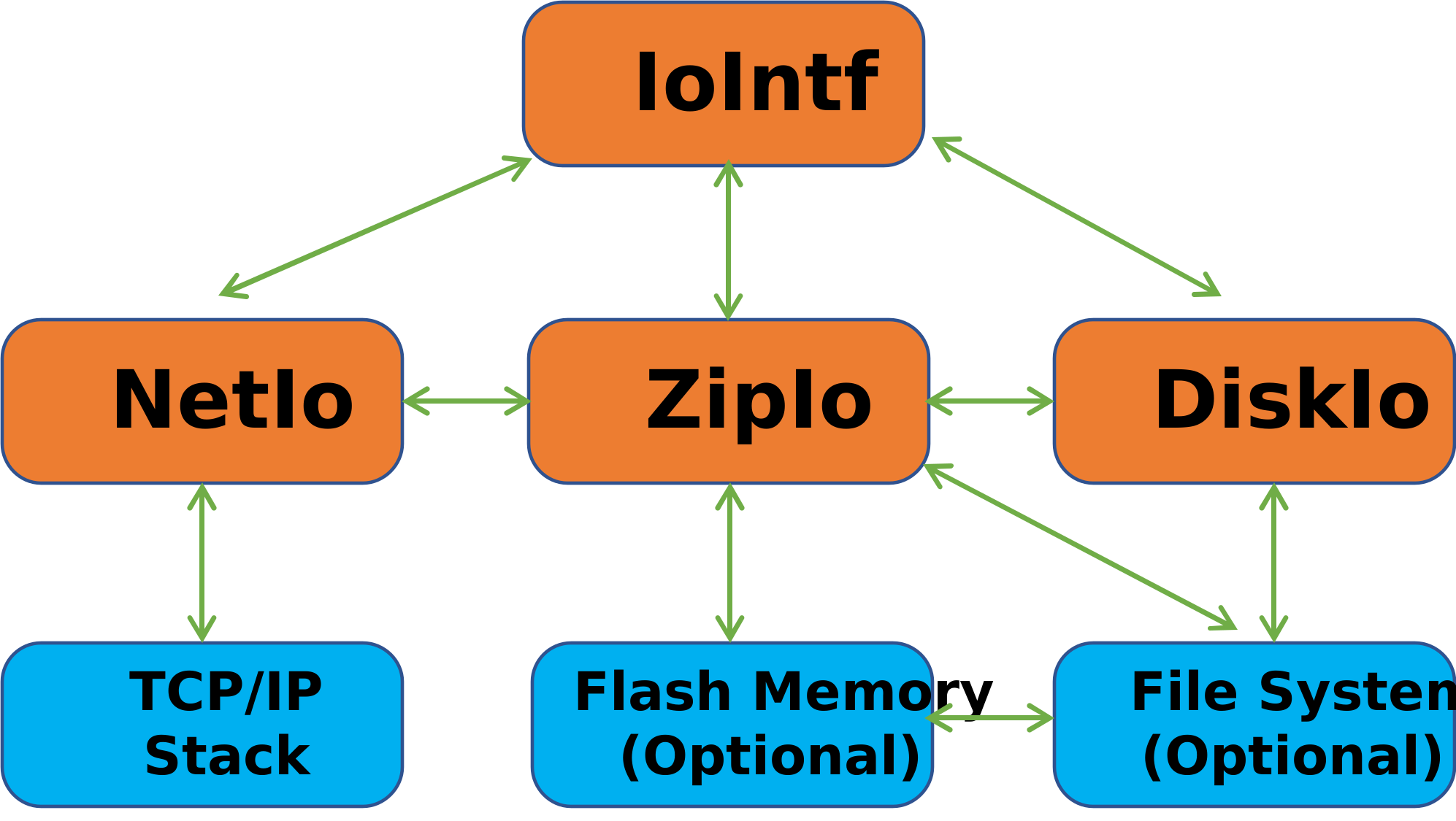
-
The I/O interface provides common functions for working with files stored on different media types, including standard file systems, ZIP files, and network files. The Lua I/O interface connects to the C-side implementation of IoIntf. C startup code initializes these interfaces and makes them accessible to Lua via ba.openio(ioname). New I/O interfaces can be created using ba.mkio(baseio, path).
- DiskIo: Provides an interface to traditional file systems. It requires a porting layer for various embedded file systems, C-side initialization, and installation in the C startup code to enable standard file operations in Lua. Several porting layers are included.
- ZipIo: ZIP files are used as a Read-Only Memory File System (ROMFS), enabling direct access to files within the archive; ideal for embedded systems without a traditional file system. ZIP files can be embedded in the firmware image, stored on a raw flash partition, or placed on a standard file system. This approach is commonly used in production environments to package entire applications. For added security, ZIP files can also be encrypted and digitally signed.
- NetIo: Enables file access over a network, useful during development or in production systems without local storage. It allows embedded systems to simulate or interact with a file system over the network, supporting both client and server setups. The tutorial Using the NetIO explains how to use it.
- Lua IO: Lets you implement custom file system interfaces in Lua; examples include GitHub IO, which makes a GitHub repository behave like a file system, and Crypto IO, which AES-encrypts files at rest.
The I/O interfaces are supported on all environments, from High Level Operating Systems (HLOS) to deep embedded RTOS environments. The standard Lua I/O is also supported on all HLOS, but not RTOS environments. The standard Lua I/O can be accessed by prefixing 'io' with _G. Example: local io = _G.io.
The I/O interfaces are delivered as C code and require compilation, linking, and installation by the C startup code. The Mako Server and Xedge provide examples for setting up these interfaces. ZipIo and NetIo are suitable for embedded systems without a file system, with NetIo for development and ZipIo for deployed applications. See the NetIo Tutorial for how to use the NetIo in an embedded device without a file system during development.
- ba.io()
-
Parameters
None.
Return values
- table interfaces - New table mapping registered names (string keys) to I/O objects (userdata values). Objects are shared with the registry; modifying this table does not change registration.
Throws
No explicit argument errors. Lua allocation failure can throw.
Returns a table with all I/O resources registered by the C/C++ startup code. The C/C++ startup code must call the function balua_iointf() for each I/O that should be available to the Lua code. The key is the I/O name, and the value is the I/O resource. See the I/O Methods for information on the methods supported by the returned objects.
for name,io in pairs(ba.io()) do
   print(name, io:realpath"", io:resourcetype())
   assert(io == ba.openio(name))
end
See the Mako Server's I/O Interfaces for an example of how this function can be used in an assembled server. - ba.openio([ioname])
-
Parameters
- string ioname - Optional registered name; default: "vm". Nil also selects the default.
Return values
- userdata or nil io - Registered I/O object, or nil when the name is not registered.
Throws
Throws if ioname cannot be read as a string. An unknown name returns nil.
Returns a Barracuda I/O object. The I/O object must have been installed by the C startup code by calling function balua_iointf().
Depending on the operating system and I/O type, some I/O objects cannot be used directly with the root folder. The I/O may require a base path. For example, on Windows, the disk drives are virtualized and require a base path such as "/c/". You may consider creating a new I/O by using ba.mkio and provide the required base path instead of having to use a base path for each file you open. As an example, the two following constructions produce the same result on Windows: fp = ba.openio"disk":open"/c/temp/myfile.txt" and fp = ba.mkio(ba.openio"disk", "/c/"):open"/temp/myfile.txt"
C/C++ startup code example:
/* Register the DiskIo as "disk" */
balua_iointf(L, "disk",  (IoIntf*)&diskIo);
Lua code example:
--Open the "disk" I/O interface created by the C startup code:
local diskio = ba.openio("disk")

--Open the "net" I/O interface created by the C startup code:
local netio = ba.openio("net")
- Create an I/O interface with ba.mkio
-
- ba.mkio(baseio, path) - Creates a new I/O interface from a DiskIo or URL, allowing file access on a standard file system.
- ba.mkio(filehandle) - Creates a new I/O interface using an existing Lua file handle for file operations.
- ba.mkio(name) - Creates a new I/O interface from an embedded ZIP file, previously installed with the C function
balua_installZIO.
- ba.mkio()
Queries the ZIP security configuration installed by the C startup code.
Parameters
None.
Return values
- boolean signed - True if a ZIP signature-verification public key is configured.
- boolean password - True if a global binary ZIP password is configured.
Throws
No explicit argument errors in the no-argument form.
- ba.mkio(name)
Creates a ZIP I/O interface for an embedded ZIP reader installed by balua_installZIO.
Parameters
- string name - Required installed ZIP reader name. This is a reader registry name, not a disk filename.
Return values
- userdata or nil io - New ZIP I/O on success; nil on failure.
- string error - Second result on failure, including an unknown reader name, ZIP initialization failure, or configured signature/password setup failure.
Throws
Throws if name cannot be read as a string. Lua allocation failures can throw. Reported ZIP creation failures return nil and an error code.
- ba.mkio(baseio, path)
Parameters
- userdata baseio - Required available BAS I/O object.
- string path - Required directory path or ZIP file path relative to baseio. For a NetIo, an absolute URL may be used. The path is checked before creating the new I/O.
Return values
- userdata or nil io - New I/O interface on success; nil on failure.
- string error - Second return value on failure: code for the reported backend, ZIP, memory, or configured signature/password setup error.
Throws
Throws for an invalid or unavailable baseio, a path that cannot be read as a string, or a Lua allocation failure. Backend path lookup, duplication, and ZIP initialization failures return nil and an error code.
Dynamically create an I/O interface object by opening a directory, a URL, or a ZIP file. The path must be relative to the base I/O. The I/O object returned from this function have the same methods as ba.openio().-
-- Create a new DiskIo instance by using the sub directory "tmp" as -- the base directory for the new I/O: local appsio = ba.mkio(ba.openio("disk"), "tmp/") print("appsio:") for name in appsio:files"/" do print(name) end -- Create a ZipIo by opening a ZIP file in the /home/mako/tutorials/ -- directory: local zio = ba.mkio(ba.openio("disk"), "/home/mako/tutorials/intro.zip") print("\nzio:") for name in zio:files"/" do print(name) end -- Required by the two examples below using https:// ba.openio("net"):netconf{shark=ba.sharkclient()} -- Create a new NetIo by using the URL -- https://tutorial.realtimelogic.com/fs/home/mako/tutorials/ -- as the base path. Note: Requires that a wfs instance is running on -- tutorial.realtimelogic.com/fs/. local netio = ba.mkio(ba.openio("net"), "https://tutorial.realtimelogic.com/fs/home/mako/tutorials/") -- Configure HTTPS on the newly created NetIo as well. netio:netconf{shark=ba.sharkclient()} print("\nnetio:") for name in netio:files"/" do print(name) end -- Mount the ZIP file -- https://tutorial.realtimelogic.com/fs/home/mako/tutorials/opc.zip -- by chaining the NetIo and ZipIo local netzipio = ba.mkio( ba.openio("net"), "https://tutorial.realtimelogic.com/fs/home/mako/tutorials/opc.zip") print("\nnetzipio:") for name in netzipio:files"/" do print(name) end - ba.mkio(filehandle)
Parameters
- userdata filehandle - Required open standard Lua file handle for a ZIP file. Use binary mode. BAS file handles returned by an I/O object are not accepted. Integrated standard Lua I/O support must be compiled into the server.
Return values
- userdata or nil io - New I/O interface on success; nil on failure.
- string error - Second return value on failure: code for the reported backend, ZIP, memory, or configured signature/password setup error.
Throws
Throws for an invalid file-handle type, a build without integrated standard Lua I/O support, or Lua allocation failure. An unusable stream or a reported ZIP initialization failure returns nil and an error code.
The ZIP I/O retains the standard Lua file handle. Keep that handle open while using the ZIP I/O. Closing the ZIP I/O releases its reference but does not close the original file handle.
Dynamically create a ZIP I/O by using a Lua file handle that refers to a valid zip file. You may use file handles opened with io.open() and io.tmpfile(). Zip files opened with io.open() must use the "rb" (read binary) mode. Note: this feature requires a server compiled with integrated Lua I/O support.Example 1:
-- Open using std Lua io
local fp = _G.io.open("my-zip-file.zip","rb")
-- Example: extract from zip file and print file content
local zio = ba.mkio(fp)
local fp = zio:open"my-file-inside-zip-file.txt"
print(fp:read"a")
fp:close()
zio:close()
Example 2:
-- Using online tutorial server, open the intro.zip application local fp = _G.io.open("/home/mako/tutorials/intro.zip","rb") local zio = ba.mkio(fp) -- Open Amazon root cert embedded in ZIP file local fp = zio:open"AmazonRootCA1.pem" print(fp:read"a") fp:close() zio:close()- I/O object methods
-
Barracuda I/O objects have the following methods associated with them:
- io:open(path[, mode)]
-
Parameters
- string path - Required path relative to this I/O interface.
- string mode - Optional; default: "r". Use "r", "w", "a", "w+", or "a+". The selected backend must support the requested mode. "r+" is treated as read-only.
Return values
- userdata or nil file - New file handle on success; nil on failure.
- string error - I/O error code on failure.
- string or nil detail - Backend error description on failure, if available.
- string path - Requested path on failure.
Throws
Throws for an invalid or unavailable I/O receiver or a path that cannot be read as a string. Throws if mode cannot be read as a string or does not start with r, w, or a. Backend open failures use the error returns above.
This function opens a file, in the mode specified in the string mode. In case of success, it returns a new file handle.
The optional mode string can be any of the following "POSIX file" open modes:
- "r": read mode (the default);
- "w": write mode;
- "a": append mode;
- "w+": update mode, all previous data is erased;
- "a+": append update mode, previous data is preserved, writing is only allowed at the end of file.
Note: the DiskIo for most embedded RTOS ports support mode "r" and "w" only. The ZipIo supports mode "r" and the NetIo supports mode "r" and "w".
File handles returned by
io:open()provide these methods:- fh:close()
-
Parameters
None.
Return values
- boolean or nil ok - True on success; nil if the backend close fails.
- string error - Returned only on failure: I/O error code.
- string detail - Returned only on failure: an empty string.
Throws
Throws for an invalid or closed file handle. The handle is marked closed even when the backend reports a close error.
- fh:flush()
-
Parameters
None.
Return values
- boolean or nil ok - True on success; nil on a backend failure.
- string error - I/O error code on failure.
- nil detail - Third return value on failure.
Throws
Throws for an invalid or closed file handle. Backend failures are returned.
- fh:getio()
-
Parameters
None.
Return values
- userdata or nil io - Parent I/O object while the file is open; nil after the file handle has been closed.
Throws
Throws for an invalid file-handle receiver. A closed file handle is accepted.
- fh:read([option, [option...]])
-
Parameters
- integer or string option, ... - Optional read requests, processed in order. A nonnegative integer reads up to that many bytes. "a" or "*a" reads the remainder. No options reads up to LUAL_BUFFERSIZE bytes.
Return values
- string data1, data2, ... - Successful read results. A final empty result is omitted. A single read at EOF, or a single zero-byte request, returns no values; assignment then produces nil.
- nil result - First value on a backend read failure; earlier results from this call are discarded.
- string error - Second value on failure: I/O error code.
- integer code - Third value on failure: numeric backend status.
Throws
Throws for an invalid or closed file handle. Throws for an unsupported format, an option that cannot be read as a string when it is not numeric, or insufficient Lua stack space. The binding does not explicitly reject negative byte counts. Lua allocation failures can throw.
- fh:seek([position])
-
Parameters
- integer position - Optional absolute byte offset; default: 0. Use a nonnegative position representable by the backend file-size type.
Return values
- boolean or nil ok - True on success; nil on a backend failure.
- string error - I/O error code on failure.
- nil detail - Third return value on failure.
Throws
Throws for an invalid or closed file handle. Throws if position cannot be read as a Lua integer. Backend seek failures are returned.
- fh:write(string, ...)
-
Parameters
- string string, ... - Zero or more strings to write in order. Binary strings and Lua numeric-to-string conversion are supported.
Return values
- boolean or nil ok - True on success; nil on a backend failure.
- string error - I/O error code on failure.
- nil detail - Third return value on failure.
Throws
Throws for an invalid or closed file handle. Throws if a value cannot be read as a string. Earlier values may already have been written when a later argument or write fails.
local dio = ba.openio"disk" local fp = dio:open("/tmp/hello.txt", "w") assert(fp,"Should work on online demo server") fp:write"Hello\n" fp:close() fp = dio:open("/tmp/hello.txt", "a+") fp:write"World\n" fp:close() fp = dio:open("/tmp/hello.txt") -- Defaults to "r" - read mode print(fp:read"a") -- Read entire file fp:close() fp = dio:open("/tmp/hello.txt", "r") local a,b,c=fp:read(5, 1, "a") print("a",a) assert(b == "\n") print("c",c) fp:close() - io:resourcetype()
-
Parameters
None.
Return values
- string type - Resource type reported by the backend, such as "disk" or "zip".
- string or nil platform - Backend platform identifier, when supplied.
Throws
Throws for an invalid or unavailable I/O receiver, or if the backend type query fails.
- io.type(object)
-
Parameters
- any object - Required value to inspect. Call with a dot; do not pass the I/O object as an implicit receiver.
Return values
- string or nil kind - "file" for an open BAS file handle, "closed file" for a closed handle, or nil for another value.
Throws
Throws only when the argument is missing. Nil and other non-file values return nil.
- io:files([dirname [,details]])
-
Parameters
- string dirname - Optional directory path; default: ".". Nil selects the default.
- boolean details - Optional; default: false. Any truthy value enables file attributes.
Return values
- function iterator - Function for a generic for loop. Retains its parent I/O object and closes the directory on exhaustion or garbage collection. Do not explicitly close the parent while iterating.
- string name - First result from each iterator call: entry name. Exhaustion returns no values, including subsequent calls.
- boolean isdir - Second iterator result with details enabled: true for a directory.
- integer mtime - Third iterator result with details enabled: last-modified Unix time in seconds.
- integer size - Fourth iterator result with details enabled: file size in bytes.
- string error - Fifth iterator result only if fetching attributes fails; isdir, mtime, and size are then false, 0, and 0.
Throws
Throws for an invalid I/O receiver, an unreadable dirname argument, missing directory support, or failure to open the directory. Directory-read errors end iteration without an error result. Lua allocation failures can throw.
- io:stat(path)
-
Parameters
- string path - Required path relative to this I/O interface.
Return values
- table or nil attributes - Attribute table on success; nil on failure.
- string attributes.name - Requested path.
- integer attributes.mtime - Last-modified Unix time in seconds.
- integer attributes.size - File size in bytes.
- boolean attributes.isdir - True for a directory.
- string attributes.type - "directory" or "regular".
- string error - Second return value on failure: I/O error code.
- nil detail - Third return value on failure.
- string path - Fourth return value on failure: requested path.
Throws
Throws for an invalid or unavailable I/O receiver or a path that cannot be read as a string. Throws if the backend has no stat function. Missing paths and other backend failures use the error returns.
- io:realpath(path)
-
Parameters
- string path - Required path relative to this I/O interface.
Return values
- string absolute - Absolute backend path on success. Returns no values when unavailable or unsuccessful; assignment then produces nil.
Throws
Throws for an invalid or unavailable I/O receiver or a path that cannot be read as a string. Unavailable paths return no values.
- io:mkdir(path)
-
Creates a directory.
Parameters
- string path - Required path relative to this I/O interface.
Return values
- boolean or nil ok - True on success; nil on failure.
- string error - Error code returned only on failure.
- string or nil detail - Backend error description, if supplied; returned only on failure.
- string path - Affected path, returned only on failure.
Throws
Throws for an invalid or unavailable I/O receiver or a path that cannot be read as a string. Throws if the backend has no implementation of this operation. Backend failures use the error returns.
- io:rmdir(path)
-
Removes a directory.
Parameters
- string path - Required path relative to this I/O interface.
Return values
- boolean or nil ok - True on success; nil on failure.
- string error - Error code returned only on failure.
- string or nil detail - Backend error description, if supplied; returned only on failure.
- string path - Affected path, returned only on failure.
Throws
Throws for an invalid or unavailable I/O receiver or a path that cannot be read as a string. Throws if the backend has no implementation of this operation. Backend failures use the error returns.
- io:remove(path)
-
Removes a file.
Parameters
- string path - Required path relative to this I/O interface.
Return values
- boolean or nil ok - True on success; nil on failure.
- string error - Error code returned only on failure.
- string or nil detail - Backend error description, if supplied; returned only on failure.
- string path - Affected path, returned only on failure.
Throws
Throws for an invalid or unavailable I/O receiver or a path that cannot be read as a string. Throws if the backend has no implementation of this operation. Backend failures use the error returns.
- io:rename(oldpath, newpath)
-
Renames a file or directory.
Parameters
- string oldpath - Required source path.
- string newpath - Required destination path.
Return values
- boolean or nil ok - True on success; nil on failure.
- string error - Error code returned only on failure.
- string or nil detail - Backend error description, if supplied; returned only on failure.
- string path - Original source path, returned only on failure.
Throws
Throws for an invalid or unavailable I/O receiver or a path that cannot be read as a string. Throws if newpath cannot be read as a string or the backend has no rename implementation. Backend failures use the error returns.
- io:loadfile(path [,_ENV])
-
Parameters
- string path - Required path relative to this I/O interface.
- table _ENV - Optional environment assigned to the loaded chunk's first upvalue. Omit to use the default environment; explicit nil is not accepted.
Return values
- function or nil chunk - Compiled chunk on success, not executed; nil on failure.
- string error - Load, compilation, or environment-assignment error message, returned only on failure.
Throws
Throws for an invalid or unavailable I/O receiver or a path that cannot be read as a string. Throws if a supplied _ENV is not a table. Loading and compilation failures use the error returns.
- io:dofile(path [,env])
-
Parameters
- string path - Required path relative to this I/O interface.
- table env - Optional environment assigned to the chunk's first upvalue. Explicit nil is not accepted.
Return values
- any result1, result2, ... - All values returned by the executed chunk, including no values when it returns none.
Throws
Throws for an invalid or unavailable I/O receiver or a path that cannot be read as a string. Throws if a supplied env is not a table, loading or compilation fails, environment assignment fails, or execution of the chunk raises an error.
-
- Extended methods
- The extended methods provide additional features for the I/O interfaces. Additional features are provided by the I/O interfaces by calling the C/C++ side I/O interface property function. The following Lua bindings are wrappers for calling the underlying C side property function. Support and failure behavior depend on the backend and the method; see each method's return values and Throws section.
- DiskIo
-
- io:hide(path [,action])
-
Sets or clears the hidden-file attribute on backends that support it.
Parameters
- string path - Required path relative to this I/O interface.
- integer action - Optional; default: 1. Zero clears the hidden attribute; a nonzero integer sets it. Boolean arguments are not accepted.
Return values
- boolean ok - True if the backend property operation succeeds; false on failure or if unsupported.
Throws
Throws for an invalid or unavailable I/O receiver or a path that cannot be read as a string. Throws if action cannot be read as a Lua integer.
- ZipIo
-
- io:setpasswd(password [,binpwd [, pwdrequired]])
-
Sets the password for accessing a ZIP file that was opened using ba.openio or created with ba.mkio, provided the ZIP file is password-protected. The Barracuda platform only supports ZIP files encrypted with AES.
In addition to setting a password for individual ZIP files, you can apply a password to all loaded ZIP files globally when compiling the C code. This method allows embedding an obfuscated password that automatically applies to all ZIP files. See Signed and Encrypted ZIP files for more details. You can still set a password for specific files, which will override the globally applied password.
Parameters
- string password - Required password bytes. Keep the length within 65535 bytes; the binding converts the length to an unsigned 16-bit value.
- boolean binpwd - Optional; default: false. True selects the BAS binary ZIP password format.
- boolean pwdrequired - Optional; default: false. True requires password protection on files within the ZIP.
See binpwd2str for the binary password format.
Return values
- boolean ok - True if both password-property operations succeed; false if either operation fails or is unsupported. This does not by itself verify that the password can decrypt a file.
Throws
Throws for an invalid or unavailable I/O receiver or a password that cannot be read as a string. If setting the password succeeds, supplied non-nil options must be booleans; invalid options then throw. The password is set before those options are checked.
- io:encrypted(filename)
-
Parameters
- string filename - Required path within the I/O interface.
Return values
- boolean or nil encrypted - True if encrypted, false if not encrypted, or nil if the property query fails.
- string error - I/O error code returned only on failure, including a missing file.
Throws
Throws for an invalid or unavailable I/O receiver or a path that cannot be read as a string.
- io:close()
-
Parameters
None.
Return values
None.
Throws
Throws for an invalid or unavailable I/O receiver, a statically registered I/O, an unsupported close operation, or a backend close failure.
Close a dynamically created ZipIo, i.e., a ZipIo created with function ba.mkio(). The ZipIo can no longer be used after you callio:close().
A dynamically created ZipIo keeps the ZIP file open until the garbage collector collects the I/O or until you explicitly callio:close(). This function is designed for operating systems such as Windows and CE that lock open files. The file cannot be deleted from the file system before it is closed. Explicitly callingio:close()makes it possible to delete the ZIP file from the file system without waiting for the garbage collector to collect the dynamically created ZipIo.
- NetIo
-
The NetIo is similar to a network file system and makes it possible for the server to access resources on another Barracuda server. NetIo is typically used during development and is often required when developing Lua code on an embedded device with no native file system support. See the NetIo Tutorial for details on using the NetIo client and server to set up a network file system.
Note that you may get severe performance degradation when using the NetIo since the NetIo generates multiple requests for each resource fetched. The NetIo speed is directly proportional to the speed of the TCP/IP stack being used in the embedded system. The faster the TCP/IP stack, the faster the NetIo will respond. The following diagram illustrates a page request using the NetIo:
Browser        Embedded System         Web File Server
  |                   |                       |
  |    get page       |                       |
  | --------------->  |                       |
  |                   |  stat (file exists?)  |
  |                   | --------------------> |
  |                   |         yes           |
  |                   | <-------------------  |
  |                   |                       |
  |                   |   get fragment 1      |
  |                   | --------------------> |
  |                   |    fragment 1         |
  |     response      | <-------------------  |
  | <---------------  |                       |
  |                   |                       |
  |                   |   get fragment 2      |
  |                   | --------------------> |
  |                   |    fragment 2         |
  |     response      | <-------------------  |
  | <---------------  |                       |
  |                   |                       |
  |                   |                       |
Figure 6: Browser to Device to WFS Sequence Diagram
- io:netconf({options})
-
Configure a NetIo.
A NetIo is typically created and installed in an uninitialized state by the C/C++ startup code. Method
io:netconf()lets you configure either the NetIo installed by the C/C++ startup code or a NetIo clone created with ba.mkio(). See the NetIo C documentation for more information.Parameters
- table options - Required configuration table. Every field is optional.
- string options.user - Destination username. Omit to retain existing credentials.
- string options.pass - Destination password, applied only with user. Defaults to an empty string when user is supplied.
- string options.proxy - Proxy server address. Omit to retain the existing proxy setting.
- number options.proxyport - Proxy port, converted to an unsigned 16-bit value. Use 1 through 65535. Default: 1080 if this call supplies socks=true; otherwise 8080. Applied only with proxy.
- boolean options.socks - True selects SOCKS5; false selects HTTP CONNECT. Omission or a non-boolean value retains the existing mode. New NetIo objects initially use HTTP CONNECT.
- string options.proxyuser - Proxy username. Omit to retain existing proxy credentials.
- string options.proxypass - Proxy password, applied only with proxyuser. Defaults to an empty string when proxyuser is supplied.
- string options.intf - Local interface name or IP address. Omit to retain the existing binding; a new NetIo has no specific interface binding.
- boolean options.ipv6 - True requests IPv6 address translation; false clears the option. Omission or a non-boolean value retains the setting. Requires platform IPv6 support.
- userdata options.shark - Client-role SharkSSL object for HTTPS. Omission or a non-userdata value leaves the current setting unchanged. Ignored when the SharkSSL Lua support is unavailable.
Return values
- boolean or nil ok - True when the checked configuration operations succeed; nil on a reported backend failure. This does not establish a connection or verify credentials.
- string error - Second return value on a reported backend failure: I/O error code.
Throws
Throws for an invalid or unavailable I/O receiver, a non-table options argument, unreadable string fields, or an invalid proxyport type when it is checked. A supplied SharkSSL userdata must have the correct type and client role. A checked backend operation returning "not implemented" throws "Not a NetIo object". Errors from options-table metamethods can propagate.
Configuration is applied in stages. Earlier changes remain if a later option fails; the call does not roll them back. A rejected SharkSSL property update releases the newly acquired reference and follows the same error handling as other property updates.
Configure the source NetIo before calling ba.mkio(netio, URL) when accessing the URL requires credentials, a proxy, or HTTPS. The two-argument constructor verifies the path. A new NetIo clone does not retain the source object's SharkSSL configuration; configure shark on the clone before using HTTPS through it.
Always supply a path or URL with a base I/O object. ba.mkio(netio) is not a supported clone form, and ba.mkio() is the ZIP security query described above.
- Error codes
-
Methods in the I/O object return nil and three error codes if a method call fails.
Error codes returned:- Error Type (short string).
- Descriptive error message.
- Optional error message that may be returned by the native file system.
The error type can be any of the following:
- ba.mallinfo()
Reports memory statistics when the BAS build uses the bundled dlmalloc allocator, includes mallinfo support, and registers this function.
Parameters
None. Additional arguments are ignored.
Return values
- table statistics - A new table containing the integer fields below.
- integer size - Total bytes in the memory region supplied to init_dlmalloc at startup.
- integer ordblks - Number of free chunks, including the top chunk once the allocator is initialized.
- integer usmblks - Maximum allocator footprint in bytes: the most memory obtained from the backing region so far. This is not the peak size of live application allocations.
- integer uordblks - Current allocator footprint minus free-chunk bytes. Includes allocator overhead; not just application payload bytes.
- integer fordblks - Bytes in free chunks within the current allocator footprint. Does not include backing-region space the allocator has not yet obtained.
- integer keepcost - Bytes in the top free chunk. This Lua API does not provide a heap-trimming operation.
The binding converts native counters to Lua integers without checking for narrowing. Statistics are sampled before allocating the result table.
Throws
Lua allocation failure while constructing the result can throw. The binding performs no argument checks and does not return nil and an error string.
local fmt=string.format
-- Inspect the configured heap and allocator footprint.
local m=ba.mallinfo()
print(fmt("\nTotal memory: %d bytes",m.size))
print(fmt("Peak footprint:	   %d bytes",m.usmblks))
print(fmt("Used:	   %d%% (%d bytes)", m.uordblks*100//m.size, m.uordblks))
print(fmt("Free:	   %d%% (%d bytes)",(m.size-m.uordblks)*100//m.size, m.size-m.uordblks))
- ba.encdate(time)
-
Parameters
- integer time - Required Unix time in seconds, converted to the platform BaTime type.
Return values
- string date - HTTP date text in GMT.
Throws
Throws if the required argument cannot be read as a Lua integer.
Encodes time in a format suitable for an HTTP response.-- Prints: Thu, 01 Jan 1970 00:00:00 GMT print(ba.encdate(0)) -- Prints 1000 print(ba.parsedate(ba.encdate(1000)))
- ba.parsedate(string)
-
Parameters
- string string - Required HTTP date text.
Return values
- integer seconds - Unix time in seconds. A parse failure returns 0, which is also the value for the Unix epoch; there is no separate error result.
Throws
Throws if the required argument cannot be read as a Lua string. Unrecognized date text returns 0.
Parses the date string and returns the number of seconds since 1970-01-01 00:00:00 GMT. This function is designed for parsing the HTTP date header and is used by several library functions such as http:stat().-- Prints the number 0 print(ba.parsedate"Thu, 1 Jan 1970 00:00:00 GMT") -- Prints: 2001-09-11T18:00:00Z print(ba.datetime(ba.parsedate"Tue, 11 Sep 2001 18:00:00 GMT"))
- ba.parselsp(string[,embed])
-
Parameters
- string string - Required LSP source text.
- boolean embed - Optional; default: false. True omits the standalone page startup code.
Return values
- string source - Generated Lua source on success; use load to compile it.
- nil, string source, error - Preprocessing failure.
Throws
Throws if the required argument cannot be read as a Lua string. Throws if embed is supplied and is neither boolean nor nil. LSP preprocessing errors are returned as nil and a message.
Parses and returns the Lua Server Page as a Lua chunk. The returned string can for example be loaded by function load().
The default is to parse the LSP page as a standalone page, unless embed is set to true. The LSP page expects the following arguments when compiled as a standalone page: page(_ENV,pathname,io,page,app), where _ENV is the command environment, pathname is typically derived from a directory functions relative path. The arguments io,page, and app are the LSP page's I/O object, page table, and application table.
See the tutorial How to Build an Interactive Dashboard App for a practical example of how to use function ba.parselsp()
Function parselsp can for example be used as an alternative to response:include(). The following example shows how to use parselsp in one LSP page to include another LSP page.
<?lsp local fp,err=io:open"mypage.lsp" if fp then local data data,err = fp:read"a" fp:close() if data then -- Convert LSP to Lua data,err = ba.parselsp(data) if data then local func -- Compile Lua code func,err = load(data,"mypage.lsp","t",_ENV) if func then local ok -- Let child use our: _ENV,io,page,app ok,err = pcall(func,_ENV,"mypage.lsp",io,page,app) end end end end ?> - ba.rndseed(seed)
-
Adds seed data to the SharkSSL random generator used by the random-data and AES functions.
Parameters
- number or string seed - Required. A number is converted to a Lua integer and then to one unsigned 32-bit seed word. Numeric strings follow the numeric path. Other strings supply up to the first 1016 bytes, including embedded zero bytes, grouped into four-byte words. A final partial word is padded with zero bytes. An empty string adds no seed data.
Return values
None.
Throws
Throws if seed is neither numeric nor readable as a string. The binding does not explicitly check the numeric range or the seed function's return status.
The following example connects to the Randomness Beacons project at NIST, downloads the data, and compacts the downloaded data using HMAC SHA512. The binary SHA512 string (64 bytes long) is then used as seed value.
ba.thread.run(function() -- Run the blocking HTTP request in a separate thread -- Create an HTTP object local http=require"httpc".create() local ok,err=http:request{ trusted=true, url="https://beacon.nist.gov/beacon/2.0/pulse/last", } if ok and http:status() == 200 then local rnddata=http:read"*a" -- Read all random data rnddata=ba.crypto.hash("hmac","sha512",ba.clock())(rnddata)(true,"binary") ba.rndseed(rnddata) -- 512 bit compacted value (16 32bit words) end -- Seed using millisec clock. -- The HTTP response time creates a random delay. ba.rndseed(ba.clock()) -- Number end) - ba.rnd([ [low ,] high])
-
Returns a random integer within an inclusive interval. With no arguments, or with a single argument of 0, the interval is 0 through math.maxinteger. This provides 63 random bits.
Parameters
- integer low - Lower bound, supplied only in the two-argument form. Must be less than or equal to high. Negative bounds are supported.
- integer high - Upper bound. With one argument, a positive high selects 0 through high, and 0 selects 0 through math.maxinteger. With two arguments, selects low through high, including when high is 0. With no arguments, defaults to math.maxinteger.
Bounds must be convertible to Lua integers. BAS floors fractional numeric arguments during this conversion.
Return values
- integer value - Random value in the selected interval, including either endpoint. Range selection avoids modulo bias. The two-argument form supports the full interval from math.mininteger through math.maxinteger.
Throws
Throws for more than two arguments, bounds that cannot be converted to Lua integers, a negative single upper bound, or low greater than high. Also throws "random generator failed" if the random generator reports failure or all 64 attempts are rejected during range selection.
local value = ba.rnd() -- 0 through math.maxinteger
local bits31 = ba.rnd(0x7fffffff) -- Explicit 31-bit range
local die = ba.rnd(1, 6) -- 1 through 6
- ba.rnds(size)
-
Generates a random integer containing up to size bytes of random bits.
Parameters
- integer size - Required byte count, 1 through 8.
Return values
- integer value - Sizes 1 through 7 return 0 through 2^(8*size)-1. Size 8 uses all 64 bits and can return a negative integer because Lua integers are signed. After conversion to a C int, sizes outside 1 through 8 return 0.
Throws
Throws if size cannot be read as a Lua integer or the random generator reports failure. The binding does not reject an out-of-range size.
- ba.rndbs(size)
-
Returns a string of random bytes.
Parameters
- integer size - Required byte count, 1 through 65535. BAS floors fractional numeric arguments before checking this range.
Return values
- string data - Exactly size random bytes. This is binary data and may contain zero bytes.
Throws
Throws if size cannot be read as a Lua integer, is outside 1 through 65535 after conversion, or the random generator reports failure. Lua allocation failure can also throw.
- ba.session(args)
Find an existing session by numeric ID, reference string, or session URL. Only the numeric-ID form can be used without a request object. Missing or invalid session references return false; these calls do not create new sessions.
- ba.session(session-number)
Parameters
- integer session-number - ID from session:id() or ba.sessions(). The binding converts the value to an unsigned 32-bit integer; missing or unconvertible values become 0.
Return values
- userdata or boolean session - Session object when found; otherwise false.
Throws
The numeric-ID form does not explicitly validate argument types. An unknown ID returns false.
- ba.session(session-ref, request [,create])
Parameters
- string session-ref - Required 24-character session reference.
- userdata request - Required active request object.
- boolean create - Optional; default: false. True attaches the found session if the request has no session. If the request already has one, that attached session is returned instead. This does not create a session.
Return values
- userdata or boolean session - Session object on success; false if lookup or peer-address validation fails.
Throws
Throws for an invalid or expired request object, or a supplied create value that is neither boolean nor nil. Lookup failure returns false.
- ba.session(request, relpath [,create])
Parameters
- userdata request - Required active request object.
- string relpath - Required relative URL path starting with the 24-character session reference, optionally followed by a slash and remaining path.
- boolean create - Optional; default: false. Attaches the session to the request as described in the preceding form.
Return values
- userdata or boolean session - Session object on success; otherwise false.
- string path - Returned only on success: the path after the session reference and slash. An exact reference with no following path returns an empty string.
Throws
Throws for an invalid or expired request object, a relpath that cannot be read as a string, or an invalid create type when a reference lookup is attempted. A missing session returns false without a second result.
See request:session() for cookie-based session management and the Web File Server for session URL usage.
local s = request:session(true)
local id = s:id() -- Returns a number suitable for local server use
assert(id == ba.session(id):id())
- ba.sessions([username])
Parameters
- string username - Optional authenticated user name. Omit to list all active sessions. Explicit nil is not accepted.
Return values
- table ids - Sequence of integer session IDs. With username, lists that authenticated user’s sessions; otherwise lists all active server sessions. Empty when none match.
Throws
Throws if username is supplied but cannot be read as a Lua string. A user with no active sessions produces an empty table.
- ba.sleep(milliseconds)
-
Parameters
- number milliseconds - Required delay in milliseconds. Use a nonnegative value representable as an unsigned 32-bit integer; fractional values are truncated by the C conversion.
Return values
None.
Throws
Throws if milliseconds cannot be read as a Lua number. The binding does not explicitly check the sign or range.
Pauses the execution of the current request or thread for the specified duration in milliseconds. The pause may allow other Barracuda threads to run, potentially resulting in a longer pause than specified. Calling ba.sleep(0) allows other pending Barracuda threads to execute, effectively acting as a yield operation.
Note: Given that BAS operates largely on an event-driven model use this function sparingly, ideally within the context of an LSP page or when running in ba.thread.run(). Refer to the threading documentation for more information on how this function interacts with Barracuda threads.
- ba.seterrh([handler])
-
Parameters
- function or nil handler - Optional callback; omitted or nil removes the installed callback. Otherwise replaces it.
Return values
- function previous - Previously installed handler, if any. Returns no values when none was installed.
Throws
Throws if handler is supplied and is neither a function nor nil. The previous handler is removed before this check, so a bad argument also removes it.
Install a Lua error handler. The error handler is called if a Lua script causes an exception. The callback function's first argument is the error message. The callback function receives the ephemeral _ENV as a second argument if an LSP page produced the error. Function ba.seterrh() returns the previously installed error handler, if any.
- handler(message [,env])
-
Called when BAS reports a Lua error through the installed handler.
Parameters
- string message - Error text, including the BAS error context when available.
- table env - The request's ephemeral environment when the error has an associated LSP command environment. Otherwise this argument is absent.
Return values
None required. BAS discards the callback's results.
Throws
If the callback raises an error, BAS catches and logs it. The error does not escape this callback invocation.
An error handler could for example be installed in a deployed system and send the error message by using the SMTP library. Another possibility is to upload the error message to an online database by using the HTTPS client library. Note: All errors are sent to the Barracuda HttpTrace library, thus a Lua error handler is typically not needed during debugging.
See also Mako Server's logerr option and Xedge's SMTP settings.
- ba.timer(callbackFn)
Parameters
- function callbackFn - Required timer callback. Receives no arguments and runs in its own Lua coroutine.
Return values
- userdata timer - A new, inactive timer object. Call set() to schedule it. Keep a Lua reference or request automatic referencing with set().
Throws
Throws if callbackFn is not a function. Lua allocation failure can also throw. The constructor does not invoke the callback or schedule an event.
Callback results
- boolean or other Lua value continue - Only a last returned or yielded value of boolean true requests another tick. False, another type, or no values stops the timer. Returning true calls the function again next time; yielding true resumes the suspended coroutine next time. No arguments are supplied on resume.
Function
ba.timerschedules tasks to run after a specified time. It can either call a function once (one-shot timer) or repeatedly at set intervals (interval timer). When creating a timer, the timer callback determines when to stop. If the callback returns true, the timer repeats. If it returns false or nothing, the timer stops and cancels itself automatically. You can easily create specialized timers that run for a while and then stop by returning false. In addition, the timer function can operate as a Lua coroutine, stay in a forever loop, and use coroutine.yield(true) to pause and wait for the next timer tick.The
ba.timerfunction returns an object with three methods:set,reset,andcancel.These methods control the timer's state, which can be active or inactive. Initially, the timer is inactive and needs to be activated withset.Theresetandcancelmethods work on an active timer, whilesetis used to activate or reactivate an inactive timer.Keep in mind that the timer object, like all Lua objects, can be collected by the Lua garbage collector if no references are held. You might be tempted to immediately call the
setmethod on the returned object like this:ba.timer(function() trace(ba.datetime"NOW") end):set(5000)
However, this might get garbage collected before the timer runs. To prevent this, keep a reference to the timer object:
timer = ba.timer(function() trace(ba.datetime"NOW") end)
timer:set(5000)
Alternatively, the
setmethod has a parameter that enables automatic referencing, allowing the first example to work if you include the reference option.The
ba.timerfunction allows for creating advanced timer logic. However, if you're looking for a simpler approach similar to the JavaScript timer API, check out our JavaScript-like timer wrapper API. This wrapper offers a familiar interface, closely mirroring JavaScript's timer functionalities, making it easier for users accustomed to JavaScript to manage timers. For those also using the C/C++ API, it's helpful to know that the Lua timer logic internally utilizes the functionality of the C/C++ Barracuda timer class.The timer object methods:
- timer:set(millisecs [,reference [,immediately]])
Parameters
- integer millisecs - Required whole-number interval from 0 through 4294967295 milliseconds. Integral numeric strings are accepted. Zero schedules the next timer tick; it does not disable the timer. Timing is subject to the native timer tick and callback execution time.
- boolean reference - Optional, default false. Only boolean true retains an automatic reference while scheduled. Other values are treated as false.
- boolean immediately - Optional, default false. Only boolean true invokes the callback synchronously during set(), before scheduling. The callback must return or yield true to schedule a later tick.
Return values
- boolean or nil ok - True if the native event was scheduled. False if an immediate callback did not request another tick, including when that callback failed. Nil if native scheduling failed. No error string or code accompanies nil.
Throws
Throws for an invalid timer object or a saved callback error. A callback error is logged and its message is saved when memory is available; later control calls raise that message. Create a new timer to recover from a saved callback error.
An invalid millisecs argument, including a fractional, negative, non-finite, or out-of-range number, also throws. Argument validation occurs before cancelling an existing event or invoking an immediate callback. Otherwise set() cancels the previous event first; a failed scheduling attempt leaves the timer inactive.
Activates an inactive timer object. If the timer is active, the timer is cancelled and then activated. The timer callback function is activated in "millisecs" time unless method "reset" or "cancel" is called before the timer triggers.- Integer millisecs - the timer or interval time.
- Boolean reference - the timer will be automatically referenced if this argument is set to true. The reference will be maintained until the timer is cancelled by calling function set or cancel, or when the timer function stops the timer. Without the auto reference, a global reference maintained by the Lua code creating the timer would have been required. Setting this argument to true is also convenient for creating a self referencing "one-shot timer" as shown in the following example:
ba.timer(function() trace(ba.datetime"NOW") end):set(5000,true)
- boolean immediately - the timer function is run immediately if the third argument is set to true. Running the timer function immediately is sometimes useful when running the timer function in interval mode and as a coroutine. The timer function can be used in a similar manner to how one creates a thread, i.e., the thread function is called and then enters a forever loop.
ba.timer(function()
  -- This code runs immediately when 'set' is called
  local starttime = ba.datetime"NOW"
  for i = 1, 10 do
     coroutine.yield(true) -- Wait for the next timer tick
     trace("This coroutine timer has run for: ",
           ba.datetime"NOW" - starttime, "picoseconds")
  end
  trace("Exiting timer coroutine")
end):set(1000, true, true)
- timer:reset(millisecs)
Reschedules an active timer using the new interval, measured from this call. Does not invoke the callback immediately.
Parameters
- integer millisecs - Required whole-number interval from 0 through 4294967295 milliseconds. Integral numeric strings are accepted. Zero schedules the next timer tick; it does not disable the timer. Timing is subject to the native timer tick and callback execution time.
Return values
- boolean or nil ok - True on successful reset. Nil if inactive or native reset failed. A failed native reset leaves the timer inactive and releases its automatic reference.
- string or nil error - "inactive" when the timer was not active, including after cancellation or normal completion. No error description is returned for a native reset failure.
Throws
Throws for an invalid timer object or a saved callback error. A callback error is logged and its message is saved when memory is available; later control calls raise that message. Create a new timer to recover from a saved callback error.
Invalid millisecs, including a fractional, negative, non-finite, or out-of-range number, throws only when the timer is active and leaves its existing event unchanged; an inactive timer returns nil,"inactive" without checking that argument. A saved callback error still throws.
- timer:cancel()
Cancels the scheduled event and releases its automatic reference. The timer can be scheduled again with set() unless it has a saved callback error.
Parameters
None.
Return values
- boolean or nil ok - True if the native event was cancelled. Nil if there was no active event or native cancellation failed. No error description is returned.
Throws
Throws for an invalid timer object or a saved callback error. A callback error is logged and its message is saved when memory is available; later control calls raise that message. Create a new timer to recover from a saved callback error.
- Timer callback
- The timer callback function is run as a "one-shot timer" if the timer callback function does not return a value or if the function returns false. The timer is automatically re-activated with the previous timeout value if the function returns true.
-
-- One-shot timer example:
local function timeout()
  -- do something
end
-- Create a timer. The timer object 't' is referenced in the _ENV table.
t = ba.timer(timeout)
-- Set the timeout to one second.
t:set(1000)
-- Interval timer that never stops.
local function timeout()
  -- do something
  return true
end
-- Create a self referencing interval timer
ba.timer(timeout):set(1000,true)
As an optional feature, the timer callback function can be run as a Lua coroutine. In coroutine mode, the timer callback is run as an interval timer.
The following example illustrates how the timer callback function can be run in coroutine mode. The timer saves the counter variable "i" on the stack. The variable is re-used when the timer function is reactivated. The timer is activated a total of five times before the timer exits.
local function timeout()
   for i=1,5 do
      trace("Interval", i)
      coroutine.yield(true)
   end
   trace("Stop interval")
   coroutine.yield(false)
end

-- Create a self referencing interval timer and start the coroutine immediately.
ba.timer(timeout):set(1000,true,true)
A timer callback function in coroutine mode cannot be re-used when the function calls coroutine.yield(false). However, the function can call timer:cancel(), or timer:reset() to either temporarily cancel an active timer or to change the interval time.
Timer Examples
This example demonstrates how to create a coroutine timer in an LSP page that can be started, canceled, and reset. The timer is initialized on the first LSP invocation, and subsequent LSP calls reset the timer. You can toggle the cancel/set state using the URL argument ?cancel=. Notice that the printouts follow the pattern A->B->A->B, regardless of how the timer is managed (set, canceled, or reset).
<?lsp
response:setcontenttype"text/plain"
if page.t then -- If timer saved in LSP's persistent page table.
   if request:data"cancel" then
      if page.cancel then
         trace("set: 2000")
         page.cancel=false
         page.t:set(2000)
      else
         trace("cancel")
         page.cancel=true
         page.t:cancel()
      end
   else
      trace("reset: 1000")
      page.t:reset(1000)
   end
else -- First LSP invocation
   -- Create timer
   local function run()
      trace"--- start ---"
      while true do
         trace"A"
         coroutine.yield(true) -- Wait for the next timer tick
         trace"B"
         coroutine.yield(true) -- Wait for the next timer tick
      end
   end
   page.t=ba.timer(run)
   page.t:set(500)
end
?>
See console for trace data.
The example below illustrates how a wrapper for the timer can be designed to create an API compatible with the JavaScript timer API. Notice the prefixing of _G before the three function names. This specific usage ensures that the functions are declared within the global environment, making them accessible in a manner akin to JavaScript's global scope.
-- setTimeout(callback, delay) -- Schedules a function to be executed once after a specified delay. -- callback: function - The function to be executed after the delay. -- delay: number - The time in milliseconds after which the callback -- function should be executed. -- returns a handle - A unique identifier for the timeout. function _G.setTimeout(callback, delay) local t = ba.timer(function() callback() return false end) t:set(delay,true) return t end -- setInterval(callback, interval) -- Schedules a function to be executed repeatedly at specified intervals. -- callback: function - The function to be executed at each interval. -- interval: number - The time in milliseconds between each execution -- of the callback. -- returns a handle - A unique identifier for the timeout. function _G.setInterval(callback, interval) local t = ba.timer(function() callback() return true end) t:set(interval,true) return t end -- clearTimer(timer) -- Cancels a timeout or interval set by setTimeout or setInterval. -- timer: handle - The identifier of the timeout or interval to clear. function _G.clearTimer(timer) timer:cancel() end -- Example code setTimeout(function() trace"One shot timer" end, 100) local timerHandle = setInterval(function() trace"interval" end, 300) setTimeout(function() trace"Canceling interval" clearTimer(timerHandle) end, 1000) setTimeout(function() for ix=1,5 do trace("Coroutine timer", ix) coroutine.yield(true) end trace"Done" end, 1500)- ba.tracker
- A table of functions for accessing the data provided by the default client login tracker. A login tracker can be associated with an authenticator as an optional security enhancement. See introduction to authentication for more information. The table is not installed unless the C startup code has activated the default tracker by calling function balua_usertracker_create().
- ba.tracker.successful()
Returns the retained successful-login records, oldest first. The default tracker retains at most 50 records; these are login events, not a list of currently authenticated users.
Parameters
None.
Return values
- table records - Array of record tables; empty if no successful logins are retained.
- string records[i].name - Login user name, or "?" if unavailable.
- integer records[i].time - Unix timestamp in seconds for the recorded login.
- string records[i].addr - Client IP address; empty if address conversion fails.
Throws
Throws if the default tracker is unavailable or Lua allocation fails.
- ba.tracker.attempted()
Returns a snapshot of the failed-login tracker cache.
Parameters
None.
Return values
- table records - Array of cache-record tables; empty if the cache is empty.
- string records[i].name - Most recently stored attempted user name for this entry, or "?" if unavailable.
- integer records[i].time - Tracker timestamp in Unix seconds.
- string records[i].addr - Client IP address; empty if address conversion fails.
- integer records[i].counter - Total login-attempt counter for the cache entry.
- integer records[i].aux - Tracker baseline counter. counter minus aux gives the count used for the current ban threshold.
Throws
Throws if the default tracker is unavailable or Lua allocation fails.
- ba.tracker.clearcache()
Removes failed-login cache entries. It does not clear the separate successful-login history.
Parameters
None.
Return values
- boolean ok - Always true after clearing the cache.
Throws
Throws if the default tracker is unavailable or Lua allocation fails.
- ba.tracker.setlogh([callback])
Replaces the login-notification callback. Call with no arguments to remove it.
Parameters
- function callback - Optional callback, retained until replaced, removed, or disabled after an error. To remove the callback, omit the argument; explicit nil is invalid.
Return values
None.
Throws
Throws if the tracker is unavailable or a supplied callback is not a function. The previous callback is removed before the new argument is validated, so an invalid argument also removes the previous callback. Lua allocation can throw.
- callback(successful, name, addr, _ENV)
Called by the tracker after a successful login or a reported failed login with a user name.
Parameters
- boolean successful - True for a successful login, false for a failed login.
- string name - User name for the attempt; "?" if unavailable.
- string addr - Client IP address; empty if address conversion fails.
- table _ENV - Current command environment. Always supplied by this binding.
Return values
None.
Throws
Callback errors are caught by the request error handler. The tracker then unregisters the callback, so it receives no further notifications until setlogh() installs another callback.
- ba.users()
-
Parameters
None.
Return values
- table usernames - Sequence of strings naming authenticated users currently represented in the server. Empty if none are present.
Throws
No argument-validation errors or operational errors are raised by this binding.
Returns an array with the name(s) of the current active user(s).The following example terminates all sessions:
-- Iterate all authenticated users for _,name in ipairs(ba.users()) do -- Iterate all sessions for the user for _,sesid in ipairs(ba.sessions(name)) do local s = ba.session(sesid) -- Fetch session using session ID. print(string.format("Logging out %s:%X IP address: %s",name,sesid,s:peername())) s:terminate() end end - ba.version()
-
Parameters
None.
Return values
- integer bas_version - BAS release version number, or 0 when the build does not define BASLIB_VER_NO.
- integer lua_version - LUA_VERSION_NUM for the compiled Lua engine.
- string build_time - Compilation date and time from the C __DATE__ and __TIME__ macros.
Throws
No argument-validation errors or operational errors are raised by this binding.
Returns 3 values: the BAS library version, the LUA version, and the time and date the library was compiled.local bv,lv,date=ba.version() print(bv,lv,date) -- ba.parsedate requires 'day', but it's not used date="Mon, "..date:gsub("^(%w+)%s*(%w+)","%2 %1") print(ba.parsedate(date), ba.datetime(ba.parsedate(date)))Prints:5354 504 Nov 14 2022 06:34:18 1668407658 2022-11-14T06:34:18Z
request object
The request object is a global variable in the command environment, accessible in directory functions and Lua Server Pages (LSP). It contains all the information sent by the client to the server, enabling you to handle incoming data like form submissions, query parameters, and more.
Note: The request and response objects are the same instance, meaning that both request-related and response-related methods are combined in a single object. For example, the following assertion will not fail: assert(request == response).
request example
<html>
<!-- request example usage -->
<?lsp
  -- has the page been modified in the last 2 minutes
  print("<h2>request methods</h2>");
  print("<pre>");
  request:checktime(os.time() - 120)
  print("request:checktime(os.time() - 120)");
  print("request:user() ", request:user())
  print("request:cookie'z9ZAqJtI'", request:cookie"z9ZAqJtI")
  print("request:header'User-Agent'", request:header"User-Agent")
  print("\nAll request headers")
  for k,v in next, request:header() do print(k,'=',v) end
  print("\nrequest:method() ", request:method())
  print("request:uri() ", request:uri())
  local t =request:data()
  print("request:data() ", request:data())
  for k,v in next, t do print("\t",k,'=',v) end

  print("\nrequest:session() ", request:session(true))
  if request:session() then
    print("session id", request:session():id(),"\n")
  end
  print("request:version() ", request:version())
  print("</pre>")
?>
</html>
The request object has the following methods:
- request:abort()
Stops the current request handler and invalidates its request/response object. Prepare the response first. See response:abort().
Parameters
None, apart from the request object.
Return values
Does not return normally.
Throws
Throws if the request object is invalid or expired. Normal termination uses Lua error unwinding as a BAS control transfer.
- request:allow([methods [,usedefaults]])
Checks the allowed HTTP methods at the start of a request handler. A disallowed method produces HTTP 405 and ends the handler. With defaults enabled, BAS handles OPTIONS itself and ends the handler. The check is skipped for a forwarded or included response.
Parameters
- table methods - Optional table of recognized HTTP method strings such as GET and POST; keys are ignored. Omission uses only the defaults. Explicit nil is invalid.
- boolean or nil usedefaults - Optional; default: true. Adds HEAD and handles OPTIONS automatically. Explicit false or nil disables defaults; other values are treated as true. Use a nonempty methods table when disabling defaults.
Return values
- boolean allowed - True when the handler may continue; rejected requests do not return normally.
Throws
Throws if the request object is invalid or expired. Throws for a non-table methods argument or an unrecognized method value. Rejection and internal check failures end the handler using BAS control transfer; they do not return false.
-- only allow GET and POST for this page request:allow{"GET", "POST"} -- Auto abort script if not GET or POST -- valid request; let's continue print"hello world"Test by removing "GET".- request:clientcert()
Requests a client certificate on a TLS connection when one is not already available. This may initiate a supported TLS renegotiation and cause a browser certificate-selection prompt. Retrieve the certificate and its trust result with request:certificate().
Parameters
None, apart from the request object.
Return values
- boolean ok - True if a certificate is already available, or the requested renegotiation completes successfully. False on a plain connection or if renegotiation cannot be requested or completed. This result is not a certificate trust decision.
Throws
Throws if the request object is invalid or expired. TLS negotiation failure returns false. This method is only registered in builds with SharkSSL support.
- request:certificate()
Gets the peer certificate chain already available on this connection. Calling clientcert() first is only necessary when a certificate has not already been supplied. For Mako CA-store configuration, see certstore.
Parameters
None, apart from the request object.
Return values
- table or nil certificate - Peer certificate information when available. Nil when no certificate is present, or on a non-TLS connection.
- boolean trusted - On TLS: whether SharkSSL trusts the certificate chain against its configured CA store. False if no certificate is present.
- string error - On a non-TLS connection: TLS-not-enabled error text, replacing trusted as the second result.
- string certificate.tzfrom - Certificate validity start, in the ASN.1 UTC/generalized time text supplied by the certificate.
- string certificate.tzto - Certificate validity end in the same format.
- table certificate.subject - Subject distinguished-name fields listed below.
- table certificate.issuer - Issuer distinguished-name fields listed below.
- table or nil certificate.san - Array of DNS subject alternative names. Nil when no subject-alternative-name extension data exists; may be empty when the extension contains no DNS names. Other name types are not included.
- table or nil certificate.parent - Next certificate in the supplied chain, using this same table structure; nil at the end.
- string certificate.subject.countryname - Certificate distinguished-name value; empty string when absent.
- string certificate.subject.province - Certificate distinguished-name value; empty string when absent.
- string certificate.subject.locality - Certificate distinguished-name value; empty string when absent.
- string certificate.subject.organization - Certificate distinguished-name value; empty string when absent.
- string certificate.subject.unit - Certificate distinguished-name value; empty string when absent.
- string certificate.subject.commonname - Certificate distinguished-name value; empty string when absent.
- string certificate.issuer.countryname - Certificate distinguished-name value; empty string when absent.
- string certificate.issuer.province - Certificate distinguished-name value; empty string when absent.
- string certificate.issuer.locality - Certificate distinguished-name value; empty string when absent.
- string certificate.issuer.organization - Certificate distinguished-name value; empty string when absent.
- string certificate.issuer.unit - Certificate distinguished-name value; empty string when absent.
- string certificate.issuer.commonname - Certificate distinguished-name value; empty string when absent.
Throws
Throws if the request object is invalid or expired. Throws if the SharkSSL helper functions have not been installed. A TLS connection without a certificate returns nil, false; a non-TLS connection returns nil, error.
if request:clientcert() then local certT,trusted = request:certificate() print("You are", trusted and "" or "not", "trusted") print(certT and ba.json.encode(certT) or "No client certificate") end- request:cipher()
Gets information about the current TLS connection.
Parameters
None, apart from the request object.
Return values
- string or nil cipher - On TLS: cipher-suite name without the TLS_ prefix, or UNKNOWN if the binding does not recognize it. Nil on a non-TLS connection.
- string protocol - On TLS: TLS_1_2 or TLS_1_3.
- string error - On a non-TLS connection: the TLS-not-enabled error string, replacing protocol as the second result.
Throws
Throws if the request object is invalid or expired. Throws if the SharkSSL helper functions have not been installed. A non-TLS connection returns nil, error.
- request:checktime(time)
Compares the resource modification time with If-Modified-Since. If a valid, nonzero header time is equal to or later than time, sets HTTP 304 with an empty body and ends the handler. Otherwise the handler continues. Call before committing the response.
Parameters
- integer time - Resource modification time in Unix seconds; converted to the native BaTime type.
Return values
- boolean modified - True when normal processing should continue. An unchanged resource ends the handler instead of returning false.
Throws
Throws if the request object is invalid or expired. Throws if time cannot be converted to an integer. HTTP 304 handling uses BAS control transfer.
   -- switch off the default cache headers
   response:setheader"Cache-control"
   response:setheader"Pragma"

  -- check the modified time (anything up to a day old)
  if not request:checktime(os.time() - (60*60*24)) then return end

  -- lets provide the updated page
  print"hello world"
- request:user()
Gets the authenticated user associated with the request.
Parameters
None, apart from the request object.
Return values
- string or nil username - Authenticated user name. With no authenticated user, nil is the only result.
- string or nil password - Stored password, when known; nil otherwise. Returned only for an authenticated user.
- string authtype - Authentication type: form, basic, digest, or ? for another native type. Returned only for an authenticated user.
Throws
Throws if the request object is invalid or expired.
- request:login([username, [maxusers, [recycle]]])
Creates a server-side login after your application has authenticated the client, for example through an external identity provider. This method does not verify a password or call the configured credential callback. Call before committing the response.
Parameters
- string or nil username - Optional user name. Omission or nil uses the internal name _autologin_ and creates a separate user list rather than looking up an existing named user. Supply a real application user name when sharing login limits or using named authorization rules.
- integer or nil maxusers - Optional; default: 1. Maximum concurrent sessions for a named user. Use a positive C int value. Zero or a negative converted value denies a new login. The binding converts to C int without a range check.
- boolean or nil recycle - Optional; default: true. Allows an existing unlocked session to be terminated to make room. Even with false, an unused unlocked session may be removed by the native cleanup logic.
Return values
- boolean or string or nil result - True when a new login succeeds; false if session creation or login admission fails. If the request already has an authenticated user, returns that user name instead (nil if unavailable), and does not validate or apply the other arguments.
Throws
Throws if the request object is invalid or expired. For a new login, invalid argument types throw. Lua allocation can throw. Admission failure normally returns false; some native allocation failures also send HTTP 503.
- request:logout([all])
Logs out the request user and terminates the associated session. If no user is authenticated, an existing request session is still terminated. Use all=true when all sessions for a named user must be ended, such as after a password change.
Parameters
- boolean or nil all - Optional; default: false. True terminates every session in this user's native user list; false terminates only the current session.
Return values
- boolean loggedout - True if the request had an authenticated user; false otherwise, even if an unauthenticated session was terminated.
Throws
Throws if the request object is invalid or expired. Throws if a supplied non-nil all argument is not a boolean.
- request:cookie(name)
Looks up a request cookie.
Parameters
- string name - Cookie name.
Return values
- cookie userdata or nil cookie - Cookie object if found; nil if absent or if native allocation fails while reading it. These cases are not distinguished. The object is tied to the current request.
Throws
Throws if the request object is invalid or expired. Throws for an invalid name type.
- request:env()
Gets the command environment associated with this request.
Parameters
None, apart from the request object.
Return values
- table environment - The existing environment table, not a copy.
Throws
Throws if the request object is invalid or expired.
- request:header([name])
Gets one request header or a table of all parsed headers.
Parameters
- string or nil name - Optional header name. Omission or nil selects all headers.
Return values
- string or nil value - For a named header: its value, or nil if absent.
- table headers - When name is omitted or nil: a table mapping header names to string values. Repeated identical keys retain the last value stored in the table.
Throws
Throws if the request object is invalid or expired. Throws for an invalid name type.
- request:domain()
Gets the lowercase Host value without its port, for example example.com or [::1]. If Host is absent or the native domain string cannot be allocated, this delegates to request:peername().
Parameters
None, apart from the request object.
Return values
- string domain - When Host is available: the lowercase host without its port. IPv6 brackets are preserved.
- string, integer, boolean address, port, ipv6 - When falling back to peername(): the client address, client port, and whether it is IPv6.
- nil, string, integer nil, error, code - On failure to obtain the fallback peer address: the socket error results.
Throws
Throws if the request object is invalid or expired.
- request:method()
Gets the HTTP request method.
Parameters
None, apart from the request object.
Return values
- string method - Method name, such as GET or POST.
Throws
Throws if the request object is invalid or expired.
- request:data([name ...])
Gets parsed URL-encoded form or query parameters. Use rawrdr() for other body formats and datapairs() to preserve duplicate names.
Parameters
- string name - Optional parameter names. Supply one or more names to select values, or omit all names to obtain a table. Explicit nil is invalid.
Return values
- string or nil, ... values - With names: one result per supplied name, in the same order. Missing names return nil. For duplicate names, the first matching value is returned.
- table parameters - With no names: a table mapping names to string values. Empty if no parameters exist. Duplicate names retain the last value.
Throws
Throws if the request object is invalid or expired. Throws for an invalid parameter-name type.
-- get some values custnbr = request:data("custnbr") -- get the value of custnbr name, num = request:data("name", "num") -- get two values -- Print all values. -- Method request:data() returns a Lua table with all name/val pairs. for name,value in pairs(request:data()) do print(name,'=',value) endThe values printed are the ones used by the tutorial engine.Additional examples:
- request:datapairs()
Iterates all parsed URL-encoded form or query parameters, including duplicate names. The iterator retains the request object but does not extend its active lifetime.
Parameters
None, apart from the request object.
Return values
- function iterator - Use in a generic for loop, or call iterator() directly. Each call returns name and value strings; exhaustion returns no values.
Throws
Throws if the request object is invalid or expired. Calling the iterator after the request expires also throws.
-- display all posted values for name,value in request:datapairs() do print(name,'=',value) end- request:rawrdr([blocksize])
Creates a reader for the raw request body, including binary data. It handles Content-Length and chunked transfer encoding. For URL-encoded or multipart form data, use request:data() or request:multipart(). For asynchronous file uploads, see ba.create.upload().
Parameters
- integer or nil blocksize - Optional maximum bytes returned per read, from 1 through 16777216 (16 MiB). Default: the compiled Lua LUAL_BUFFERSIZE, which depends on pointer and Lua number sizes. BAS floors fractional numeric arguments before checking the range.
Return values
- function reader - Call reader() as documented below. It retains the request object, but does not extend the request's active lifetime. Use one reader to consume the body.
Throws
Throws for an invalid or expired request, an invalid block size, a missing Content-Length without chunked encoding, or a body in URL-encoded or multipart/form-data format. Read failures are returned by reader(), not thrown. Lua allocation failures can still throw.
- reader()
Reads the next raw-body chunk. A read can wait for network data. It returns up to blocksize bytes, combining native reads when necessary.
Parameters
None.
Return values
- string or nil data - A nonempty binary string on success. Nil at normal EOF or on failure.
- string or nil error - On failure: "request body read failed". At normal EOF, this second result is absent. The native reader does not provide a more specific error description.
If successful native reads have already contributed bytes to the current Lua chunk when a later read fails, that partial chunk is returned first. The next call returns nil, error. Repeated calls after failure keep returning nil, error; repeated calls after normal EOF return nil. Neither case reads the socket again.
Throws
Throws if the owning request expires before reading finishes, or Lua allocation fails. Connection and body-decoding failures return nil, error. Once EOF or failure has been recorded, retrieving that result does not require an active request.
A generic for loop stops at nil and cannot distinguish EOF from failure. Call the reader explicitly when you need to verify that the body was received successfully.
This streaming example logs a read failure and stops the request. Data already written to the response cannot be taken back:
<?lsp
local reader = request:rawrdr()
while true do
   local data, err = reader()
   if not data then
      if err then
         trace(err)
         request:abort()
      end
      break
   end
   response:write(data)
end
?>
This small JSON example waits for normal EOF before decoding or returning a successful response:
<?lsp if "application/json" == request:header"Content-Type" then local reader, chunks = request:rawrdr(), {} while true do local data, err = reader() if not data then if err then response:senderror(400, err) request:abort() end break end chunks[#chunks+1] = data end -- Decode only after the complete body has arrived. local ok, value = pcall(ba.json.decode, table.concat(chunks)) if ok and type(value) == "table" then response:json(value) end response:senderror(400, "Invalid JSON object or array") request:abort() end ?> <html> <script> const data={ weekdays: ["Sunday", "Monday", "Tuesday", "Wednesday", "Thursday", "Friday", "Saturday"] }; async function sendData() { const response = await fetch(location.href, { method: 'POST', body: JSON.stringify(data), headers: {'Content-Type': 'application/json'} }); const result = await response.json(); console.log(result); document.body.innerHTML = "Server response: "+JSON.stringify(result); } sendData(); </script> <body></body> </html>- request:multipart(callbacks [,bufsize] [,keepAlive])
Reads a multipart/form-data POST synchronously, delivering fields and file data to callbacks. The call waits until parsing completes, is canceled, or fails. For asynchronous file storage, see ba.create.upload().
Parameters
- table callbacks - Callback table with the fields listed below. At least formdata or both beginfile and filedata must be functions. Non-function fields are treated as absent. Unhandled data is discarded.
- function or nil callbacks.formdata - Optional callback for ordinary form fields.
- function or nil callbacks.beginfile - File-start callback; must be supplied together with filedata.
- function or nil callbacks.filedata - File-data callback; must be supplied together with beginfile.
- function or nil callbacks.endmp - Optional callback when the multipart request ends successfully.
- function or nil callbacks.error - Optional callback for errors reported by the native parser. Some startup failures return directly without this callback.
- integer bufsize - Optional; default: 8192 bytes. Choose a nonnegative size that fits an unsigned 32-bit integer. The binding currently converts without a range check. The native parser uses at least 1024 bytes and may enlarge the buffer to accommodate data already buffered by the server. Choose enough space for the largest ordinary form field.
- boolean keepAlive - Optional; default: true. False requests connection closure after the response. A boolean immediately after callbacks selects keepAlive and uses the default buffer size. Explicit nil placeholders are not supported.
Return values
- boolean or nil ok - True on successful completion. Nil on an operational failure or callback cancellation.
- string error - On failure: Connection terminated, Allocation error, Multipart parse error, or Operation failed, depending on the available native error information.
- integer code - Native failure status, returned only with nil, error. Code -1 can represent a failure during reading or callback cancellation; it no longer implies that the response was already committed.
Throws
Throws for an invalid or expired request, an already-committed response, a non-multipart POST, invalid argument types/counts, or an invalid callback combination. An exception raised by any callback is rethrown after the native parser is cleaned up, preserving the original Lua error object. Network, parser, and native allocation failures return nil, error, code. Lua allocation failures can still throw.
- callbacks.formdata(name, value)
Called for each ordinary form field.
Parameters
- string or nil name - Form field name supplied by the parser; nil if unavailable.
- string or nil value - Field value supplied by the parser; nil if unavailable.
Return values
- any continue - Return no values or a truthy last value to continue. An explicit false or nil as the last result cancels parsing and makes multipart() return nil, error, code. If multiple values are returned, only the last is used.
Throws
A callback exception stops processing. After parser cleanup, multipart() rethrows the original error object to its caller; it is not replaced by a generic parser error.
- callbacks.beginfile(name, filename, contenttype, transferencoding)
Called before the data for each uploaded file. This parser does not save the file; your filedata callback handles its contents.
Parameters
- string or nil name - Form field name.
- string or nil filename - Client-supplied filename, potentially including a client-side path. Do not treat it as a validated server path.
- string or nil contenttype - Part MIME type, or nil if absent.
- string or nil transferencoding - Part Content-Transfer-Encoding value, or nil if absent.
Return values
- any continue - Return no values or a truthy last value to continue. An explicit false or nil as the last result cancels parsing and makes multipart() return nil, error, code. If multiple values are returned, only the last is used.
Throws
A callback exception stops processing. After parser cleanup, multipart() rethrows the original error object to its caller; it is not replaced by a generic parser error.
- callbacks.filedata(data)
Called as chunks of file data arrive. The same file can produce many calls.
Parameters
- string data - Binary data chunk; may contain zero bytes.
Return values
- any continue - Return no values or a truthy last value to continue. An explicit false or nil as the last result cancels parsing and makes multipart() return nil, error, code. If multiple values are returned, only the last is used.
Throws
A callback exception stops processing. After parser cleanup, multipart() rethrows the original error object to its caller; it is not replaced by a generic parser error.
- callbacks.endmp()
Called at the end of a successfully parsed multipart request.
Parameters
None.
Return values
Callback return values are ignored.
Throws
A callback exception stops processing. After parser cleanup, multipart() rethrows the original error object to its caller; it is not replaced by a generic parser error.
- callbacks.error(error)
Called when the native parser reports an error. It is not called again to report a Lua callback exception.
Parameters
- string error - Connection terminated, Allocation error, or Multipart parse error.
Return values
Callback return values are ignored. Returning normally does not turn the failed upload into a success.
Throws
A callback exception stops processing. After parser cleanup, multipart() rethrows the original error object to its caller; it is not replaced by a generic parser error.
This example accepts ordinary form fields and checks the final parser result. File data is discarded because no file callbacks are installed:
local fields = {}
local ok, err, code = request:multipart{
   formdata = function(name, value)
      if name then fields[name] = value end
   end
}
if not ok then
   trace("Multipart request failed", err, code)
   response:senderror(400, "Upload failed")
   request:abort()
end
response:json(fields)
Example forms that produce ordinary-field and file callbacks:
<form method="post" enctype="multipart/form-data">
<input type="text" name="Text input" />
<textarea name="Text area" cols="40" rows="3"></textarea>
</form>
<form method="post" enctype="multipart/form-data">
<input type='file' size='40' name='File 1'/>
<input type='file' size='40' name='File 2'/>
</form>
- request:uri()
Gets the request URI path.
Parameters
None, apart from the request object.
Return values
- string uri - Path beginning with a slash, for example /myrequest.lsp.
Throws
Throws if the request object is invalid or expired.
- request:url([forcehttps])
Builds an absolute URL from the request host and escaped URI path. This is also used by tostring(request).
Parameters
- boolean forcehttps - Optional; default: false. Literal true uses the https scheme even on a plain HTTP connection. This changes only the returned URL; it does not secure the connection. Other values are ignored.
Return values
- string or nil url - Absolute URL, for example http://localhost/myrequest.lsp. Nil if the native URL buffer cannot be allocated.
Throws
Throws if the request object is invalid or expired.
- request:session([create])
Gets the request session, optionally creating one. Create the session before committing the response so BAS can send its session cookie. See also ba.session().
Parameters
- boolean or nil create - Optional; default: false. A truthy value requests creation if no session exists.
Return values
- session userdata or boolean session - Session object if available; false otherwise, including failed creation, a pending session termination, or creation attempted after the response is committed.
Throws
Throws if the request object is invalid or expired. Failure to obtain or create a session returns false.
- request:version()
Gets the HTTP request version.
Parameters
None, apart from the request object.
Return values
- string version - Protocol version string reported by the request parser.
Throws
Throws if the request object is invalid or expired.
- request:issecure()
Checks the actual request connection. See response:redirect2tls().
Parameters
None, apart from the request object.
Return values
- boolean secure - True for a TLS connection; false for plain HTTP.
Throws
Throws if the request object is invalid or expired.
- request:peername()
Gets the connected client socket address.
Parameters
None, apart from the request object.
Return values
- string address - On success: numeric IP address.
- integer port - On success: connected client port.
- boolean ipv6 - On success: true for IPv6, false for IPv4.
- nil, string, integer nil, error, code - On socket failure, these three values replace the success values.
Throws
Throws if the request object is invalid or expired. Socket failures return nil, error, code.
- request:sockname()
Gets the connected server socket address.
Parameters
None, apart from the request object.
Return values
- string address - On success: numeric IP address.
- integer port - On success: connected server port.
- boolean ipv6 - On success: true for IPv6, false for IPv4.
- nil, string, integer nil, error, code - On socket failure, these three values replace the success values.
Throws
Throws if the request object is invalid or expired. Socket failures return nil, error, code.
- request:setnodelay(enabled)
Changes the TCP_NODELAY socket option.
Parameters
- boolean enabled - True disables the Nagle algorithm; false enables it.
Return values
None.
Throws
Throws if the request object is invalid or expired. Throws unless enabled is a boolean. The binding does not return a socket-option status.
response object
The response object is a global variable in the command environment, accessible to directory functions and LSP pages. It offers methods for sending messages to the client. Return values and error handling depend on the method; see each entry below. If you need to compress dynamically generated response data, use the response:setresponse() method to handle this.
Note: The request and response objects are the same instance, meaning that both request-related and response-related methods are combined in a single object. For example, the following assertion will not fail: assert(request == response).
- response:abort()
Stops the current LSP page or directory function and invalidates its request/response object. Prepare the response before calling this method. The binding does not itself send or flush data; response completion is handled by the surrounding server code.
Parameters
None.
Return values
None. The method does not return normally.
Throws
Always unwinds Lua execution. For a valid object, it sets the request stop flag, invalidates the object, and raises an internal Lua error that the BAS request error handler recognizes as normal termination. For an invalid or expired object, it throws a programmer error instead.
A calling page can regain control when forward(), redirect(), or include() uses return2caller=true. With false, the destination's stop propagates. Returning to a higher scope does not restore the request/response object.
Lua pcall() can catch the unwind, but it also does not restore the object. Most subsequent request/response method calls throw
request/response expired; response:valid() can check its state. The same object is used for request and response, so both names become invalid together.- response:bytecount()
Gets the body byte count maintained by the response output logic.
Parameters
None, apart from the response object.
Return values
- integer count - Native body byte counter plus bytes still in the output buffer.
Throws
Throws for an invalid or expired request/response object.
- response:containsheader(name)
Looks up a header in the response header database.
Parameters
- string name - Header name.
Return values
- string or boolean value - Stored header value, or false if the header is absent.
Throws
Throws for an invalid or expired request/response object. Invalid name types throw.
- response:clearkeepalive()
Requests connection closure after the response is sent.
Parameters
None, apart from the response object.
Return values
None.
Throws
Throws for an invalid or expired request/response object.
- response:createcookie(name)
-
Creates a cookie object, or returns an existing cookie with the same name. Names are matched case-sensitively. Set the cookie's attributes and call cookie:activate() before response headers are sent.
Parameters
- string name - Cookie name. Use a name valid for HTTP cookies; this function does not validate its syntax.
Return values
- userdata or nil cookie - The cookie object on success; nil if native memory allocation fails. The object can be used only while its request remains active.
- string error - Returned only on failure: the allocation error description.
- integer code - Returned only on failure: the native allocation error code.
Throws
Throws for an invalid or expired response object or an invalid argument type. Native allocation failures return nil, error, code. Creation itself does not check whether headers have already been sent; creating a cookie afterward cannot add it to those headers.
- response:deferred()
Transfers the request's connection to a deferred response object so the response can be completed later, normally from a thread. Call this before committing the standard response. Use the returned object for subsequent output, set its status and headers before writing its body, and finish with close().
Parameters
None, apart from the active response object.
Return values
- deferred-response userdata deferred - Response handle owning the transferred connection. Its methods report subsequent output failures; see the deferred-response contract.
Throws
Throws for an invalid or expired response object, or if the standard response is already committed. Lua allocation errors can propagate. This constructor returns no operational error pair.
- response:downgrade()
Requests HTTP/1.0 response mode and disables persistent connections. If chunked transfer mode has already been selected, the native operation does nothing; the Lua binding does not report this refusal.
Parameters
None, apart from the response object.
Return values
None.
Throws
Throws for an invalid or expired request/response object.
- response:encoderedirecturl(url [, withdata [, sessionURL]])
Builds a redirect URL from an HTTP or HTTPS URL, a server path beginning with /, or a path relative to the current request. Relative paths normally acquire the request's host and HTTP or HTTPS scheme. Without a Host header, the result remains relative.
Parameters
- string url - URL or path to encode. The path is escaped and dot segments and repeated slashes are normalized. Supply unescaped path text; an existing percent sign in the path is escaped again. Existing query text is preserved.
- boolean withdata - Optional, default false. If truthy, appends the parsed request parameters, including URL-encoded form parameters, after any existing query parameters. Duplicate names are preserved; neither set replaces the other. The implementation uses Lua truthiness rather than requiring a boolean.
- boolean sessionURL - Optional, default false; considered only when withdata is truthy. If truthy, omits the session-ID parameter from the copied request parameters and appends the current session ID if a session exists. Does not create a session.
For example, if the request contains a=2, encoding /next?a=1 with withdata=true produces a URL ending in /next?a=1&a=2. The method adds ? for a new query or & for an existing query, and reuses a trailing ? or &. The same separator rules apply when appending the current session ID. When sessionURL is true, session-ID parameters in the copied request data are omitted as described above; existing query text supplied in url is preserved.
Return values
- string or nil encodedURL - The resulting URL, or nil if native URL construction fails, including allocation failure. No error description or code is returned.
Throws
Throws for an invalid or expired response object or an invalid URL argument type. Native URL construction failures return nil.
- response:encodeurl(path)
Escapes a path for use in a URL and normalizes dot segments and repeated slashes in the path. For example, a/../path/with spaces becomes path/with%20spaces. Text from the first question mark onward is preserved; this method does not encode query parameter values.
Parameters
- string path - Unescaped path, optionally followed by query text. An existing percent sign in the path is escaped again. Text after an embedded NUL byte is ignored.
Return values
- string or nil encodedPath - Encoded path with any query text preserved; nil on native allocation failure. An empty input returns an empty string.
Throws
Throws for an invalid or expired response object or an invalid path argument type. Native allocation failures return nil.
- response:flush()
Flushes the current response writer. With the default writer, this can commit the headers and send buffered body data.
Parameters
None, apart from the response object.
Return values
- boolean ok - True if the writer flush succeeds; false otherwise.
Throws
Throws for an invalid or expired request/response object. A failed native flush returns false.
- response:forward(path [, return2caller])
Runs another resource as a forwarded request. Standard directory authentication and authorization checks are skipped for forwarded requests. Call before response headers have been sent. Buffered response body data is discarded. The destination LSP page shares the caller's request environment.
Parameters
- string path - Required. Resource path on this server. A leading slash selects the server root; otherwise the path is relative to the current LSP page, or the current directory when called from a directory function. Dot segments are normalized.
- boolean return2caller - Optional, default false. False ends the current execution after successful dispatch. Operational failures return nil, error, code unless the destination stops the request. True returns control to the caller and clears any request stop flag set by the destination. Omit the argument to use its default; nil is not accepted.
Return values
- boolean or nil ok - True when execution returns with native success; nil when execution returns with a native operational error.
- string error - Returned only with nil: the native error description.
- integer code - Returned only with nil: the native error code.
Native operational failures return nil, error, code even with return2caller=false, unless a request stop from the destination propagates. Check the return value to handle a failed dispatch; code after the call can now run on failure. Returning to the caller does not restore an object already invalidated by the destination. Check response:valid() before using request/response methods again.
Throws
Throws for an invalid or expired object, invalid argument types, a missing destination resource, an already-committed response, or a native delegation/output misuse error. Forward nesting is limited to 10 active forwards; exceeding the limit throws. Normal request termination uses the internal Lua unwinding mechanism described under abort().
See include(), directory functions, and Request delegation.
- response:redirect(path [, return2caller])
Runs another resource on the server without marking the call as a forward. Standard directory authentication and authorization checks apply when the response is still an initial request. This is an internal dispatch; use sendredirect() to send a redirect to the browser. Call before response headers have been sent. Buffered response body data is discarded. The destination LSP page shares the caller's request environment.
Parameters
- string path - Required. Resource path on this server. A leading slash selects the server root; otherwise the path is relative to the current LSP page, or the current directory when called from a directory function. Dot segments are normalized.
- boolean return2caller - Optional, default false. False ends the current execution after successful dispatch. Operational failures return nil, error, code unless the destination stops the request. True returns control to the caller and clears any request stop flag set by the destination. Omit the argument to use its default; nil is not accepted.
Return values
- boolean or nil ok - True when execution returns with native success; nil when execution returns with a native operational error.
- string error - Returned only with nil: the native error description.
- integer code - Returned only with nil: the native error code.
Native operational failures return nil, error, code even with return2caller=false, unless a request stop from the destination propagates. Check the return value to handle a failed dispatch; code after the call can now run on failure. Returning to the caller does not restore an object already invalidated by the destination. Check response:valid() before using request/response methods again.
Throws
Throws for an invalid or expired object, invalid argument types, a missing destination resource, an already-committed response, or a native delegation/output misuse error. Normal request termination uses the internal Lua unwinding mechanism described under abort().
See include(), directory functions, and Request delegation.
- response:include(path [, return2caller])
Includes another resource's output in the current response without discarding the buffered body. The included LSP page shares the caller's request environment. Inclusion preserves the request path and parameters.
An included page's setstatus() and setmaxage() calls are ignored. Header changes are not generally ignored: setheader() and setcontenttype() can change headers before the response is committed. Coordinate headers with the caller.
Parameters
- string path - Required. Resource path on this server. A leading slash selects the server root; otherwise the path is relative to the current LSP page, or the current directory when called from a directory function. Dot segments are normalized.
- boolean return2caller - Optional, default false. False returns normally unless the included resource stops the request. True clears that stop flag and returns to the caller even in that case. Omit the argument to use its default; nil is not accepted.
Return values
- boolean or nil ok - True when execution returns with native success; nil when execution returns with a native operational error.
- string error - Returned only with nil: the native error description.
- integer code - Returned only with nil: the native error code.
An included resource can invalidate the request/response object. Returning with true does not restore it; check response:valid() before using other methods. With return2caller=false, a stop raised by the included resource propagates through the caller.
Throws
Throws for an invalid or expired object, invalid argument types, a missing resource, more than 10 active includes, or a native delegation/output misuse error. A propagated request stop uses the internal Lua unwinding mechanism described under abort(). Native operational errors return nil, error, code when no request stop is propagated.
See forward(), ba.parselsp(), directory functions, Request delegation, and the Dynamic Navigation Menu Tutorial.
- response:committed()
Checks whether response headers have been sent.
Parameters
None, apart from the response object.
Return values
- boolean committed - True after headers are sent; false beforehand.
Throws
Throws for an invalid or expired request/response object.
- response:env()
Gets the command environment associated with this request.
Parameters
None, apart from the response object.
Return values
- table environment - The existing environment table, not a copy.
Throws
Throws if the request object is invalid or expired.
- response:initial()
Checks whether processing is outside a forward or include.
Parameters
None, apart from the response object.
Return values
- boolean initial - True when both forward and include counters are zero. This does not indicate whether response headers have been sent.
Throws
Throws for an invalid or expired request/response object.
- response:isforward()
Gets the current forward state.
Parameters
None, apart from the response object.
Return values
- boolean forwarded - True when the native forward counter is nonzero.
- integer count - Current forward counter.
Throws
Throws for an invalid or expired request/response object.
- response:isinclude()
Gets the current include state.
Parameters
None, apart from the response object.
Return values
- boolean included - True when the native include counter is nonzero.
- integer count - Current include counter.
Throws
Throws for an invalid or expired request/response object.
- response:getdata()
Gets a copy of the body currently held in the default response buffer.
Parameters
None, apart from the response object.
Return values
- string or nil data - Buffered binary data, including an empty string for an empty buffer. Nil if the response is committed or a custom response writer is installed.
Throws
Throws for an invalid or expired request/response object.
- response:getstatus()
Gets the stored HTTP response status.
Parameters
None, apart from the response object.
Return values
- integer status - Current HTTP status code.
Throws
Throws for an invalid or expired request/response object.
- response:json(data [, ...] [, return2caller [, noreset]])
-
Encodes one or more Lua tables as JSON and sends the result. One table is encoded directly; multiple tables form an outer JSON array. The method discards previously buffered body data, sets Content-Type to application/json and Content-Length to the encoded size, and sets Cache-Control to no-store, no-cache, must-revalidate, max-age=0. It preserves the HTTP status code.
Parameters
- table data, ... - One or more tables to encode, before any boolean options. See ba.json.encode() for JSON conversion rules.
- boolean return2caller - Optional, default false. After success, false ends the request like response:abort(); true returns true to the caller. Either successful path invalidates the request/response object. On an operational failure, the method returns nil, error, code regardless of this option.
- boolean noreset - Optional, default false. True preserves existing headers except for the JSON headers set above and changes required by Content-Length. Buffered body data is still discarded. Supply return2caller before this option. Omit unused options rather than passing nil.
Return values
- boolean or nil ok - True on success when return2caller is true. Nil on an operational failure. A successful call with return2caller=false does not return.
- string error - Returned only on failure: the native error description.
- integer code - Returned only on failure: the native error code.
Native buffer allocation, header setup, and output failures are reported. No further output step is attempted after a failed step. A failure may already have changed response headers or sent some data; stop response processing instead of attempting to send another body. The method does not invalidate the request/response object on a returned failure, so the caller can end the request explicitly.
Throws
Throws for an invalid or expired response object, an already-committed response, invalid argument types, or a JSON encoding error such as an unsupported table key or invalid UTF-8. The default successful request termination uses the same internal Lua unwinding mechanism as response:abort(); it is not an output failure.
local ok, err, code = response:json({message="ready"}, true)
if not ok then
   -- Output may be partial. Log the error and end the request.
   trace("JSON response failed", err, code)
   request:abort()
end
-- Success invalidates request and response; do not use their methods here.
To receive JSON from a client, see the JSON Echo LSP Example.
- response:redirect2tls([return2caller])
-
Checks the actual request connection. If it is already secure, returns false without changing the response. Otherwise, prepares a 301 redirect to the HTTPS version of the current URL. Call before committing the response.
An explicit port in the Host header selects a 403 error response instead. For example, example.com:8080 and [::1]:8080 select 403, while [::1] and [2001:db8::1] can redirect. The method does not infer a corresponding HTTPS port. Unbracketed IPv6 hosts also select 403.
Parameters
- boolean or nil return2caller - Optional, default false when omitted or nil. After successfully preparing a 301 or 403 response, false ends execution like abort(); true returns true. Both paths invalidate the request/response object. The option is read only after native success on an unsecured connection.
Return values
- boolean or nil handled - False when already secure, leaving the object valid. True on explicit return after successfully preparing either a 301 or 403 response. Nil on a native failure, regardless of return2caller. True does not establish that the client received the response.
- string error - Returned only on failure: the native error description.
- integer code - Returned only on failure: the native error code.
A returned failure does not invalidate the Lua object, but the native operation can already have changed the response or connection state. Handle the failure and end request processing.
Throws
Throws for an invalid or expired request/response object, or a non-boolean return2caller value when that option is read. Native failures, including a committed-response error reported by the native operation, return nil, error, code. Default successful termination uses the internal Lua unwinding mechanism described under abort().
See also dir:redirect2tls().
- response:reset([mode])
-
Clears response headers, buffered body data, or both before the response is committed. All modes preserve the HTTP status code.
Parameters
- userdata response - The response object for an active request.
- string or nil mode - Optional; defaults to
"all"when omitted or nil."headers"clears headers and preserves the buffered body."buffer"clears the buffered body and preserves headers."all"clears both.
Return values
- boolean success - Always true on normal return.
Throws
Throws for an invalid or expired response object, an invalid mode, or an already-committed response. A rejected reset leaves the response unchanged.
- response:send(data)
Sends body data directly to the connection, bypassing the response writer and its filters. Set the total body length with response:setcontentlength() before sending. This method does not select chunked framing or check that the supplied data matches that length. Do not mix it with buffered output.
Parameters
- string or number data - Body data. Numbers use Lua's string conversion; embedded NUL bytes in strings are preserved. The current implementation treats omitted data and all other types as empty data, which can still cause headers to be sent. Each string length must fit a native signed int; the binding converts the length without a range check.
Return values
- boolean or nil ok - True on success; nil on a native output failure.
- string error - Returned only on failure: the native error description.
- integer code - Returned only on failure: the native error code.
A failed call may already have sent headers or part of the data. Stop sending after failure. For a HEAD request, the native method counts the data without sending body bytes.
Throws
Throws for an invalid or expired response object, or if the current response writer has buffered data. Native output failures return nil, error, code.
- response:senderror(code [, message])
Builds a simple HTML error response using the specified HTTP status. Call before committing the response. The method prepares the status and error headers before formatting the body, so a message larger than the response buffer uses the correct status when output starts.
Replaces buffered body data and disables connection keep-alive. Sets Content-Type to text/html only if no Content-Type is already present, and sets Cache-Control to prevent caching. Other headers are retained. The method can send data while formatting; a short response can remain buffered until normal response completion. It does not end Lua execution or invalidate the request/response object.
Parameters
- integer code - Required HTTP error status, for example 400 or 500. A negative value reuses the current response status. The binding converts to native int without a range check; supply a supported HTTP status or a negative value that fits that type.
- string or nil message - Optional extra HTML placed after the status heading. Omitted, nil, and empty strings add no message. Numbers use Lua's string conversion; embedded NUL terminates the native string. The message is inserted without HTML escaping; escape any text that must be displayed literally.
Return values
- boolean or nil ok - True on native success; nil on an operational failure. Success does not establish that the complete response reached the client.
- string error - Returned only on failure: the native error description.
- integer nativeCode - Returned only on failure: the native error code, distinct from the requested HTTP status.
A failure can occur after the response has changed or some output has been sent. Handle the error and end request processing.
Throws
Throws for an invalid or expired request/response object, invalid argument types, or an already-committed response. A committed call is rejected before changing response data. Native header-storage and output failures return nil, error, nativeCode.
- response:sendredirect(url [, permanent [, return2caller]])
-
Prepares an HTTP redirect to the specified URL. Call before response headers have been sent. The method discards buffered body data, sets Location and Content-Length: 0, and sets status 302 or 301. Relative URLs are converted using encoderedirecturl(). Existing unrelated headers are retained. The method prepares the response; it does not itself flush it to the connection.
Parameters
- string url - Required destination URL. Absolute HTTP/HTTPS URLs are used as supplied; other values go through the redirect URL encoder. Supply a valid URL. Lua numbers are converted to strings; embedded NUL terminates the native string.
- boolean or nil permanent - Optional, default false when omitted or nil. False selects 302 (Found); true selects 301 (Moved Permanently).
- boolean or nil return2caller - Optional, default false when omitted or nil. On success, false ends execution like abort(); true returns true. Both successful paths invalidate the request/response object.
Return values
- boolean or nil ok - True on successful explicit return; nil on native operational failure, regardless of return2caller. Success means the redirect was prepared, not that the client received it.
- string error - Returned only on failure: the native error description.
- integer code - Returned only on failure: the native error code.
A returned failure leaves the request/response object available, but the native method marks the connection terminated. It can already have changed the response. End request processing after handling the failure.
Throws
Throws for an invalid or expired object, invalid argument types, or an already-committed response. Allocation and header-storage failures return nil, error, code. Default successful termination uses the internal Lua unwinding mechanism described under abort().
Example:response:sendredirect"../start.html"; -- Send a permanent redirect request response:sendredirect("https://realtimelogic.com", true); - response:setbasic(realm)
Prepares an HTTP Basic authentication challenge in WWW-Authenticate and sets status 401. Call before committing the response. Does not send the response or end execution. During inclusion, the call has no effect.
Parameters
- string realm - Required realm name. Inserted directly into the quoted realm field without escaping; supply a value suitable for that field. Numbers use Lua's string conversion. Embedded NUL terminates the native string.
Return values
No values on success, including an ignored call during inclusion. Failure returns the following three values:
- nil ok - Indicates failure.
- string error - Native error description.
- integer code - Native error code.
If header storage fails, the method returns nil, error, code and leaves the status code and existing headers unchanged. Successful calls return no values, so check for the error string rather than treating a missing first result as failure.
Throws
Throws for an invalid or expired request/response object, an invalid realm type, or an already-committed response. Header-storage failures are returned.
Typically used in a response message handler with an auth type authenticator.
- response:setdigest(realm)
Prepares an HTTP Digest authentication challenge in WWW-Authenticate and sets status 401. Call before committing the response. Does not send the response or end execution. During inclusion, the call has no effect.
Parameters
- string realm - Required realm name. Inserted directly into the quoted realm field without escaping; supply a value suitable for that field. Numbers use Lua's string conversion. Embedded NUL terminates the native string.
Return values
No values on success, including an ignored call during inclusion. Failure returns the following three values:
- nil ok - Indicates failure.
- string error - Native error description.
- integer code - Native error code.
If header storage fails, the method returns nil, error, code and leaves the status code and existing headers unchanged. Successful calls return no values, so check for the error string rather than treating a missing first result as failure.
Throws
Throws for an invalid or expired request/response object, an invalid realm type, or an already-committed response. Header-storage failures are returned.
Typically used in a response message handler with an auth type authenticator.
- response:setcontentlength(length)
Sets Content-Length and disables automatic chunked transfer selection. Call before committing the response.
Parameters
- integer length - Nonnegative response body length in bytes. The binding converts to the native unsigned BaFileSize without a range check.
Return values
- boolean or nil ok - True on success; nil on an operational failure.
- string error - Error description, returned only on failure.
- integer code - Native error code, returned only on failure.
Throws
Throws for an invalid or expired request/response object. Throws for an invalid length type or an already-committed response. Native allocation failures return nil, error, code.
- response:setcontenttype(type [,replace])
Sets the Content-Type response header, optionally preserving an existing value.
Parameters
- string type - MIME type, such as application/json. This argument is only validated when the header is actually set.
- boolean or nil replace - Optional; omission means true. Explicit false or nil preserves an existing Content-Type. Other values are treated as true.
Return values
- boolean or nil ok - True if the header is set; false if an existing value is preserved; nil on an operational failure.
- string error - Native error description, only on failure.
- integer code - Native error code, only on failure.
Throws
Throws for an invalid or expired request/response object. Setting an invalid value or changing an already-committed response throws. Preserving an existing header returns false without changing or validating its value.
- response:setdateheader(name, time)
Formats a Unix timestamp as an HTTP date and stores it in the response header database. Call before committing the response; this native helper does not reject calls after commitment, but cannot change headers already sent.
Parameters
- string name - Header name, such as Last-Modified.
- integer time - Unix timestamp in seconds, converted to the native BaTime type.
Return values
- boolean or nil ok - True on success; nil on an operational failure.
- string error - Error description, returned only on failure.
- integer code - Native error code, returned only on failure.
Throws
Throws for an invalid or expired request/response object. Invalid argument types throw. Native allocation failures return nil, error, code.
- response:setdefaultheaders()
Installs the default HTML content type if none exists and sets Cache-Control to no-store, no-cache, must-revalidate, max-age=0. Does nothing in an included response.
Parameters
None, apart from the response object.
Return values
- boolean or nil ok - True on success; nil on an operational failure.
- string error - Error description, returned only on failure.
- integer code - Native error code, returned only on failure.
Throws
Throws for an invalid or expired request/response object. Throws if headers are already committed outside an include. Native allocation failures return nil, error, code.
- response:setheader(name [, value])
-
Sets or removes a response header before the response is committed. Setting a header replaces its previous value. Header names are matched without regard to case.
Parameters
- string name - Header name. An empty name returns an error.
- string or nil value - Optional header value. Omitting it, passing nil, or passing an empty string removes the header.
Content-Length: A nonempty value uses a separate numeric conversion and calls response:setcontentlength() internally. Prefer response:setcontentlength() when setting a body length. Removing Content-Length preserves buffered body data, removes any Transfer-Encoding header, and immediately restores automatic framing. The default writer selects chunked transfer for a keep-alive response other than HEAD; otherwise it leaves chunking disabled. A custom response writer remains responsible for its output handling. Passing
"0"sets an explicit zero length; it does not remove the header.Return values
- boolean or nil success - True on success; nil on failure.
- string error - Returned only on failure: an error description. An empty name is an invalid-parameter error. Insufficient memory, a header too large for internal storage, or exceeding the configured header storage limit produces an allocation error.
- integer code - Returned only on failure: the native error code.
Throws
Throws for an invalid or expired response object, invalid argument types, or an already-committed response. A committed response is rejected before its headers or buffered body are changed. Storage failures are returned as nil, error, code, including failure to store Transfer-Encoding when restoring automatic framing; stop response processing if this fails.
- response:setmaxage(seconds)
Sets Cache-Control to max-age followed by the supplied duration. Does nothing in an included response.
Parameters
- integer seconds - Cache lifetime in seconds. Use a nonnegative value representable as a C int; the binding converts without a range check.
Return values
- boolean or nil ok - True on success; nil on an operational failure.
- string error - Error description, returned only on failure.
- integer code - Native error code, returned only on failure.
Throws
Throws for an invalid or expired request/response object. Invalid argument types throw. Outside an include, an already-committed response throws; native allocation failure returns nil, error, code.
- response:setresponse([mode])
Installs a response writer that compresses buffered output or passes it to a Lua callback. Install it before writing body data. It applies to buffered output such as write(), _emit(), and print(). Direct send() output bypasses it.
Parameters
- function, boolean, or nil mode - Optional. A function selects callback mode. True selects Deflate with a zlib wrapper (RFC1950). False, nil, or omission selects raw Deflate (RFC1951). Other truthy Lua values also select the zlib wrapper; the binding does not require a boolean.
Return values
- userdata or nil obj - Filter object on success. Nil if a writer cannot be installed because body data is already buffered or another custom writer is active. No error description accompanies this nil. A rejected object is released without calling its callback or flushing the response.
Successful installation clears existing response headers and preserves the status code. Keep the object until you finalize or abort it, and use it only while its underlying request is active. Set response headers after installation.
Throws
Throws for an invalid or expired request/response object, an already-committed response, or a zlib initialization error. Zlib initialization failure currently raises an exception even when its cause is allocation failure.
Callback
The callback runs in a Lua coroutine and receives one argument:
- string or nil data - A block of buffered response bytes. Nil notifies the callback of automatic finalization or scope-close cleanup. Explicit obj:finalize() flushes buffered data without this nil notification.
- any result - The callback's last return value. False reports failure and disables the filter. Any other value, or no return values, indicates success. Callback errors and yields are logged and reported as filter failure; they are not rethrown as the original Lua error.
Filter object methods
These methods belong to the object returned by setresponse(), not the request/response object. Use it only during its request. Once released, it cannot affect a subsequently installed writer.
- obj:abort()
Discards the filter or compression writer without flushing it, restores the default response writer, clears response headers, and releases the object's resources. The HTTP status is preserved. This method returns normally; it is different from response:abort().
Parameters
None.
Return values
- boolean ok - True when this object's writer was removed. False if the object was already released, is no longer the installed writer, or the response is committed. A failed abort leaves the active writer and its resources intact.
Throws
Throws for an invalid filter-object argument. A committed response or repeated abort returns false.
- obj:finalize([sendData])
Flushes buffered input through the installed filter or compressor, restores the default writer, and releases the object. Finalization consumes the object even when it returns nil. It does not invalidate the request/response object.
Parameters
- boolean or nil sendData - Optional, default false. In compression mode, false, nil, or omission returns compressed bytes without sending them; true sends them with Content-Encoding: deflate and Content-Length. Other values use Lua truthiness. In callback mode the argument is ignored.
Return values
- string, boolean, or nil result - A compressed byte string when compression succeeds with sendData=false. True when compressed output is sent successfully or the callback flush succeeds. Nil for an inactive/released object, a flush or output failure, or an already-committed response when sending compressed output. No error description or code accompanies nil.
Callback mode flushes pending data without the final nil notification used during automatic cleanup. Its success does not mean the callback sent an HTTP response. A failed output operation may already have sent some bytes; do not send a second body after failure.
Throws
Throws for an invalid filter-object argument. Lua allocation while assembling the compressed return string can also throw. Callback errors and yields are logged and become filter failures; native flush/output failures return nil.
Finalize or abort the object before leaving its request. A Lua <close> variable invokes cleanup at scope exit: compression attempts to send its output, while callback mode flushes pending bytes and then calls the callback with nil. During server-driven request termination, request/response methods may already be unavailable. Automatic cleanup cannot return a result to the caller; use explicit finalization when you need to check its result.
In addition to the examples below, see the Light Dashboard for a real-world example of how to use 'setresponse'. In the dashboard, compression is enabled in function cmsfunc(), which is found in cms.lua.
The following examples are intended to serve as .preload scripts that can be executed using the Mako Server or Xedge. To understand the examples provided below, it is recommended that you review the Command Environment and the functionality of the Resource Reader (resrdr).
-- The global 'dir' is the .preload's Resource Reader
local dir=dir -- convert to closure so it works in serviceFunc()
local function serviceFunc(_ENV,path)
   local ae = request:header("Accept-Encoding")
   -- If requesting an LSP file and the client accepts deflate compression
   if path:find("%.lsp$") and ae and ae:find("deflate") then
      trace"Using compression"
      local xrsp <close> = response:setresponse() -- Activate compression
      -- Calling finalize() below is for illustration purposes only;
      -- we do not need to call it since we declared the object using
      -- local xrsp <close> , meaning it finalizes automatically
      -- when the object goes out of scope.

       -- Run the resource manager's service function
      local found = dir:service(request,path)
      if found then
         response:setcontenttype("text/html")
         xrsp:finalize(true) -- Send compressed data to client
         -- Above sets Content-Encoding and Content-Length before sending data
         return true -- LSP page (resource) found
      end
      -- Not found, but we must clean up.
      xrsp:finalize()
      return false -- Resource not found
   end
    -- Service request without using compression
   trace"Not using compression"
   return dir:service(request,path)
end
dir:setfunc(serviceFunc) -- Install
In the example above, a directory function is created and installed within the Resource Reader, acting as a filter. This filter analyzes incoming requests and enables compression if the client supports deflate compression. Since compression cannot be applied to non-LSP resources, the function checks whether the request is for an LSP page by verifying if the requested resource ends with .lsp.
The call to xrsp:finalize(true) after the Resource Manager's service function renders the response, compiles all data, and sends it to the client. By default, the finalize method returns the data without sending it to the client. The following example demonstrates a modified service function that fetches compressed data and sends it to the client using response:write.
local dir=dir
local function serviceFunc(_ENV,path)
   local ae = request:header("Accept-Encoding")
   -- If requesting an LSP file and the client accepts deflate compression
   if path:find("%.lsp$") and ae and ae:find("deflate") then
      local xrsp = response:setresponse() -- Activate compression
      -- Run the resource manager's service function
      local found = dir:service(request,path)
      if found then
         local data=xrsp:finalize() -- Fetch compressed data
         response:setcontenttype("text/html")
         response:setcontentlength(#data)
         response:setheader("Content-Encoding", "deflate")
         response:write(data) -- Write is now the standard socket write
         return true -- LSP page (resource) found
      end
      xrsp:finalize() -- Not found, but we must clean up
      return false -- Resource not found
   end
   -- Service request without using compression
   dir:service(request,path)
end
dir:setfunc(serviceFunc) -- Install
Fetching data by calling finalize() without sending it immediately (as opposed to using finalize(true)) is beneficial in applications that implement caching. This allows a service function to be designed in a way that it can handle the caching of dynamically generated LSP data.
As an example, a cache can be implemented by using a table.
local function serviceFunc(_ENV,path)
   if pageCacheTable[path] then
      sendCachedPage(pageCacheTable[path])
      return true -- found
   end
   -- Not in cache
   .
   .
The most common use of HTTP filters is to compress response data, and the methods described above are optimized for this functionality. However, if you require filtering for purposes other than compression, a generic filter function can be installed. The following example demonstrates how to install a filter by calling response:setresponse(myRespFilter).
local dir=dir
local function serviceFunc(_ENV,path)
   -- If requesting an LSP page
   if path:find("%.lsp$") then
       -- Create a table for storing response data and a function to collect
      local dataTable={}
      local function myRespFilter(data)
         if data then
            table.insert(dataTable, data)
         else
            trace"response:abort() or similar"
         end
      end
       -- Activate response filter
      local xrsp = response:setresponse(myRespFilter)
       -- Run the resource manager's service function
      local found = dir:service(request,path)
      xrsp:finalize() -- Cleanup
      if found then
         local data
         local ae = request:header("Accept-Encoding")
         -- If client accepts deflate compression
         if ae and ae:find("deflate") then
            response:setheader("Content-Encoding", "deflate")
            data = ba.deflate(dataTable) -- Compress and assemble response data
         else
            data = table.concat(dataTable) -- Assemble response data
         end
         response:setcontenttype("text/html")
         response:setcontentlength(#data)
         response:write(data) -- Write compressed or non compressed data
         return true -- LSP page (resource) found
      end
      return false -- Resource not found
   end
   return dir:service(request,path)
end
dir:setfunc(serviceFunc) -- Install
In this example, the myRespFilter callback function is invoked when the internal web-server buffer reaches capacity. The frequency of these calls depends on the ratio of the LSP data size to the internal web-server buffer size. At a minimum, the callback is triggered once when finalize() is called. It is important to note that the buffer size can be configured through C/C++ code at startup.
Response data is collected into a table at line 8, which is then assembled into compressed data if the client supports compression, or left uncompressed if the client does not support it.
Other uses
Beyond the examples provided, the HTTP filter can also be applied to resources that are either included or forwarded using response:include and response:forward. The filter operates with any resource that dynamically generates response data, such as CSP and CGI resources.
- response:setstatus(status)
Sets the HTTP response status. Does nothing in an included response.
Parameters
- integer status - HTTP status code, converted to C int. The binding does not validate that the code is a standard HTTP status.
Return values
- boolean or nil ok - True on success; nil on an operational failure.
- string error - Error description, returned only on failure.
- integer code - Native error code, returned only on failure.
Throws
Throws for an invalid or expired request/response object. Invalid argument types throw. Outside an include, an already-committed response throws.
- response:valid()
Checks whether this Lua request/response handle still has its native command.
Parameters
None, apart from the response object.
Return values
- boolean valid - False after the handle has been invalidated; true while its command is present. This is a handle-lifetime check, not a socket-connectivity check.
Throws
Throws for an object of the wrong type. An expired handle returns false.
- Returns true if the response has not been invalidated and response-related methods can still be called. If the response object is no longer valid, attempts to use its methods will result in the error: "request/response expired".
- The response becomes invalid after calling response:abort() or any other method that halts execution and does not return. While this is straightforward in simple scripts, more complex applications, especially those using directory functions, response:forward(), etc., can encounter this condition if execution continues when execution continues in the calling scope.
- response:write(data, ...)
Appends data to the current response writer. The default writer buffers data and sends it when space is needed or the response is flushed. It selects automatic framing unless an explicit content length has already been set. A custom response writer receives the data instead.
Parameters
- string or number data, ... - Zero or more values to write in order, without separators. Numbers use Lua's string conversion; embedded NUL bytes in strings are preserved. Other Lua types contribute no bytes. The method does not call tostring or __tostring. Each string length must fit a native signed int; the binding converts lengths without a range check.
Return values
- integer or nil count - Total bytes accepted on success, including buffered bytes; zero when no data is supplied. Nil on a native output failure. This is not confirmation that the client received the data.
- string error - Returned only on failure: the native error description.
- integer code - Returned only on failure: the native error code. No partial byte count is returned.
A failed call may already have accepted or sent some data. Stop writing after failure.
Throws
Throws for an invalid or expired response object or if the required Lua stack space cannot be obtained. Native writer failures return nil, error, code.
example:<?lsp response:write"hello world" -- create a convenience function for writing data local fmt = string.format local function prt(...) response:write(...) end local function prtf(...) prt(fmt(...)) end prt("<br>as ","many ", "strings as you like<br>") prtf("You can format numbers %d", 1234) ?>- response:writesize()
Gets the capacity of the current response writer buffer.
Parameters
None, apart from the response object.
Return values
- integer size - Total buffer capacity in bytes, including space already occupied by buffered data.
Throws
Throws for an invalid or expired request/response object.
Deferred Response Object
A deferred response is returned by methods such as upload:response() after the response is detached from its original request. It wraps the C HttpAsynchResp object and is normally used from a thread.
Set an optional status and any headers before starting the body. Then choose one body-writing mode:
- For an unknown body length, call write(). The underlying response uses chunked transfer encoding for a persistent connection and connection-close framing otherwise.
- For a known body length, call setcontentlength(length) followed by send(data). Alternatively, start with send(data, length) and continue with send(data). The length is the total body size, not the size of each call.
Do not mix write() with setcontentlength()/send(). Starting either body mode commits the headers. Finish with close(). Check operation results before sending more data; a failed operation can already have changed the response state or sent part of the response.
- defresp:setstatus(status [, protocol])
Sets the response status before any status line is generated. If omitted, the underlying response uses 200 OK.
Parameters
- integer status - Required HTTP status code; converted to a C int.
- string or nil protocol - Optional HTTP version string; default: "1.1". For example, "1.0".
Return values
- boolean or nil ok - True on success; false if the underlying response operation fails; nil if the call is invalid in the current response state.
- string error - State-error description; returned only with nil.
Throws
Throws for an invalid deferred-response object or an object already closed through this binding. Invalid status or protocol arguments throw when the status line has not yet been generated. A repeated status call returns nil, error before checking its arguments. Lua allocation can also throw.
- defresp:setheader(name, value)
Adds a response header before body transmission starts. Generates the default status line if none has been set.
Parameters
- string name - Required HTTP header name.
- string value - Required HTTP header value.
Return values
- boolean or nil ok - True on success; false if the underlying response operation fails; nil if the call is invalid in the current response state.
- string error - State-error description; returned only with nil.
Throws
Throws for an invalid deferred-response object or an object already closed through this binding. Invalid name or value arguments throw while headers can still be added. After headers have been sent, this returns nil, error before checking those arguments. Lua allocation can also throw.
- defresp:write([data, ...])
Writes buffered body data in the unknown-length mode. The first call starts this mode even if no data is supplied.
Parameters
- string data, ... - Zero or more data strings; numbers convertible to strings are also accepted. Embedded NUL bytes are preserved. Data may be buffered until the buffer fills or the response closes.
Return values
- boolean or nil ok - True if the writer accepted the supplied data; false if writing failed; nil if no writer is available.
- string error - Description returned with nil: an invalid-state message, or a backend error if the connection is no longer valid.
- integer code - Backend error code, returned only for the nil, error, code backend-failure form.
Throws
Throws for an invalid deferred-response object or an object already closed through this binding. Invalid data arguments throw after the writer has been obtained, potentially after earlier arguments were written. Lua allocation can also throw. State and backend failures use the return values above.
- defresp:setcontentlength(length)
Starts a fixed-length response and sends its headers immediately. Set other headers before this call.
Parameters
- integer length - Required total body length in bytes. Use a nonnegative value that fits in a C int. The binding converts to C int without a range check. Zero starts an empty body.
Return values
- boolean or nil ok - True on success; false if the underlying response operation fails; nil if the call is invalid in the current response state.
- string error - State-error description; returned only with nil.
Throws
Throws for an invalid deferred-response object or an object already closed through this binding. A length that cannot be converted to an integer throws. A valid argument in the wrong response state returns nil, error. Lua allocation can also throw.
- defresp:send(data [, length])
Sends fixed-length body data. The binding does not track or enforce the sum of the bytes sent; the caller must send exactly the declared total length.
Parameters
- string or nil data - Required data for this call; embedded NUL bytes are preserved. Explicit nil supplies no body data. Omitting data is invalid.
- integer length - Required only when starting the body directly with send(), instead of calling setcontentlength() first. Total body length in bytes, converted to a C int; the converted value must be nonnegative and at least the size of this first data string. Ignored on subsequent send() calls. Use values that fit in a C int.
Return values
- boolean or nil ok - True on success; false if the underlying response operation fails; nil if the call is invalid in the current response state.
- string error - State-error description; returned only with nil.
Throws
Throws for an invalid deferred-response object or an object already closed through this binding. Invalid data throws. On the first send(), a missing or non-integer length, or a converted length smaller than the first data string, throws. Wrong body mode returns nil, error. Lua allocation can also throw.
- defresp:close([closeconnection])
Closes the response, flushing buffered output. The object is then expired; closing it again throws. This method provides no status for a flush or connection failure.
Parameters
- boolean or nil closeconnection - Optional; default: false. True requests connection closure rather than retaining the connection for another request.
Return values
None.
Throws
Throws for an invalid deferred-response object or an object already closed through this binding. A supplied closeconnection value other than boolean or nil throws.
- defresp:abort([closeconnection])
Alias for close(), with the same flushing, argument, return, and error behavior.
Parameters
- boolean or nil closeconnection - Optional; default: false. True requests connection closure.
Return values
None.
Throws
Throws for an invalid deferred-response object or an object already closed through this binding. A supplied closeconnection value other than boolean or nil throws.
- defresp:valid()
Checks whether the underlying deferred response is still valid. It can become invalid after a connection failure even before close() is called.
Parameters
None.
Return values
- boolean valid - True while valid; false after close() or when the underlying response is no longer valid.
Throws
Throws for an invalid object type. A closed deferred-response object returns false.
-- Send a known-size body using an existing deferred response.
local body="Completed"
assert(defresp:setheader("Content-Type", "text/plain"))
assert(defresp:setcontentlength(#body))
assert(defresp:send(body))
defresp:close()
cookie object
A cookie is used for exchanging a small amount of information between a page and a web browser.
A cookie's value can uniquely identify a client, so cookies are commonly used for session management.
A cookie has a name, a single value, and optional attributes such as a comment, path and domain qualifiers, a maximum age, and a version number.
Typical usage:
 cookie = request:cookie"myCookie"
 print("Cookie:",cookie and "yes" or "no")
 if not cookie then  -- If no cookie set for this page
   print"Creating session cookie"
   cookie = response:createcookie"myCookie"
   cookie:value"Hello World" -- Set
   -- Active cookie i.e. send cookie to client
   cookie:activate()
 end
 -- This should never fail
 assert("Hello World" == request:cookie"myCookie":value())
- cookie:activate()
Marks the cookie for inclusion in the response. Call before response headers are committed; activation does not itself send the response. The binding does not check whether headers have already been committed.
Parameters
None.
Return values
None.
Throws
Throws for an invalid cookie object or an expired owning request.
- cookie:delete()
Marks the cookie for expiration in the browser. Set the same path and domain used when creating it, and activate it before response headers are committed. This method does not destroy the Lua cookie object.
Parameters
None.
Return values
None.
Throws
Throws for an invalid cookie object or an expired owning request.
- cookie:comment([comment])
Reads or replaces the cookie comment.
Parameters
- string comment - Optional new value. Omit to read; explicit nil is invalid. Text is stored up to the first embedded NUL byte.
Return values
- string or nil comment - Current value when reading; nil if unset. Setting returns no values on success; returns nil, error, code on allocation failure, preserving the previous comment.
- string error - Returned only when setting fails: the native allocation error description.
- integer code - Returned only when setting fails: the native allocation error code.
Throws
Throws for an invalid cookie object or an expired owning request. A supplied value that cannot be converted to a string throws. Lua allocation can throw while returning a string. Native allocation failures are returned as nil, error, code.
- cookie:domain([domain])
Reads or replaces the cookie domain.
Parameters
- string domain - Optional new value. Omit to read; explicit nil is invalid. Text is stored up to the first embedded NUL byte.
Return values
- string or nil domain - Current value when reading; nil if unset. Setting returns no values on success; returns nil, error, code on allocation failure, preserving the previous domain.
- string error - Returned only when setting fails: the native allocation error description.
- integer code - Returned only when setting fails: the native allocation error code.
Throws
Throws for an invalid cookie object or an expired owning request. A supplied value that cannot be converted to a string throws. Lua allocation can throw while returning a string. Native allocation failures are returned as nil, error, code.
- cookie:maxage([time])
Reads or sets cookie lifetime. A newly created cookie has lifetime 0 without a deletion flag, so no expiration date is sent. Explicitly setting 0 marks the cookie for deletion.
Parameters
- integer time - Optional lifetime in seconds. Omit to read; explicit nil is invalid. Positive values produce an expiration date relative to response time. Zero marks deletion; negative values omit the expiration date. Activate the cookie to send the change.
Return values
- integer time - Current stored lifetime when reading. Setting returns no values.
Throws
Throws for an invalid cookie object or an expired owning request. A supplied time that cannot be converted to an integer throws.
- cookie:name()
Reads the cookie name.
Parameters
None.
Return values
- string or nil name - Cookie name, or nil if unavailable.
Throws
Throws for an invalid cookie object or an expired owning request. Lua allocation can throw while returning the name.
- cookie:path([uri])
Reads or replaces the cookie path.
Parameters
- string uri - Optional new value. Omit to read; explicit nil is invalid. Text is stored up to the first embedded NUL byte.
Return values
- string or nil path - Current value when reading; nil if unset. Setting returns no values on success; returns nil, error, code on allocation failure, preserving the previous path.
- string error - Returned only when setting fails: the native allocation error description.
- integer code - Returned only when setting fails: the native allocation error code.
Throws
Throws for an invalid cookie object or an expired owning request. A supplied value that cannot be converted to a string throws. Lua allocation can throw while returning a string. Native allocation failures are returned as nil, error, code.
- cookie:secure([enabled])
Reads or changes the Secure flag, requesting transport over a secure connection.
Parameters
- boolean or nil enabled - Optional new flag. Omit to read. The setter uses Lua truthiness: false and nil clear the flag; all other supplied values set it.
Return values
- boolean secure - Current flag when reading. Setting returns no values.
Throws
Throws for an invalid cookie object or an expired owning request.
- cookie:httponly([enabled])
Reads or changes the HttpOnly flag, requesting that browser scripts cannot access the cookie.
Parameters
- boolean or nil enabled - Optional new flag. Omit to read. The setter uses Lua truthiness: false and nil clear the flag; all other supplied values set it.
Return values
- boolean httponly - Current flag when reading. Setting returns no values.
Throws
Throws for an invalid cookie object or an expired owning request.
- cookie:value([value])
Reads or replaces the cookie value.
Parameters
- string value - Optional new value. Omit to read; explicit nil is invalid. Text is stored up to the first embedded NUL byte.
Return values
- string or nil value - Current value when reading; nil if unset. Setting returns no values on success; returns nil, error, code on allocation failure, preserving the previous value.
- string error - Returned only when setting fails: the native allocation error description.
- integer code - Returned only when setting fails: the native allocation error code.
Throws
Throws for an invalid cookie object or an expired owning request. A supplied value that cannot be converted to a string throws. Lua allocation can throw while returning a string. Native allocation failures are returned as nil, error, code.
session object
HTTP is a stateless protocol, however, many web applications require persistent state information stored at the server side. The session object provides a way to identify a HTTP client across requests.
Modern web applications may use a combination of stateless requests such as HTTP/REST and persistent connections using WebSockets. The session object provides methods that enable seamless state information integration between HTTP/REST and WebSockets. The session logic is also integrated with the authentication logic and enables a modern Single Page Application to initially authenticate and create a session object using HTTP, when the application initially loads. The session/authentication information is then made available when the client initiates the WebSocket connection. The session is also available for server side SMQ code that may require identification of a user that was authenticated using HTTP.
The session management is handled by the server and is in C code available via the HttpSession class. The Lua interface enables HttpSession interaction as depicted in the following figure:
          ref1 = request:session()
   +----+
   |ref1+-----+   +---------+         +-------------+
   +----+     +---> Session |         | HttpSession |
                  |         +-------->+             |
   +----+     +---> table   |         | (C object)  |
   |ref2+-----+   +---------+         +-------------+
   +----+
          ref2 = ba.session()
The Lua session table references the HttpSession C object as shown in the figure above and provides Lua bindings for the HttpSession C methods. The session table allows you to:
- View and manipulate information about a session, such as the session identifier, creation time, and last accessed time.
- Bind attributes/objects to sessions, allowing user information to persist across multiple user connections. These objects can be any Lua object, e.g., tables, strings, or numbers.
The session table is accessed via session table reference object(s) (depicted as ref1 and ref2 in the figure above). All session methods, except session:lock() and session:release(), operate indirectly on the session table via a session reference object. A session reference object is for example created by calling method request:session(true).
Note:
- Any attempt to create session variables with names the same as the session methods, will result in an error.
Session variables are destroyed when the session terminates or times out. LSP session variables are not accessable from CSP pages and vice versa. - A user can create a tool that could potentially overflow the session container. The authenticators makes sure that a session object is not created before the user is authenticated. It is therefore recommended to create a session object by using the authenticators.
Using session methods and reading session table attributes
  session = request:session() -- returns nil/false if there is no session
  if session then
     print("we have a session ", session)
     session:maxinactiveinterval(60);
     print("id", session:id());
     print("creationtime"        ,os.date("%c",session:creationtime()))
     print("lastaccessedtime"    ,os.date("%c",session:lastaccessedtime()))
     print("maxinactiveinterval" ,session:maxinactiveinterval())
     print("usecounter"          ,session:usecounter())

     session.attr1="val1"
     session.attr2="val2"

     -- print 'attr1=val1' and 'attr2=val2'
     for k,v in pairs(session:attributes()) do
        print(string.format("%s=%s",k,v))
     end
  else
     print"No session: run example below first"
  end
Shopping basket
  -- Using session variables
  local session = request:session()
  if not session then -- no session ?
    print"you must first login using a valid username and password"
    request:login"my-username" -- simulate login and create session
  else
    -- no basket? - create it
    session.basket = session.basket or {}
        -- add an item to the basket table
    session.basket[#session.basket +1] = "something new"
    print("We have ", #session.basket, " items in the shopping basket")
  end
- Attributes
-
You may set your own attributes on the session and persistently store the attributes for the lifetime of the session.
        local session=request:session(true)
        session.myattr1=val1
        session["myattr2"]=val2
- session:attributes()
Returns the actual session attribute table, not a copy. It is created when an attribute is first assigned.
Parameters
None.
Return values
- table or nil attributes - Session attribute table, or nil if no attribute table has been created. Entries have application-defined keys and values.
Throws
Throws for an invalid or expired session reference. Lua allocation can also throw.
The following example creates attributes before iterating over their table.
        local session=request:session(true)
        session.key1="val1" -- Indirect session table access
        session["key2"]="val2"
        for key,value in pairs(session:attributes()) do
           print(string.format("%s=%s",key,value))
        end
- session:id([asstring])
Returns the session identifier.
Parameters
- boolean asstring - Optional; default: false. Only literal true selects the string form; other values select the integer form.
Return values
- integer or string id - Numeric session ID, or a 24-character session URL identifier when asstring is true. See ba.session().
Throws
Throws for an invalid or expired session reference. Lua allocation can also throw.
- session:creationtime()
Returns when the session was created.
Parameters
None.
Return values
- integer time - Unix time in seconds, suitable for os.date().
Throws
Throws for an invalid or expired session reference. Lua allocation can also throw.
- session:lastaccessedtime([update])
Reads the last-access time and optionally refreshes it.
Parameters
- boolean update - Optional; default: false. Only literal true updates the timestamp to the current time before returning it.
Return values
- integer time - Unix time in seconds. A cached method called after the session expires returns -1.
Throws
Throws for an invalid session reference. Looking up this method on an expired session throws; a previously cached method function returns -1 instead.
- session:maxinactiveinterval([interval])
Reads the inactivity timeout and optionally replaces it.
Parameters
- integer interval - Optional new timeout in seconds. Omit the argument to read without changing it; explicit nil is invalid. The binding does not reject zero or negative values, which make the timeout immediately eligible once the server checks it.
Return values
- integer previous - Timeout in seconds before this call, including when setting a new timeout.
Throws
Throws for an invalid or expired session reference or a supplied interval that cannot be converted to an integer.
- session:peername()
Returns the client IP address associated with the session.
Parameters
None.
Return values
- string or nil address - Textual IP address on success; nil if address conversion fails.
- string error - Error description; returned only with nil.
- integer code - Backend error code; returned only with nil.
Throws
Throws for an invalid or expired session reference. Lua allocation can also throw.
- session:usecounter()
Reads the session usage counter.
Parameters
None.
Return values
- integer count - Number of times the server has associated requests with the session. This is not the session lock count.
Throws
Throws for an invalid or expired session reference. Lua allocation can also throw.
- session:terminate()
Requests session termination regardless of its lock count. Destruction and attribute cleanup can be deferred while C-side references remain.
Parameters
None.
Return values
- boolean terminated - True if the session was found and termination requested. A cached method returns false if the session no longer exists.
Throws
Throws for an invalid session reference. Looking up this method on an expired session throws; a previously cached method function returns false instead. Errors in onterminate are logged by its callback handler.
- session:user()
Returns the user associated with this session.
Parameters
None.
Return values
- string or nil username - Authenticated user name; nil if there is no authenticated user. In that case, only nil is returned.
- string password - Stored credential associated with the authenticated user, possibly an HA1 hash. Returned only with a user name.
- string type - Authentication type: "basic", "digest", "form", or "?" for another type. Returned only with a user name.
Throws
Throws for an invalid or expired session reference. Lua allocation can also throw.
- session.onterminate()
Optional callback installed by assigning a function to session.onterminate. Called with no arguments when the underlying session is destroyed. Non-function values are ignored.
Parameters
None.
Return values
None. Return values are ignored.
Throws
Callback errors are logged and do not propagate to the caller that triggered destruction. The callback must finish without yielding; a yielded callback is reported as a failure and is not resumed.
The server calls onterminate when the server destroys the session object and if this attribute is set to a function.
Example:local s=request:session(true) function s.onterminate() ba.thread.run(function() trace"Do the work here!" end) end
- session:lock()
Prevents inactivity timeout while this session reference holds a lock. Repeated calls on the same reference do not add locks.
Parameters
None.
Return values
- boolean locked - True if this call acquired the lock; false if this reference already held it.
Throws
Throws for an invalid or expired session reference. Lua allocation can also throw.
Lock a session and prevent the session timer from terminating the session when the session:maxinactiveinterval() expires. Locking a session is useful when designing certain web applications using persistent connections such as WebSockets and SMQ. persistent WebSocket and SMQ connections do not terminate when the session expires and locking the session makes it easier for certain types of applications to maintain a consistent state.
As an alternative, you may invert the application's logic by installing a session.onterminate callback that terminates any persistent WebSocket or SMQ connection when the server's session object expires.
Note: a session will be terminated when session:terminate() is called, regardless of lock state.
Method request:session() returns a session reference object that lets you interact with the session, but the object itself is not the session. A new object is returned for each request:session() call, thus the following construction creates three locks:
local s1=request:session(true)
s1:lock()
local s2=request:session()
s2:lock()
local s3=request:session()
s3:lock()
- session:release()
Releases the lock held by this particular session reference. Garbage collection of the reference also releases its lock.
Parameters
None.
Return values
- boolean released - True if a lock was released; false if the reference held no lock or the session was already gone.
Throws
Throws for an invalid session reference. Looking up this method on an expired session throws; a previously cached method function returns false instead.
Authenticator User Database Object
- The objects created by ba.create.authuser() and by ba.create.jsonuser() are typically used by the underlying C authenticator code for granting or denying access.
- The authenticator user database object has the following method that can be used by Lua:
- authuser:getpwd(username [, request])
-
Looks up a stored credential in a JSON-backed or Lua-backed user database. This method does not check a submitted password, authenticate the client, or create a login session.
Parameters
- string username - Required user name to look up.
- userdata or nil request - Optional active request object from the command environment; default: nil. Pass the request object, not the command-environment table. For a Lua-backed database, this supplies the request's existing command environment to the callback. JSON-backed databases accept and validate this argument, but do not use it for credential lookup.
Return values
- string or nil password - Stored plaintext password or 32-character HA1 hash. HA1 is returned as a string, even when the callback supplied it in a table. Returns only nil if there is no usable credential, including a missing user, an empty password, an invalid callback result, or a boolean authentication decision. Passwords longer than 98 bytes are not usable in this build.
- integer maxusers - Maximum concurrent login sessions. Returned only with a credential. Default: 3 for Lua-backed databases; 5 for JSON-backed databases.
- boolean recycle - Whether older sessions may be recycled; default: false. Returned only with a credential.
- integer inactive - Session inactivity timeout in seconds; default: 0, selecting the normal session timeout. Returned only with a credential.
A successful lookup always returns all four values. Lua callbacks use the credential and optional-value rules described under ba.create.authuser().
Throws
Throws for an invalid user-database object, invalid username argument, or an invalid or expired request object. Errors raised by a Lua user-database callback propagate to this caller, including when request is supplied; use pcall() if the application needs to handle them. Lua allocation can also throw. Missing or unusable credentials return nil.
For a Lua-backed database, the callback runs synchronously on the calling Lua state. With request, it receives
(username, nil, commandEnvironment). Without request, it receives(username, nil, nil); the binding does not infer a request from the calling page. The client-password argument is always nil because this is a credential lookup. A callback that supports standalone lookups must handle a nil command environment. Normal authentication continues to supply its request environment and use its request error handler.-- This credential lookup works with and without a request environment. local users=ba.create.authuser(function(username, upasswd, _ENV) if username == "alice" then return "example-password", 3, false, 0 end end) local password, maxusers, recycle, inactive=users:getpwd("alice") -- Inside an LSP page or directory callback, supply its request when needed. local password, maxusers, recycle, inactive=users:getpwd("alice", request)
Authenticator Object
- The authenticator object created by ba.create.authenticator() is typically used by the underlying C code for a directory type when authenticating the user. The authenticator can also be used by Lua directory functions.
- All authenticator object types have the following method that can be used by Lua:
- authenticator:authenticate(request, path)
Authenticates the client. A failed attempt may send a login response.
Parameters
- userdata request - Required active request object from the command environment.
- string path - Required relative resource path, normally the directory function's relpath argument.
Return values
- string or nil username - Authenticated user name on success; nil on failure. Failure returns only nil.
- string password - Stored credential associated with the authenticated user; returned only on success. It may be an HA1 hash rather than a plaintext password.
- string type - Authentication type: "digest", "basic", "form", or "?" for another type. Returned only on success.
Throws
Throws for an invalid authenticator, invalid or expired request object, or invalid path argument. Lua allocation can also throw. Rejected credentials return nil; errors in Lua authentication callbacks are handled by the request error handler.
-
Example:
local function myDirectoryService(_ENV,relpath)
   if authenticator:authenticate(request, relpath) then
      response:write"You are authenticated"
   else
      -- The response was sent by the
      -- authenticator's Response Message Handler
   end
   return true -- True means resource found and response is committed
end
Authorizer Object
- The authorizer object created by a number of functions such as ba.create.authorizer() is typically used by the underlying C code for a directory type when authorizing the user. The authorizer can also be used by Lua directory functions.
- All authorizer object types have the following method that can be used by Lua:
- authorizer:authorize(request,method,path)
Checks access for the user associated with a request or upload.
Parameters
- userdata request - Required request object, or an upload callback's upload-node object. The binding obtains the authenticated user from its request or session.
- string method - Required HTTP method to check, such as "GET". Unrecognized strings map to the internal unknown method.
- string path - Required resource path relative to the owning directory.
Return values
- boolean allowed - True if the authorizer grants access; false if access is denied or no authenticated user is associated with the object.
Throws
Throws for an invalid authorizer or request/upload-node object. With an authenticated user, invalid method or path arguments throw; without one, the binding returns false before checking those arguments. Lua allocation can also throw. Errors in a Lua authorization callback are caught and deny access.
JSON Authorizer (jauthorizer) Object
- The JSON authorizer object, which inherits from the authorizer object, created by method jauthenticator:authorizer() is an optional authorizer that can be used as the target for ba.create.authenticator(), when used together with the jauthenticator that created the jauthorizer.
- The jauthorizer object has the following additional authorizer methods:
- jauthorizer:set(constraintdb)
Replaces the authorization constraints. Pass the database directly, with one record per string constraint name. Names are labels and do not affect authorization;
vhas no special meaning.Parameters
- table or string constraintdb - Required name-to-constraint table, or its JSON object representation. An empty table or JSON object clears the constraints.
- table (JSON object) constraintdb[name] - Constraint record containing urls, methods, and roles.
- table (JSON array) urls - Required nonempty array of URL path strings. Paths are relative to the protected directory; an initial slash is removed. A trailing /* defines a directory-prefix constraint, and /* covers all paths.
- table (JSON array) methods - Required array of HTTP method strings such as GET or POST. An empty array/table matches all methods. HEAD requests are checked as GET.
- table (JSON array) roles - Required array of role-name strings. An empty array/table matches all roles.
Return values
- boolean or nil ok - True on success; nil on a conversion, JSON parsing, or constraint-schema error.
- string error - Error description; returned only with nil.
Throws
Throws for an invalid JSON authorizer object or a constraintdb argument that is neither a table nor convertible to a string. Lua allocation or errors from table conversion can also throw. JSON syntax and constraint-schema errors normally return nil, error.
JSON parsing failures leave the old constraints intact. After parsing, the old constraints are removed before the new records are validated; a later error can leave an empty or partially populated replacement. Always check the result. Duplicate exact paths keep the first installed constraint for that path.
-- Allow the reader role to read resources under this directory. local az=ju:authorizer() assert(az:set{read={urls={'/*'},methods={'GET'},roles={'reader'}}})- jauthorizer:casesensitive([enabled])
Reads or changes case sensitivity for directory-prefix constraints. Newly created authorizers are case sensitive. Exact-path constraints always use case-sensitive matching in the current implementation, even when this flag is false.
Parameters
- boolean or nil enabled - Optional. True enables case sensitivity; false disables it for directory-prefix constraints. Omitting the argument reads the flag without changing it. Explicit nil sets the flag to false.
Return values
- boolean previous - Flag value before this call.
Throws
Throws for an invalid JSON authorizer or a supplied enabled value other than boolean or nil.
directory object
-
Objects implementing directory functionality:
The HTTP directory object is returned by a number of functions such as the ba.create.xxx functions.
The Lua directory object is a wrapper for the HttpDir "C" class or any class that inherits from HttpDir such as HttpResRdr.
- dir:baseuri()
Returns the directory's absolute virtual-file-system path with a trailing slash.
Parameters
None.
Return values
- string uri - Base URI, or / for an unlinked directory. Returns no values if C-side path allocation fails.
Throws
Throws for an invalid directory object. Lua allocation can also throw.
- dir:insert()
Inserts this directory as a root in the virtual file system. Keep a Lua reference while installed.
Parameters
None.
Return values
- boolean or nil ok - True on success; nil on a backend insertion failure.
- string error - Backend error description, returned only with nil.
- integer code - Backend error code, returned only with nil.
Throws
Throws for an invalid or already-linked directory. Lua allocation can also throw.
- dir:insert(child [,reference])
Inserts an unlinked child directory. See constructing a virtual file system tree.
Parameters
- userdata or table child - Required child directory or wrapper table with a dir userdata field.
- boolean or nil reference - Optional; default: false. True retains the child in its parent. Otherwise, application code must retain the child.
Return values
- boolean or nil ok - True on success; nil on a backend insertion failure.
- string error - Backend error description, returned only with nil.
- integer code - Backend error code, returned only with nil.
Throws
Throws for invalid objects, an already-linked child, insertion into itself, or an invalid reference argument. Reference validation follows insertion, so an invalid reference argument can leave the child inserted. Lua allocation can also throw.
- dir:name()
Returns the directory name.
Parameters
None.
Return values
- string or nil name - Configured name; normally an empty string for an unnamed directory, or nil if the C directory has no name pointer.
Throws
Throws for an invalid directory object. Lua allocation can also throw.
- dir:p403(path)
Sets the page used when the directory's authorizer denies access.
Parameters
- string path - Required virtual path to forward to on a 403 denial.
Return values
None.
Throws
Throws for an invalid directory or path argument. The underlying C string-copy allocation failure is not reported by this binding.
- dir:setauth(authenticator, [authorizer])
Replaces the authentication and authorization objects. Calling without arguments, or with nil, removes both.
Parameters
- userdata or nil authenticator - Optional authenticator from ba.create.authenticator(); default: none.
- userdata or nil authorizer - Optional authorizer; default: none. Both supplied objects are retained by the directory.
Return values
- boolean ok - Always true after installing the supplied objects.
Throws
Throws for invalid directory, authenticator, or authorizer objects. Lua allocation can also throw.
Enables authentication and optionally authorization for this directory. The authenticator is created by ba.create.authenticator() and the authorizer is created by ba.create.authorizer() or jauthenticator:authorizer(). Returns true on success.Note: when setting an authenticator for a Resource Reader, the authenticator logic enables bypassing of authentication for any resource stored in the "public" directory, if such a directory exists. This construction makes it possible to load resources used by a form-based HTML authenticator page.
- dir:redirect2tls()
Installs automatic redirection of non-TLS requests to HTTPS.
Parameters
None.
Return values
- boolean ok - Always true after installing the redirect callback.
Throws
Throws for an invalid directory, or if a Lua service callback or TLS redirect is already installed. Use a service callback that performs the redirect itself when custom handling is needed.
- Once installed, any request to the directory that is not already using TLS will be redirected to the secure version of the same URL.
- Use this to enforce HTTPS at the directory level without having to manually call response:redirect2tls() in each page or function.
- Note that this method cannot be used in combination with dir:setfunc(). If a directory function is required, the directory function must internally manage the redirect. The following example shows how a directory function can be used to redirect all non-secure requests to secure requests:
local function myservice(_ENV,relpath) -- Automatically returns if client needs to be redirected response:redirect2tls() -- We get here if secure end dir:setfunc(myservice) - dir:service(request, relpath [,sim-forward])
Calls this directory's service function. From its own Lua service callback, calls the original service function instead.
Parameters
- userdata request - Required active request object.
- string relpath - Required path relative to this directory.
- boolean or nil sim-forward - Optional; default: false. True temporarily increases the response forward counter, simulating a forward without clearing response buffers. This can bypass resource-reader authentication and hidden-file checks.
Return values
- boolean handled - True if the service reports the request handled; false if searching should continue.
Throws
Throws for invalid directory/request objects, an expired request, invalid relpath, or a sim-forward argument other than boolean or nil. Errors in a Lua directory callback are managed by the request error handler.
- dir:setfunc(function)
Installs or removes a Lua directory service callback.
Parameters
- function or nil function - Optional callback, retained by the directory. Omit it or pass nil to remove the callback and restore the original service function.
Return values
- boolean ok - Always true after updating the callback.
Throws
Throws for an invalid directory or a supplied value other than function or nil. Lua allocation can also throw.
Sets the directory service function.Apply dir:setfunc() to objects created with:A directory function is the directory's service callback function which is activated by the server's virtual file system when searching for resources. All directory types have a default service function implemented in C code. The Lua code can install a new directory function that either replaces the original service function or extends the functionality of the original service function. The original "C" service function can be called from within the Lua service function by calling dir:service().
The directory function must be declared as follows:
local function myservice(_ENV,relpath)
The _ENV variable is the command environment. The relpath variable is constructed from the URL and is the relative URL path component for the directory branch.
The directory function must return true if the resource was found and a response was sent to the client. The function must return false if the resource was not found and no response was sent to the client. The virtual file system will continue its search for a suitable resource if the directory function returns false. A no return value is interpreted as returning true.
See ba.create.dir for example code.
- callback(_ENV, relpath)
Directory service callback installed by dir:setfunc().
Parameters
- table _ENV - Current command environment.
- string relpath - Requested path relative to this directory.
Return values
- boolean handled - Only literal false delegates to the original service function, provided the request has not been stopped. True, nil, no result, and all other types stop directory searching. Extra return values are ignored.
Throws
Callback errors are caught and reported by the request error handler, and directory searching stops.
- dir:unlink()
Unlinks this directory from its parent or server and releases the parent's optional reference to it.
Parameters
None.
Return values
- boolean unlinked - True if it was linked and is now removed; false if it was already unlinked.
Throws
Throws for an invalid directory object. Lua allocation can also throw.
Standard Lua Libraries
All of the standard Lua libraries are implemented with the two exceptions that the io library is only supported when the target platform supports ANSI I/O (MAC, Windows, POSIX) and the os library functions are implemented when it is appropriate on the target platform. os.exit() is not implemented on any Barracuda platform.
Platform independence is achieved by using the ba library.
Barracuda global functions
- print(...)
-
When called from the command environment,
print()sends response data to the client. Otherwise,print()behaves like the standard Luaprint()function. To call the standard console-printing function from the command environment, use the global scope variable, e.g.,_G.print().print()differs from response:write() in that it calls Luatostring()on each parameter passed to it.print()is useful for diagnostics and small amounts of output, butresponse:write()is usually preferred for response content.Note: the global
_G.print()function (console output) may not be available on some embedded systems. Usetrace()as a replacement.Parameters
- any ... - Zero or more values. In the command environment, each is converted using global tostring; results are separated by tabs and followed by a newline. Embedded zero bytes are preserved.
Return values
- boolean or nil success - True on successful response output; nil on a native write failure. Success may mean data was buffered.
- string error - Returned only on failure: the native error description.
- integer code - Returned only on failure: the native status code.
- none results - The standard console _G.print function returns no values; the success/error results above apply only to command-environment print.
Throws
Throws if the global tostring function fails or returns a value that cannot be converted to a string. Errors from a value's __tostring metamethod propagate. Lua allocation failure can also throw. Command-environment print also throws when the request/response has expired. Native response write failures return nil, error, code; earlier output is not rolled back.
Example:
<?lsp
  print("hello", "world")
?>
This example would emit "hello\tworld\n".
- trace(...)
Writes values to the server trace log at priority 0, with function and line information.
Parameters
- any ... - Zero or more values, converted using global tostring, separated by tabs, and followed by a newline. Embedded zero bytes are preserved.
Return values
- none results - Returns no values and does not report whether the trace output was delivered.
Throws
Throws if the global tostring function fails or returns a value that cannot be converted to a string. Errors from a value's __tostring metamethod propagate. Lua allocation failure can also throw.
- tracep([info,] priority, ...)
Writes values to the server trace log at the selected priority.
Parameters
- boolean info - Optional first argument, default true. False suppresses function and line information. Omit it rather than supplying nil.
- integer or string priority - Required priority. Use integers 0 (highest) through 7 (lowest), or the names below. Numeric priorities are converted to C int without a range check.
- any ... - Zero or more values converted using global tostring, separated by tabs, and followed by a newline. Embedded zero bytes are preserved.
Return values
- none results - Returns no values. Messages can be filtered by the configured trace level; filtering does not skip Lua value conversion or its possible errors.
Throws
Throws if the global tostring function fails or returns a value that cannot be converted to a string. Errors from a value's __tostring metamethod propagate. Lua allocation failure can also throw. Also throws for a missing priority or a non-string priority that cannot be converted to an integer.
Recommended priority names are emergency (0), alert (1), critical (2), error (3), warning (4), notice (5), informational (6), and debug (7). The implementation examines only the first character, ignoring its case. For e/E, a lowercase m as the second character selects 0; otherwise it selects 3. Unrecognized strings, including an empty string, select 7. Names are not validated as complete words.
Both trace functions require the trace library to be initialized by the C startup code. See TraceLogger and Logging for Testing and Production Mode for configuration.
- _emit(string)
Writes a string to the current response. Available in the command environment. The LSP parser generates calls to this function for literal page content and expression output.
Parameters
- string or number string - Required output. Numbers are converted to strings by Lua. Embedded zero bytes are preserved. No separator or newline is added; additional arguments are ignored.
Return values
- boolean or nil success - True on successful response output; nil on a native write failure. Success may mean data was buffered.
- string error - Returned only on failure: the native error description.
- integer code - Returned only on failure: the native status code.
Throws
Throws for a missing argument, an argument other than a string or number, or an expired request/response. Lua allocation failure can also throw. Native write failures return nil, error, code. Generated LSP calls do not inspect these return values.
Standalone Extended Executable Lua Interpreter: Xlua
A standalone executable Lua interpreter is delivered with the Barracuda Server's SDK. The executable, called xlua, is found in the SDK's bin directory.
The executable xlua is an extended version of the standard standalone executable Lua interpreter and includes many BAS APIs in addition to the original Lua APIs.
The standalone interpreter makes it easy to create standalone applications for sending (secure) E-mail, using the HTTP(S) client libraries, and creating (secure) client and server socket applications in Lua.
Note that the Mako Server can also execute a script and exit. See the Mako script option for details.
The extended executable includes:
- All functions in ba.xxx except for functions related to creating and working with server objects such as HTTP directories.
- DiskIo and NetIo I/O interface objects. DiskIo is initialized to the root (i.e.,
"/") and NetIo is uninitialized. DiskIo is returned when calling ba.openio"disk", and NetIo is returned when callingba.openio"net". A new NetIo instance is typically created (cloned) and initialized by calling ba.mkio(). - An embedded ZIP file that includes the Lua resources for SMTP, HTTP, and sockets. For example, calling
require"socket/mail"loads the SMTP libraries from the embedded ZIP file. You can also open the ZIP I/O directly by callingba.openio"vm". - The Lua SSL/TLS API for our SharkSSL stack, including the certificate management functions.
- The SQLite database engine and the Lua SQLite API.
- The thread library.
- The Linux version of xlua includes the forkpty API.